Creational Patterns
Creational patterns provide object creation mechanisms that increase flexibility and reuse of existing code.
They provide various ways to create objects while hiding the creation logic, making the system more flexible, maintainable, and scalable. Creational design patterns encapsulate object creation to ensure that the system is independent of how its objects are created, composed, and represented.
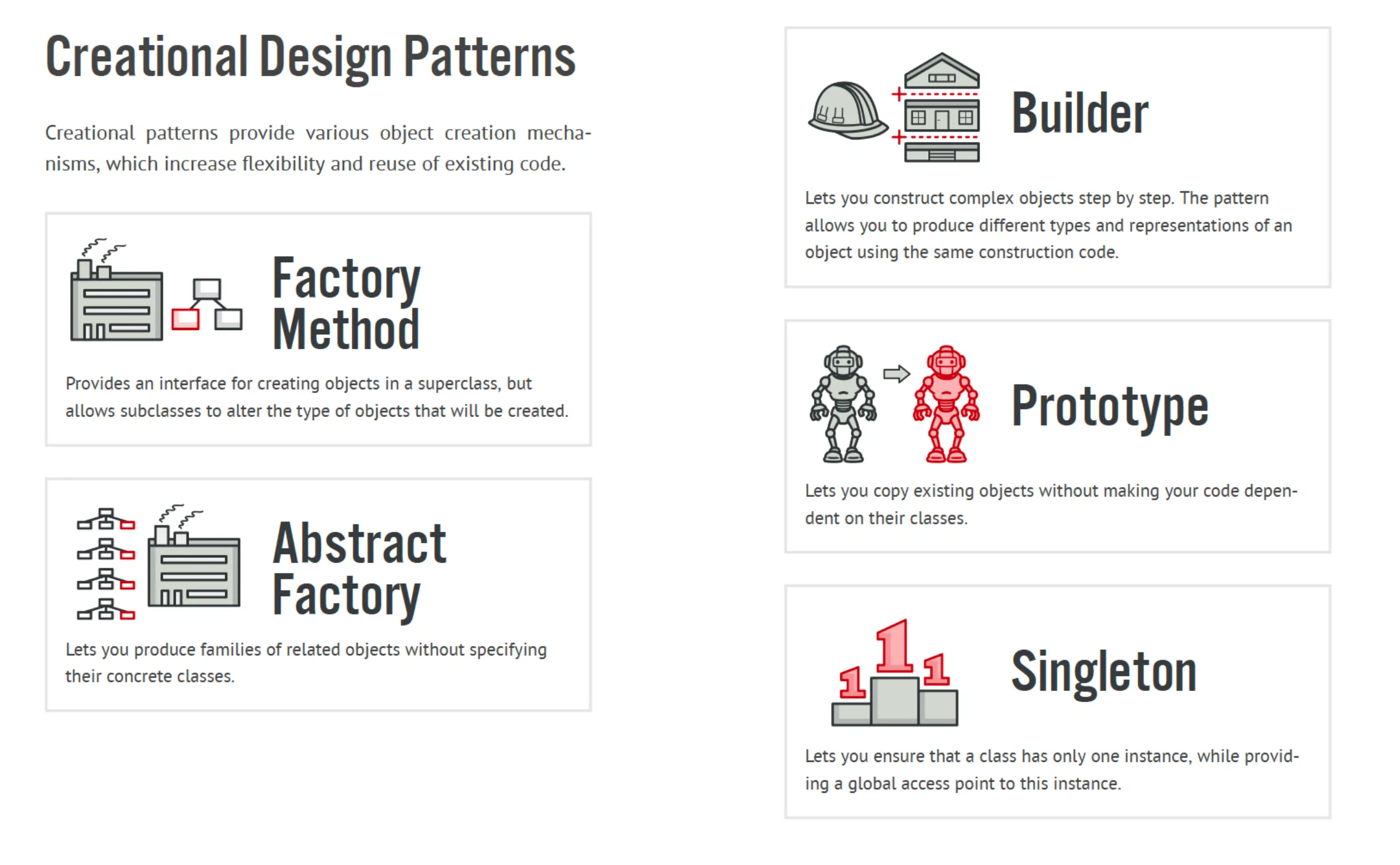
Factory Method
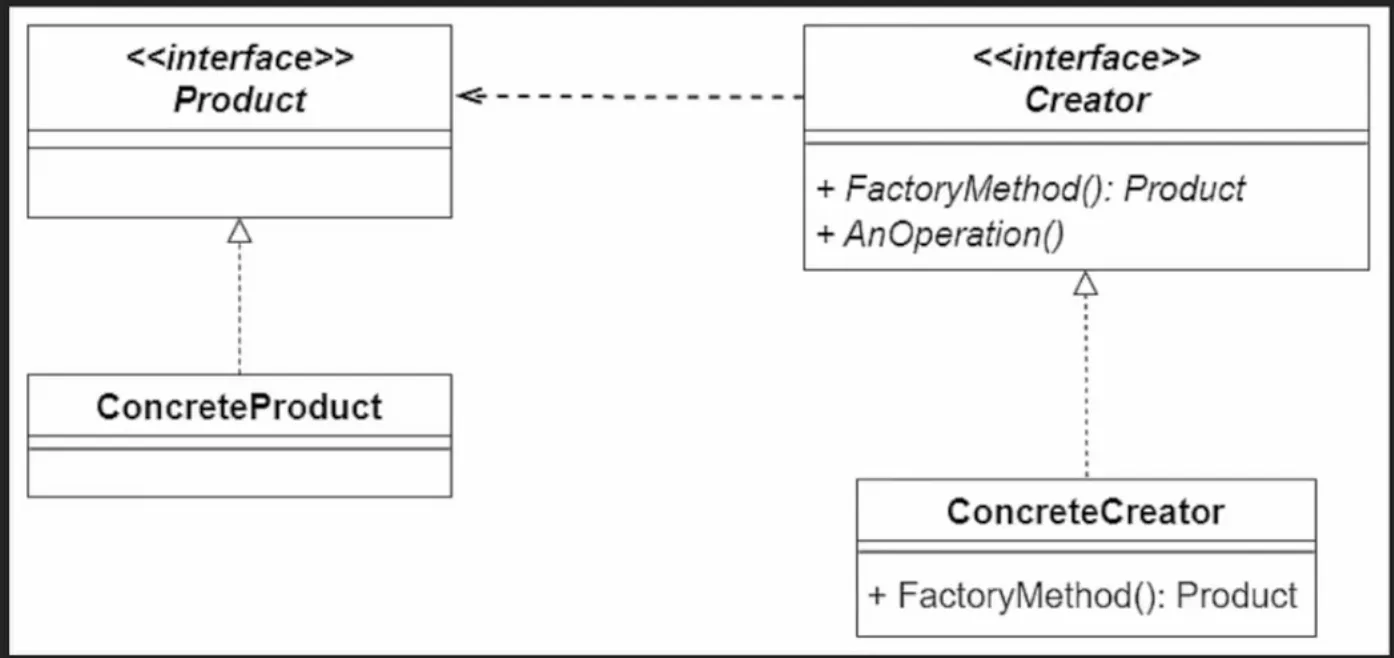
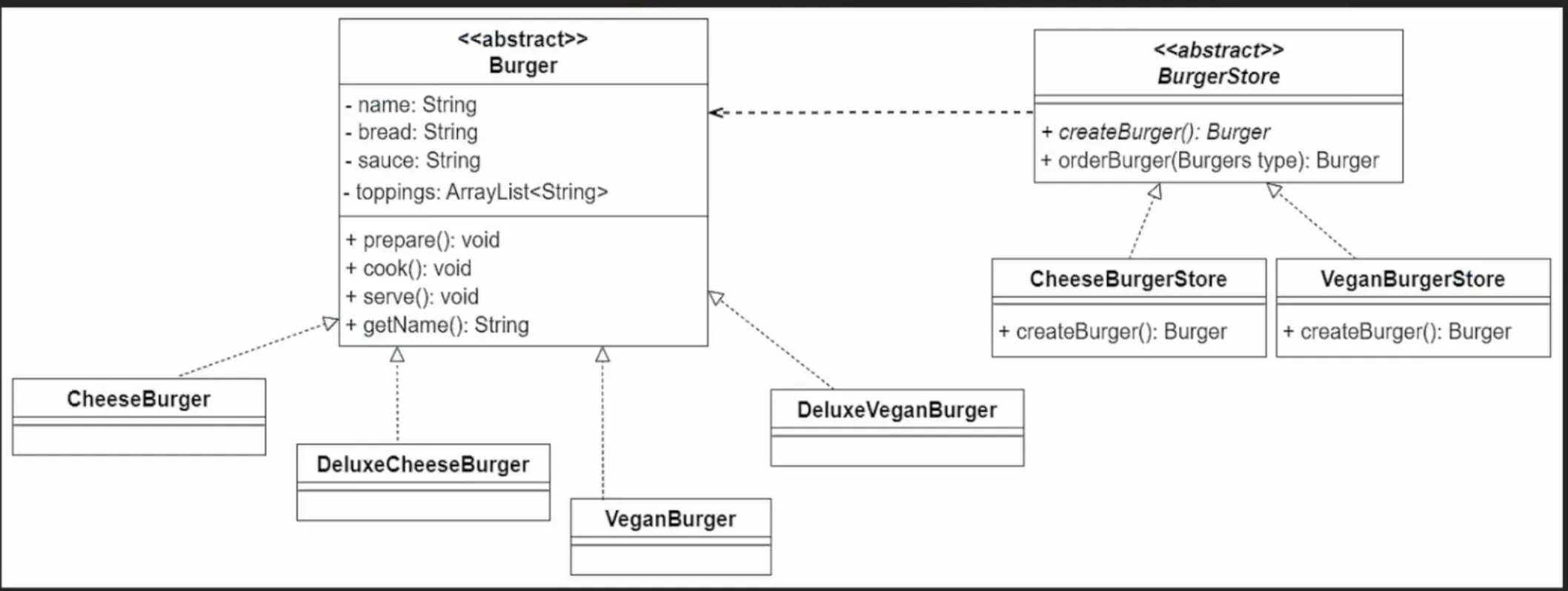
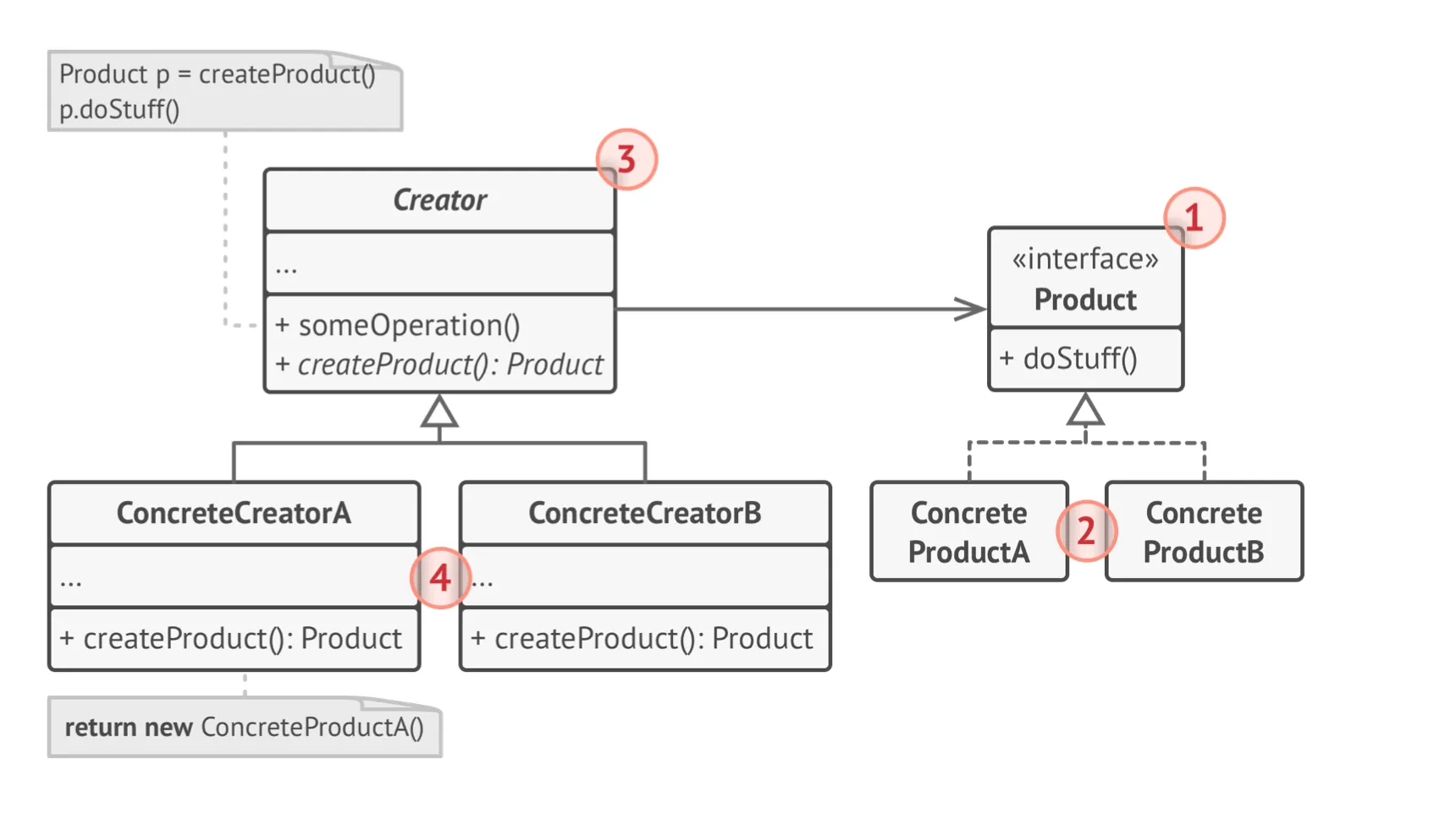
Section titled “Factory Method”- Intent: Define an interface for creating an object, but let subclasses decide which class to instantiate. Factory Method lets a class defer instantiation to subclasses.
The Factory Method pattern is like having a blueprint for creating objects. You have a method (the “factory” method) that knows how to construct different types of objects based on your request
// Product Interfaceinterface Animal {    void makeSound();}
// Concrete Productsclass Dog implements Animal {    @Override    public void makeSound() {        System.out.println("Woof!");    }}
class Cat implements Animal {    @Override    public void makeSound() {        System.out.println("Meow!");    }}
// Creator Interfaceabstract class AnimalFactory {    public abstract Animal createAnimal();}
// Concrete Creatorsclass DogFactory extends AnimalFactory {    @Override    public Animal createAnimal() {        return new Dog();    }}
class CatFactory extends AnimalFactory {    @Override    public Animal createAnimal() {        return new Cat();    }}
// Usage:AnimalFactory dogFactory = new DogFactory();Animal dog = dogFactory.createAnimal();dog.makeSound();  // Output: Woof!
Singleton Pattern
Section titled “Singleton Pattern”Singleton is a creational design pattern that lets you ensure that a class has only one instance while providing a global access point to this instance.
Things to do for Singleton
- Make the Constructor as Private
- Create a static creation method that acts as a constructor. Under the hood, this method calls the private constructor to create an object and saves it in a static field
- It is not thread-safe
In a multithreaded scenario, if multiple threads call getInstance() at the same time when instance is null, each thread could end up creating a new instance of the Singleton class before the other threads have a chance to check if instance is null. As a result, multiple instances can be created.
Solutions to Resolve the Issue
Section titled “Solutions to Resolve the Issue”- Synchronized Method: One way to prevent this is by making the
getInstance()method synchronized, which ensures that only one thread can execute this method at a time.
public static synchronized Singleton getInstance() { if (instance == null) { instance = new Singleton(); }return instance;}However, using synchronization at the method level can lead to performance drawbacks because every call to `getInstance()` will require synchronization.2. Double-checked Locking: An optimized approach using double-checked locking can reduce the performance impact by only synchronizing the creation process.
public static Singleton getInstance() { if (instance == null) { synchronized (Singleton.class) { if (instance == null) { instance = new Singleton(); } } }return instance;}Here, synchronization happens inside the `if` block only if `instance` is `null`. This way, the synchronized block is bypassed once the instance is initialized, improving performance over the fully synchronized approach.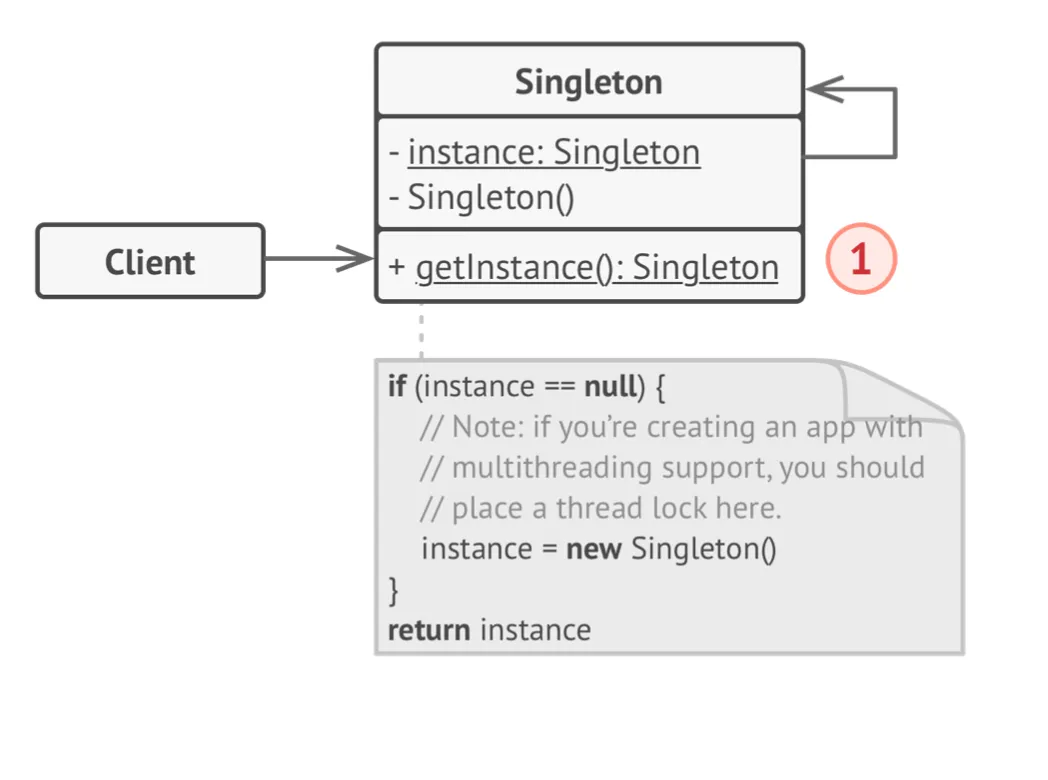
class Database {    private static Database instance;
    private Database() {        // Some initialization code, such as the actual connection to a database server.    }
    public static Database getInstance() {        if (instance == null) {            synchronized (Database.class) {                if (instance == null) {                    instance = new Database();                }            }        }        return instance;    }
    public void query(String sql) {        // For instance, all database queries of an app go through this method.        // Therefore, you can place throttling or caching logic here.    }}
class Application {    public static void main(String[] args) {        Database foo = Database.getInstance();        foo.query("SELECT ...");
        Database bar = Database.getInstance();        bar.query("SELECT ...");        // The variable `bar` will contain the same object as `foo`.    }}
Builder Pattern
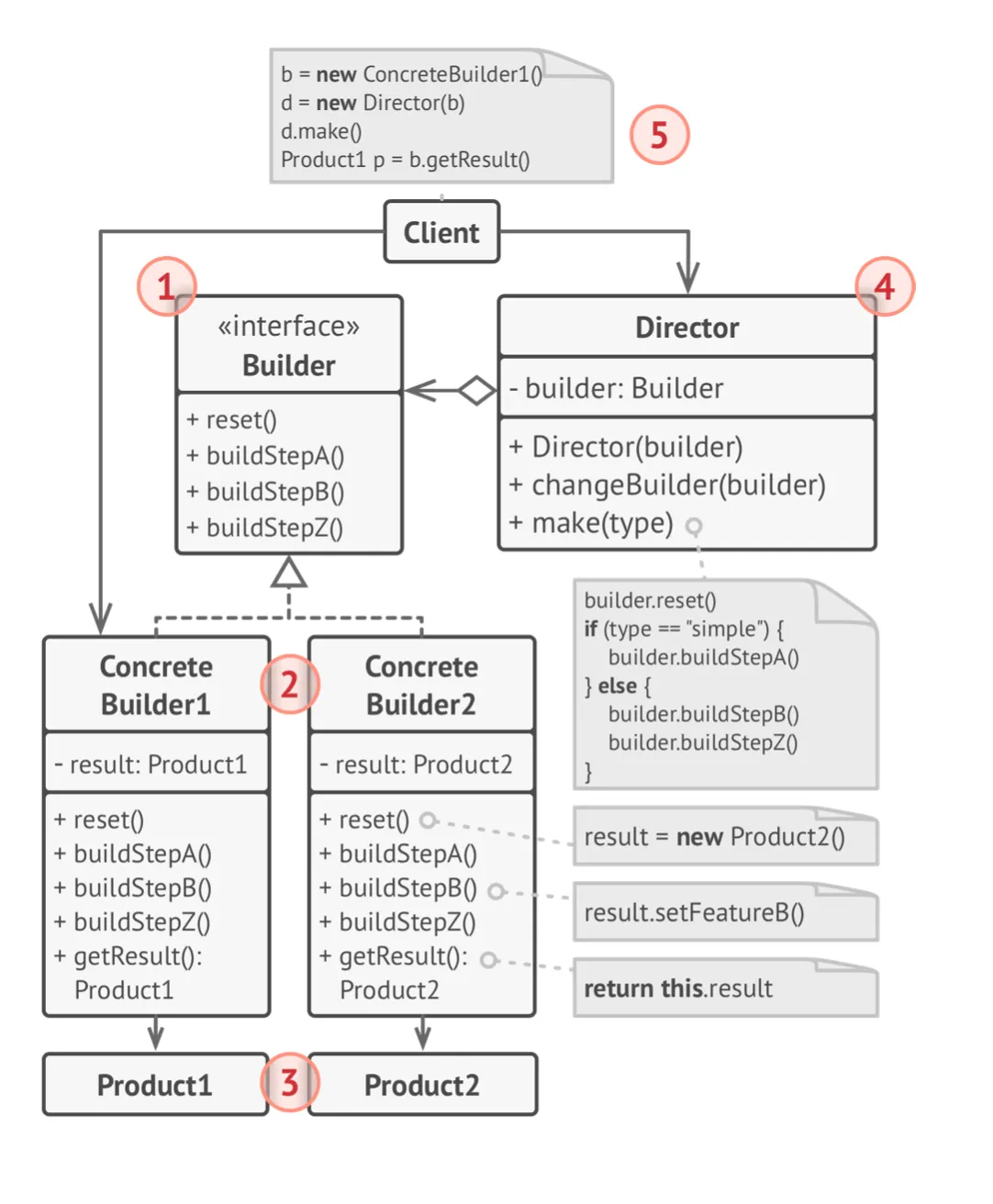
Section titled “Builder Pattern”- Intent: Separate the construction of a complex object from its representation so that the same construction process can create different representations.
- Use When: The algorithm for creating a complex object should be independent of the parts that make up the object and how they’re assembled.
Simple Example
Section titled “Simple Example”// Productclass Computer { private String CPU; private String RAM; private String storage;
public Computer(String CPU, String RAM, String storage) { this.CPU = CPU; this.RAM = RAM; this.storage = storage; }
@Override public String toString() { return "Computer [CPU=" + CPU + ", RAM=" + RAM + ", storage=" + storage + "]"; }}
// Builderclass ComputerBuilder { private String CPU = "Intel i5"; private String RAM = "8GB"; private String storage = "256GB SSD";
public ComputerBuilder setCPU(String CPU) { this.CPU = CPU; return this; }
public ComputerBuilder setRAM(String RAM) { this.RAM = RAM; return this; }
public ComputerBuilder setStorage(String storage) { this.storage = storage; return this; }
public Computer build() { return new Computer(CPU, RAM, storage); }}
// Usage:Computer computer = new ComputerBuilder() .setCPU("AMD Ryzen 7") .setRAM("16GB") .build();
System.out.println(computer);// Output: Computer [CPU=AMD Ryzen 7, RAM=16GB, storage=256GB SSD]Builder is a creational design pattern that lets you construct complex objects step by step
class Car {    // A Car class with features such as GPS, trip computer, and seats.}
class Manual {    // A Manual class that corresponds to the Car's configuration.}
interface Builder {    void reset();    void setSeats(int seats);    void setEngine(Object engine); // Replace Object with the appropriate type    void setTripComputer(boolean hasTripComputer);    void setGPS(boolean hasGPS);}
class CarBuilder implements Builder {    private Car car;
    public CarBuilder() {        this.reset();    }
    public void reset() {        this.car = new Car();    }
    public void setSeats(int seats) {        // Set the number of seats in the car.    }
    public void setEngine(Object engine) {        // Install a given engine.    }
    public void setTripComputer(boolean hasTripComputer) {        // Install a trip computer.    }
    public void setGPS(boolean hasGPS) {        // Install a global positioning system.    }
    public Car getProduct() {        Car product = this.car;        this.reset();        return product;    }}
class CarManualBuilder implements Builder {    private Manual manual;
    public CarManualBuilder() {        this.reset();    }
    public void reset() {        this.manual = new Manual();    }
    public void setSeats(int seats) {        // Document car seat features.    }
    public void setEngine(Object engine) {        // Add engine instructions.    }
    public void setTripComputer(boolean hasTripComputer) {        // Add trip computer instructions.    }
    public void setGPS(boolean hasGPS) {        // Add GPS instructions.    }
    public Manual getProduct() {        Manual product = this.manual;        this.reset();        return product;    }}
class Director {    private Builder builder;
    public void setBuilder(Builder builder) {        this.builder = builder;    }
    public void constructSportsCar(Builder builder) {        builder.reset();        builder.setSeats(2);        builder.setEngine(new Object()); // Replace Object with actual engine type        builder.setTripComputer(true);        builder.setGPS(true);    }
    public void constructSUV(Builder builder) {        // Implementation for constructing an SUV.    }}
class Application {    public void makeCar() {        Director director = new Director();
        CarBuilder carBuilder = new CarBuilder();        director.constructSportsCar(carBuilder);        Car car = carBuilder.getProduct();
        CarManualBuilder manualBuilder = new CarManualBuilder();        director.constructSportsCar(manualBuilder);        Manual manual = manualBuilder.getProduct();    }}