Structural Patterns
Structural patterns explain how to assemble objects and classes into larger structures, while keeping the structures flexible and efficient.
Adapter Pattern
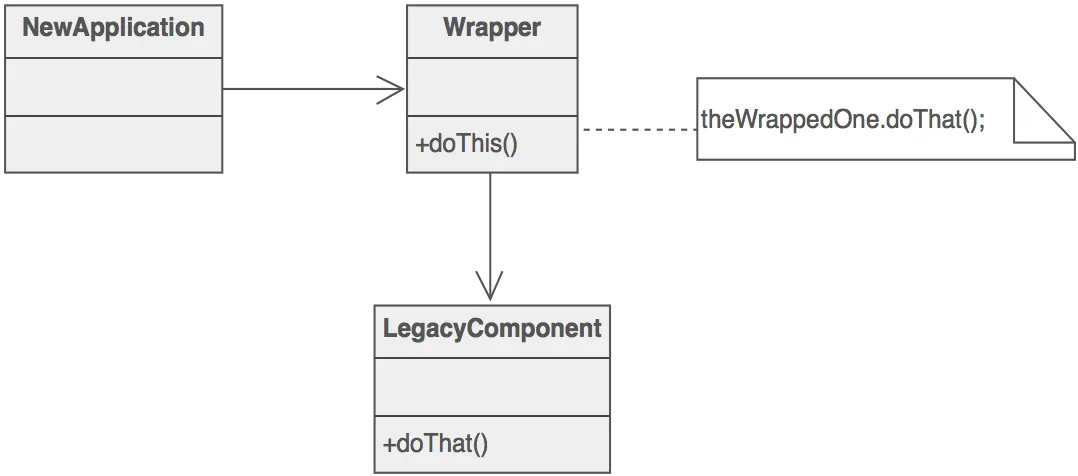
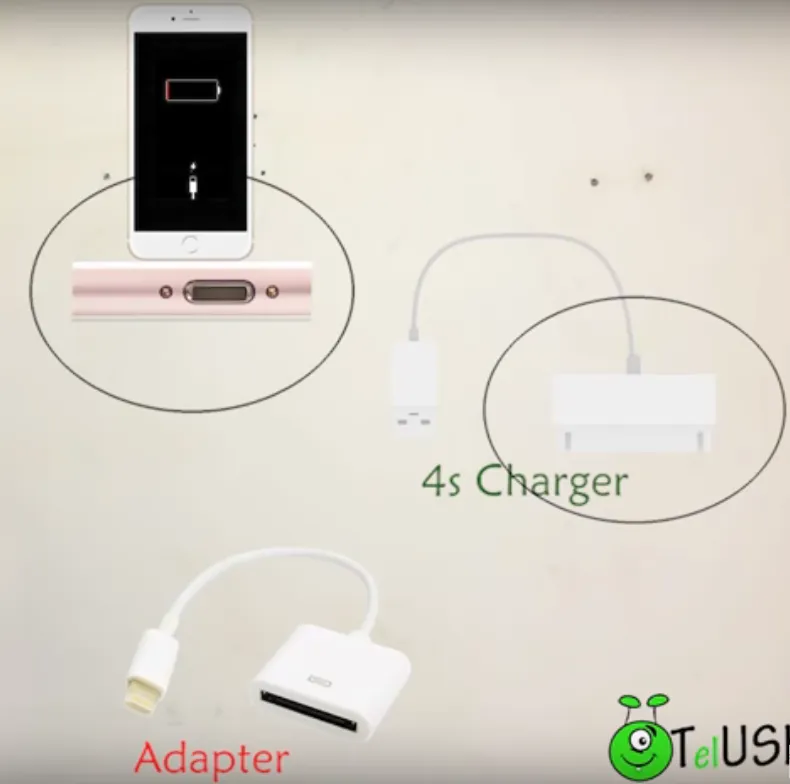
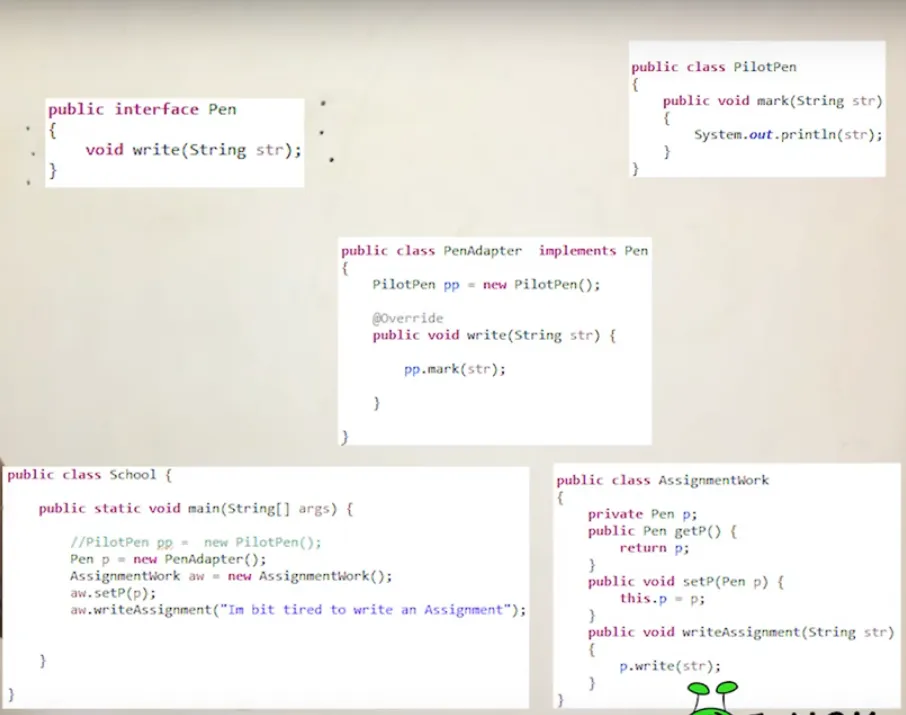
Section titled “Adapter Pattern”The Adapter Pattern is a structural design pattern that allows objects with incompatible interfaces to work together. It acts as a bridge between two incompatible interfaces, making them compatible without changing their existing code.
Code Implementation
Section titled “Code Implementation”Step 1: Define the Target Interface
Section titled “Step 1: Define the Target Interface”public interface Socket { void charge();}Step 2: Implement Adaptee Classes
Section titled “Step 2: Implement Adaptee Classes”public class BritishSocket { public void plugIn() { System.out.println("Plugged into British Socket"); }}
public class EuropeanSocket { public void connect() { System.out.println("Connected to European Socket"); }}Step 3: Create the Adapter
Section titled “Step 3: Create the Adapter”public class SocketAdapter implements Socket { private BritishSocket britishSocket; private EuropeanSocket europeanSocket;
public SocketAdapter(BritishSocket britishSocket) { this.britishSocket = britishSocket; }
public SocketAdapter(EuropeanSocket europeanSocket) { this.europeanSocket = europeanSocket; }
@Override public void charge() { if (britishSocket != null) { britishSocket.plugIn(); } else if (europeanSocket != null) { europeanSocket.connect(); } }}Step 4: Use the Adapter Pattern
Section titled “Step 4: Use the Adapter Pattern”public class AdapterPatternExample { public static void main(String[] args) { BritishSocket britishSocket = new BritishSocket(); EuropeanSocket europeanSocket = new EuropeanSocket();
SocketAdapter adapter1 = new SocketAdapter(britishSocket); SocketAdapter adapter2 = new SocketAdapter(europeanSocket);
// Charge using British socket adapter adapter1.charge();
// Charge using European socket adapter adapter2.charge(); }}Benefits
Section titled “Benefits”- Allows Reusability: Adapters can be reused for different Adaptees and Targets.
- Enhances Flexibility: Allows the system to work with new classes without modifying their code.
- Promotes Decoupling: Separates the client code from the complexities of interfacing with different systems.
Composite Pattern
Section titled “Composite Pattern”Composite literally means made up of various elements or parts
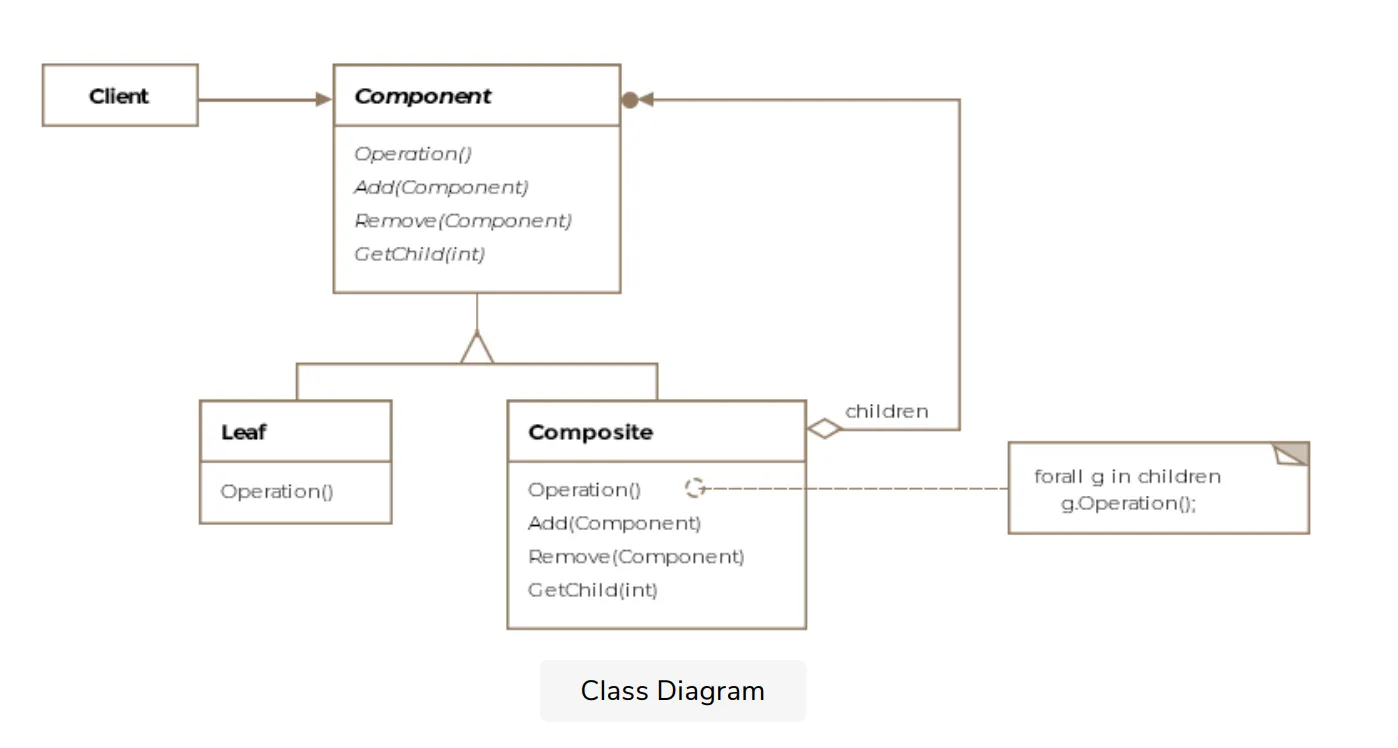
- Intent: Compose objects into tree structures to represent part-whole hierarchies. Composite lets clients treat individual objects and compositions of objects uniformly.
- Use When: You want to represent part-whole hierarchies of objects. You want clients to be able to ignore the difference between compositions of objects and individual objects.
Example
Section titled “Example”import java.util.ArrayList;import java.util.List;
// Component Interfaceinterface Component { void displayPrice();}
// Leafclass Leaf implements Component { private String name; private int price;
public Leaf(String name, int price) { this.name = name; this.price = price; }
@Override public void displayPrice() { System.out.println(name + " : " + price); }}
// Compositeclass Composite implements Component { private String name; private List<Component> components = new ArrayList<>();
public Composite(String name) { this.name = name; }
public void addComponent(Component component) { components.add(component); }
@Override public void displayPrice() { System.out.println(name + ":"); for (Component component : components) { component.displayPrice(); } }}
// Usage:Leaf mouse = new Leaf("Mouse", 50);Leaf keyboard = new Leaf("Keyboard", 100);Leaf monitor = new Leaf("Monitor", 300);Leaf ram = new Leaf("RAM", 150);Leaf hdd = new Leaf("HDD", 200);
Composite cabinet = new Composite("Cabinet");cabinet.addComponent(ram);cabinet.addComponent(hdd);
Composite computer = new Composite("Computer");computer.addComponent(mouse);computer.addComponent(keyboard);computer.addComponent(monitor);computer.addComponent(cabinet);
computer.displayPrice();// Output:// Computer:// Mouse : 50// Keyboard : 100// Monitor : 300// Cabinet:// RAM : 150// HDD : 200- Explanation: The
Componentinterface defines the common operation (displayPrice).Leafrepresents individual components.Compositerepresents a group of components. ThedisplayPricemethod in theCompositeclass iterates through all its children and calls theirdisplayPricemethods, allowing you to treat individual objects and compositions uniformly.
Decorator Pattern
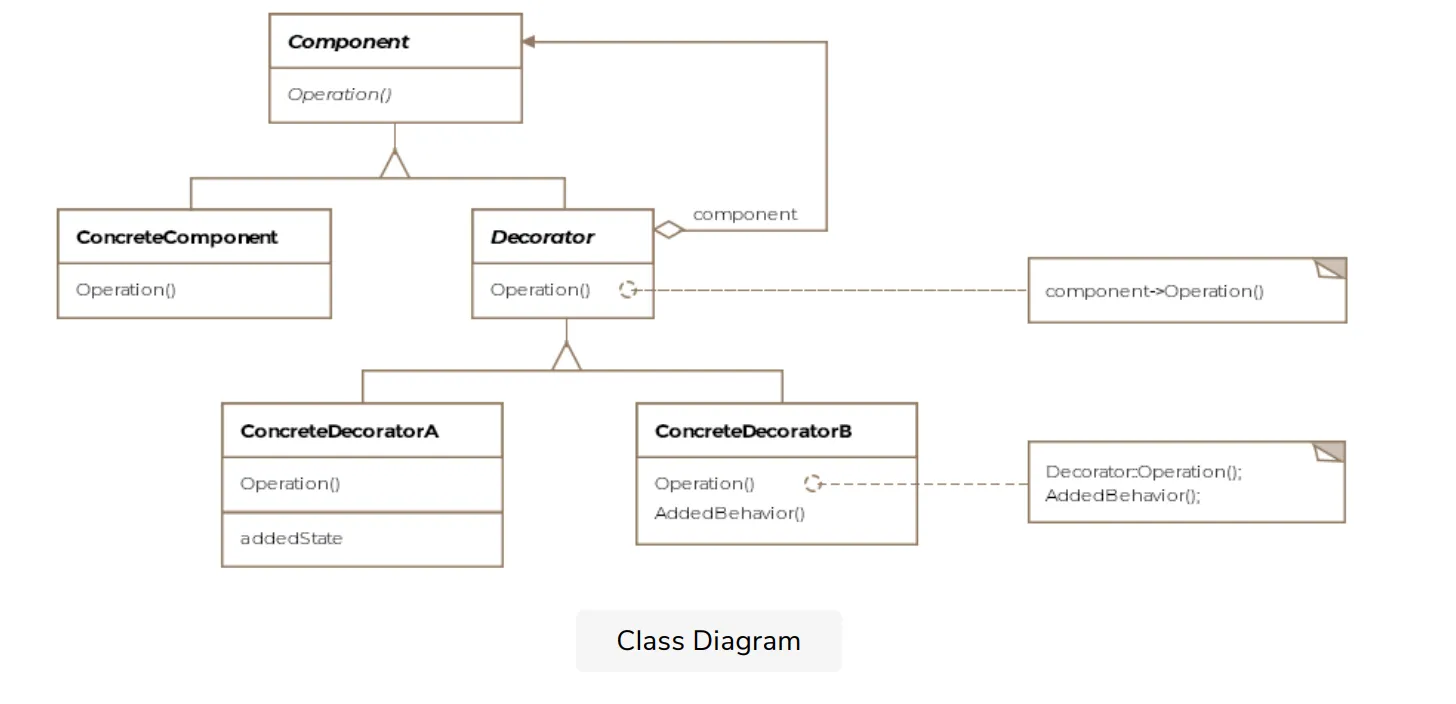
Section titled “Decorator Pattern”- Intent: Attach additional responsibilities to an object dynamically. Decorators provide a flexible alternative to subclassing for extending functionality.
- Use When: You want to add responsibilities to individual objects without affecting other objects. Extension by subclassing is impractical.
Example
Section titled “Example”// Component Interfaceinterface Coffee { String getDescription(); double getCost();}
// Concrete Componentclass SimpleCoffee implements Coffee { @Override public String getDescription() { return "Simple coffee"; }
@Override public double getCost() { return 2.0; }}
// Decoratorabstract class CoffeeDecorator implements Coffee { protected Coffee decoratedCoffee;
public CoffeeDecorator(Coffee decoratedCoffee) { this.decoratedCoffee = decoratedCoffee; }
@Override public String getDescription() { return decoratedCoffee.getDescription(); }
@Override public double getCost() { return decoratedCoffee.getCost(); }}
// Concrete Decoratorsclass Milk extends CoffeeDecorator { public Milk(Coffee decoratedCoffee) { super(decoratedCoffee); }
@Override public String getDescription() { return decoratedCoffee.getDescription() + ", with milk"; }
@Override public double getCost() { return decoratedCoffee.getCost() + 0.5; }}
class Sugar extends CoffeeDecorator { public Sugar(Coffee decoratedCoffee) { super(decoratedCoffee); }
@Override public String getDescription() { return decoratedCoffee.getDescription() + ", with sugar"; }
@Override public double getCost() { return decoratedCoffee.getCost() + 0.2; }}
// Usage:Coffee coffee = new SimpleCoffee();System.out.println(coffee.getDescription() + " Cost: " + coffee.getCost());// Output: Simple coffee Cost: 2.0
coffee = new Milk(coffee);System.out.println(coffee.getDescription() + " Cost: " + coffee.getCost());// Output: Simple coffee, with milk Cost: 2.5
coffee = new Sugar(coffee);System.out.println(coffee.getDescription() + " Cost: " + coffee.getCost());// Output: Simple coffee, with milk, with sugar Cost: 2.7- Explanation: The
Coffeeinterface is the component.SimpleCoffeeis a concrete component.CoffeeDecoratoris the abstract decorator.MilkandSugarare concrete decorators that add functionality (milk and sugar) to the coffee object dynamically. You can chain decorators together to add multiple responsibilities.
Facade Pattern
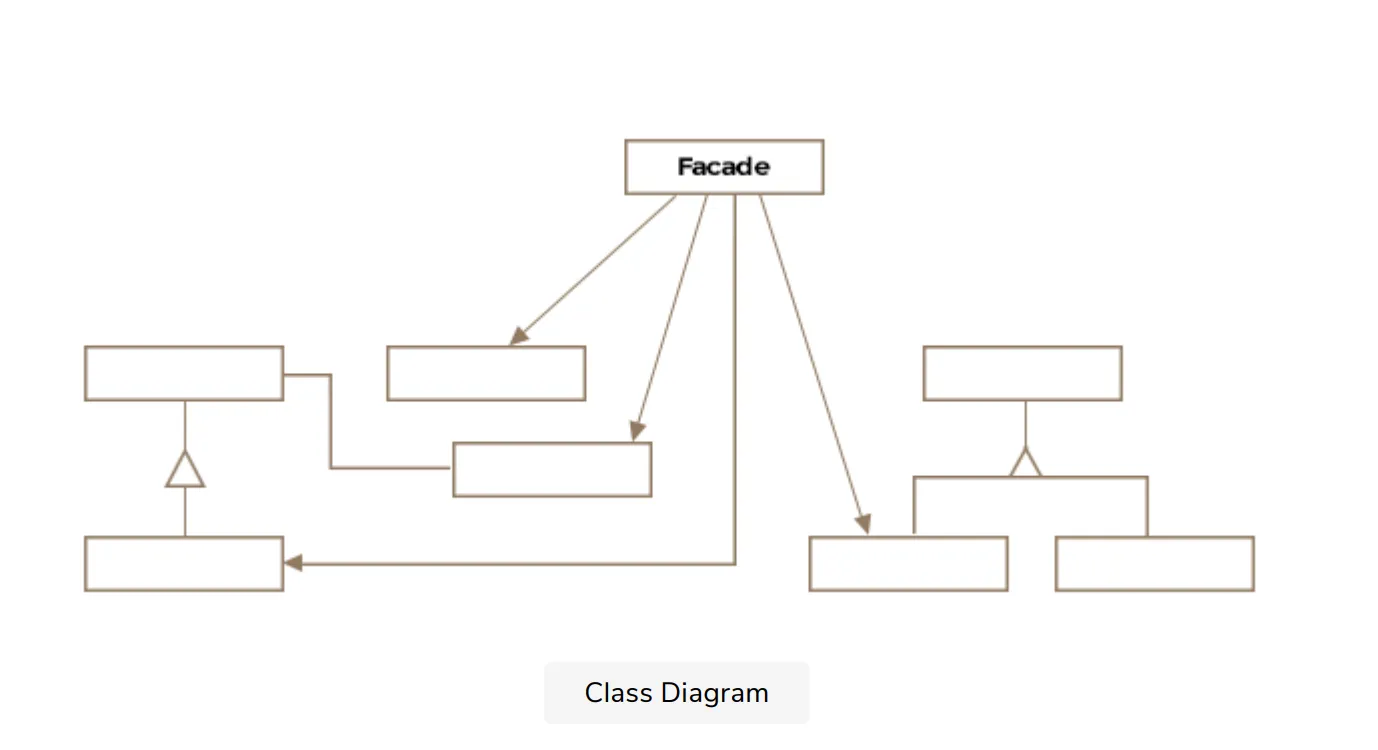
Section titled “Facade Pattern”- Intent: Provide a unified interface to a set of interfaces in a subsystem. Facade defines a higher-level interface that makes the subsystem easier to use.
- Use When: You want to provide a simple interface to a complex subsystem. You want to reduce dependencies between clients and the subsystem.
Example
Section titled “Example”// Subsystem Classesclass CPU { public void freeze() { System.out.println("CPU Freeze"); }
public void jump(long position) { System.out.println("CPU Jump to position " + position); }
public void execute() { System.out.println("CPU Execute"); }}
class Memory { public void load(long position, byte[] data) { System.out.println("Memory Load data to position " + position); }}
class HardDrive { public byte[] read(long lba, int size) { System.out.println("HardDrive Read from lba " + lba + " size " + size); return new byte[size]; // Simulate data read }}
// Facadeclass ComputerFacade { private CPU cpu; private Memory memory; private HardDrive hardDrive;
public ComputerFacade() { this.cpu = new CPU(); this.memory = new Memory(); this.hardDrive = new HardDrive(); }
public void startComputer() { cpu.freeze(); memory.load(0, hardDrive.read(100, 1024)); cpu.jump(0); cpu.execute(); }}
// Usage:ComputerFacade computer = new ComputerFacade();computer.startComputer();// Output:// CPU Freeze// HardDrive Read from lba 100 size 1024// Memory Load data to position 0// CPU Jump to position 0// CPU Execute- Explanation: The
CPU,Memory, andHardDriveclasses represent a complex subsystem. TheComputerFacadeprovides a simplified interface (startComputer()) to the client, hiding the complexity of the subsystem.
Proxy Pattern
Section titled “Proxy Pattern”proxy is the authority to represent someone else.
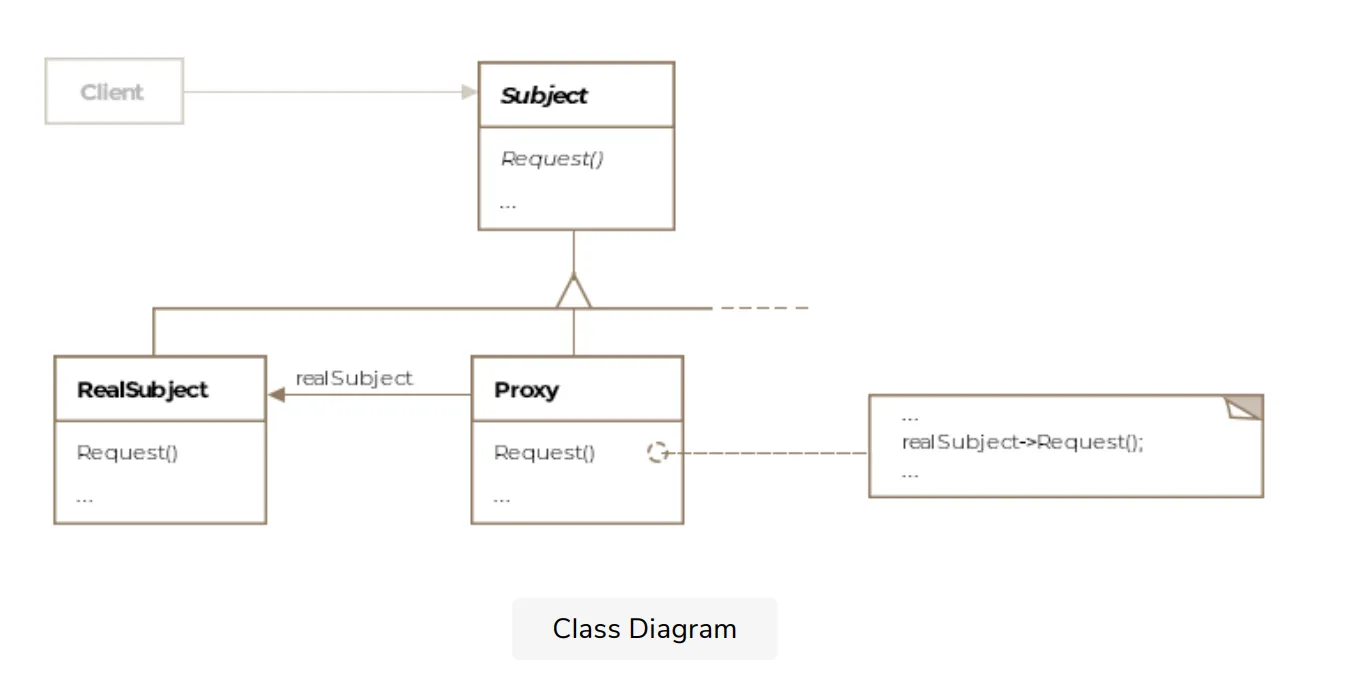
- Intent: Provide a surrogate or placeholder for another object to control access to it.
- Use When: You want to control access to an object. The object is expensive to create and you want to delay its creation. You want to add functionality (like security checks) when accessing an object.
// Subject Interfaceinterface Image {    void display();}
// Real Subjectclass RealImage implements Image {    private String fileName;
    public RealImage(String fileName) {        this.fileName = fileName;        loadFromDisk(fileName);    }
    private void loadFromDisk(String fileName) {        System.out.println("Loading " + fileName);    }
    @Override    public void display() {        System.out.println("Displaying " + fileName);    }}
// Proxyclass ProxyImage implements Image {    private String fileName;    private RealImage realImage;
    public ProxyImage(String fileName) {        this.fileName = fileName;    }
    @Override    public void display() {        if (realImage == null) {            realImage = new RealImage(fileName);        }        realImage.display();    }}
// Usage:Image image = new ProxyImage("test_image.jpg");
// Image will be loaded from disk only when display() is calledimage.display();// Output:// Loading test_image.jpg// Displaying test_image.jpg
// Image is already loaded, so it will be displayed directlyimage.display();// Output:// Displaying test_image.jpg- Explanation: The
Imageinterface is the subject.RealImageis the real subject that is expensive to create (loading from disk).ProxyImageacts as a proxy. It creates theRealImageobject only when it’s needed, implementing lazy loading.
Bridge Pattern
Section titled “Bridge Pattern”Definition: The Bridge Pattern is a structural design pattern that separates an abstraction from its implementation so that the two can vary independently.
📌 Before Applying Bridge Pattern
Section titled “📌 Before Applying Bridge Pattern”❓The Problem Scenario
Section titled “❓The Problem Scenario”Suppose we have:
-
2 Shapes:
Circle,Square -
2 Drawing APIs:
OpenGL,DirectX
👎 Naive Implementation (Before Bridge Pattern)
Section titled “👎 Naive Implementation (Before Bridge Pattern)”Without using the Bridge pattern, you might try to handle every combination with separate subclasses:
class OpenGLCircle {    public void draw() {        System.out.println("Drawing Circle using OpenGL");    }}
class DirectXCircle {    public void draw() {        System.out.println("Drawing Circle using DirectX");    }}
class OpenGLSquare {    public void draw() {        System.out.println("Drawing Square using OpenGL");    }}
class DirectXSquare {    public void draw() {        System.out.println("Drawing Square using DirectX");    }}
😡 What’s Wrong Here?
Section titled “😡 What’s Wrong Here?”- For every new shape, you need to create new classes for every drawing API.
- If you add 1 more shape and 1 more API, the number of classes grows exponentially.
- Tightly coupled logic: Drawing logic and shape logic are mixed together.
| Shapes ↓ / APIs → | OpenGL | DirectX |
|---|---|---|
| Circle | ✅ | ✅ |
| Square | ✅ | ✅ |
| Triangle (new) | ❌ | ❌ |
| Vulkan (new API) | ❌ | ❌ |
To support Triangle + Vulkan, you’d need 3 × 3 = 9 classes total!
✅ After Applying Bridge Pattern
Section titled “✅ After Applying Bridge Pattern”Now let’s refactor this using the Bridge Pattern:
Step 1: Implementor Interface
Section titled “Step 1: Implementor Interface”1. Implementor: Device
Section titled “1. Implementor: Device”interface DrawingAPI { void drawCircle(double x, double y, double radius); void drawSquare(double x, double y, double size);}2. Concrete Implementations
Section titled “2. Concrete Implementations”class OpenGLAPI implements DrawingAPI { public void drawCircle(double x, double y, double radius) { System.out.println("OpenGL: Drawing circle at (" + x + "," + y + ") with radius " + radius); }
public void drawSquare(double x, double y, double size) { System.out.println("OpenGL: Drawing square at (" + x + "," + y + ") with size " + size); }}
class DirectXAPI implements DrawingAPI { public void drawCircle(double x, double y, double radius) { System.out.println("DirectX: Drawing circle at (" + x + "," + y + ") with radius " + radius); }
public void drawSquare(double x, double y, double size) { System.out.println("DirectX: Drawing square at (" + x + "," + y + ") with size " + size); }}3. Abstraction
Section titled “3. Abstraction”abstract class Shape { protected DrawingAPI drawingAPI;
protected Shape(DrawingAPI drawingAPI) { this.drawingAPI = drawingAPI; }
public abstract void draw();}4. Refined Abstraction
Section titled “4. Refined Abstraction”class Circle extends Shape { private double x, y, radius;
public Circle(double x, double y, double radius, DrawingAPI drawingAPI) { super(drawingAPI); this.x = x; this.y = y; this.radius = radius; }
public void draw() { drawingAPI.drawCircle(x, y, radius); }}
class Square extends Shape { private double x, y, size;
public Square(double x, double y, double size, DrawingAPI drawingAPI) { super(drawingAPI); this.x = x; this.y = y; this.size = size; }
public void draw() { drawingAPI.drawSquare(x, y, size); }}Client
Section titled “Client”public class BridgePatternDemo { public static void main(String[] args) { Shape circle1 = new Circle(5, 10, 2, new OpenGLAPI()); Shape circle2 = new Circle(15, 30, 5, new DirectXAPI());
Shape square1 = new Square(0, 0, 3, new OpenGLAPI()); Shape square2 = new Square(5, 5, 6, new DirectXAPI());
circle1.draw(); circle2.draw(); square1.draw(); square2.draw(); }}Flyweight Pattern
Section titled “Flyweight Pattern”The Flyweight Pattern is a structural design pattern used to minimize memory usage by sharing as much data as possible with similar objects.
It separates the intrinsic (shared) state from the extrinsic (unique) state, so that shared parts of objects are stored only once and reused wherever needed.
Bad Design
Section titled “Bad Design”import java.util.*;
// ================ Tree Class =================class Tree { // Attributes that keep on changing private int x; private int y;
// Attributes that remain constant private String name; private String color; private String texture;
public Tree(int x, int y, String name, String color, String texture) { this.x = x; this.y = y; this.name = name; this.color = color; this.texture = texture; }
public void draw() { System.out.println("Drawing tree at (" + x + ", " + y + ") with type " + name); }}
// ================ Forest Class =================class Forest {
private List<Tree> trees = new ArrayList<>();
public void plantTree(int x, int y, String name, String color, String texture) { Tree tree = new Tree(x, y, name, color, texture); trees.add(tree); }
public void draw() { for (Tree tree : trees) { tree.draw(); } }}
// =============== Client Code ==================class Main { public static void main(String[] args) { Forest forest = new Forest();
// Planting 1 million trees for(int i = 0; i < 1000000; i++) { forest.plantTree(i, i, "Oak", "Green", "Rough"); }
System.out.println("Planted 1 million trees."); }}Understanding the Issues
Section titled “Understanding the Issues”Although the above codes works absolutely fine but there are a few problems associated with it:
- Redundant memory usage: Same tree data duplicated a million times.
- Inefficient: Slower rendering, higher GC overhead.
The previous implementation created a new Tree object for each of the 1 million trees, even when most of them had identical properties like name, color, and texture. This led to unnecessary duplication of memory for the shared attributes.
Good Design: Using Flyweight Pattern
Section titled “Good Design: Using Flyweight Pattern”import java.util.*;
// ============= TreeType Class ================class TreeType { // Properties that are common among all trees of this type private String name; private String color; private String texture;
public TreeType(String name, String color, String texture) { this.name = name; this.color = color; this.texture = texture; }
public void draw(int x, int y) { System.out.println("Drawing " + name + " tree at (" + x + ", " + y + ")"); }}
// ================ Tree Class =================class Tree { // Attributes that keep on changing private int x; private int y;
// Attributes that remain constant private TreeType treeType;
public Tree(int x, int y, TreeType treeType) { this.x = x; this.y = y; this.treeType = treeType; }
public void draw() { treeType.draw(x, y); }}
// ============ TreeFactory Class ==============class TreeFactory {
static Map<String, TreeType> treeTypeMap = new HashMap<>();
public static TreeType getTreeType(String name, String color, String texture) { String key = name + " - " + color + " - " + texture;
if (!treeTypeMap.containsKey(key)) { treeTypeMap.put(key, new TreeType(name, color, texture)); } return treeTypeMap.get(key); }}
// ================ Forest Class =================class Forest { private List<Tree> trees = new ArrayList<>();
public void plantTree(int x, int y, String name, String color, String texture) { Tree tree = new Tree(x, y, TreeFactory.getTreeType(name, color, texture)); trees.add(tree); }
public void draw() { for (Tree tree : trees) { tree.draw(); } }}
// =============== Client Code ==================class Main { public static void main(String[] args) { Forest forest = new Forest();
// Planting 1 million trees for(int i = 0; i < 1000000; i++) { forest.plantTree(i, i, "Oak", "Green", "Rough"); }
System.out.println("Planted 1 million trees."); }}✅ When to Use Flyweight Pattern
Section titled “✅ When to Use Flyweight Pattern”| Scenario | Use Flyweight? |
|---|---|
| Huge number of similar objects (e.g. pixels, chars) | ✅ Yes |
| Objects share data (intrinsic state) | ✅ Yes |
| Memory usage is critical | ✅ Yes |
| Objects have minor variations | ✅ Yes |