
LSM Tree Database Architecture
In a database, we need to support two fundamental operations: read and write. Let’s build one from scratch, starting simple and evolving it to handle real-world scale.
Starting with Memory
Section titled “Starting with Memory”The simplest approach: maintain an in-memory map.
Map<Integer, String> data = new TreeMap<>();
// Writedata.put(5, "Alice");
// ReadString value = data.get(5); // O(log n)
When a user writes data, we insert it into the map. When they read, we look it up and return it.
For a small dataset, this works perfectly. Reads and writes are both fast.
But there is a problem.
Making Writes Durable
Section titled “Making Writes Durable”What happens if the system crashes?
If everything is stored only in memory, a crash wipes out all recent writes. That’s unacceptable for any real system.
The fix: Before writing to memory, append every incoming write to a file on disk. This file is sequential and append-only, which makes it very fast to write. Only after the write is safely recorded do we update the in-memory structure.
We call this file the Write-Ahead Log (WAL).
WAL on disk:[put(5, "Alice"), put(2, "Bob"), put(8, "Carol"), delete(5)]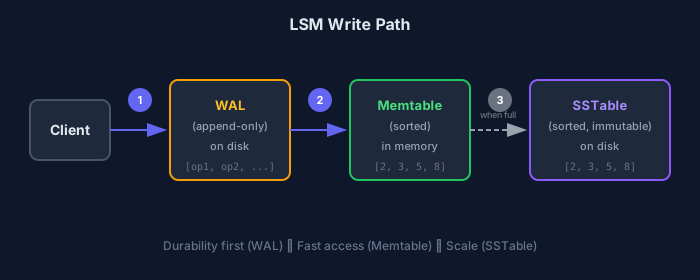
This changes the guarantees completely:
- Even if the process crashes, the WAL contains the history of operations
- On restart, we replay the WAL and rebuild the in-memory state
- Each write does two things: persisted in WAL for durability, stored in memory for fast access
What’s next? The system is fast, simple, and durable. But when real scale kicks in, memory cannot hold everything.
Scaling to Disk
Section titled “Scaling to Disk”Beyond a certain point, we need to flush data from memory to disk.
We want to keep data sorted in the disk file so lookups are O(log n) binary search, not O(n) linear scan. For this reason, our in-memory structure is an ordered map (like TreeMap or a skip list), making the flush operation cheap.
We call the in-memory ordered structure a Memtable. It holds the most recent writes and is optimized for fast access.
When the Memtable grows beyond a size threshold, we flush it to disk as a Sorted String Table (SSTable). The SSTable is immutable—once written, it is never modified.
Memtable (in memory, sorted) ↓ flush when fullSSTable (on disk, sorted, immutable)Why Immutable?
Section titled “Why Immutable?”- No in-place updates = no fragmentation
- Simpler crash recovery
- Sequential write = cheap
Why Sorted?
Section titled “Why Sorted?”- Binary search possible within the file
- Merge operations become efficient (we’ll need this later)
Example: Write Flow
Section titled “Example: Write Flow”Suppose we receive: put(5), put(2), put(8), put(3) (values omitted for simplicity).
Each operation is first written to the WAL, then inserted into the Memtable. Since the Memtable is ordered, it ends up as:
Memtable: [2, 3, 5, 8]Say the Memtable reaches its size threshold and flushes to disk:
SSTable-1: [2, 3, 5, 8]Memtable: [] (empty, ready for new writes)Now more writes arrive: put(1), put(7), put(3).
These go into the Memtable:
Memtable: [1, 3, 7]SSTable-1: [2, 3, 5, 8]The system is now split across two places. The Memtable contains the most recent data, and the SSTable contains older data.
How Reads Work
Section titled “How Reads Work”When a user asks for a key, we always start with the Memtable—it contains the freshest data. If the key is found, return immediately. If not, check SSTables from newest to oldest.
Using our example state:
Memtable: [1, 3, 7]SSTable-1: [2, 3, 5, 8]Query: key = 3
- Found in Memtable → return that value
- SSTable-1 also has key 3, but it’s older and ignored
Query: key = 5
- Not in Memtable
- Found in SSTable-1 → return that value
The rule: Always prefer newer data. The first match wins.
Deletes and Tombstones
Section titled “Deletes and Tombstones”Deletes introduce an interesting challenge. Since SSTables are immutable, we cannot go back and remove a key from disk.
Solution: Record the intent to delete. When a user deletes a key, we write a special marker called a tombstone. This tombstone is treated like any other write—it goes into the WAL and into the Memtable.
// Delete key 3memtable.put(3, TOMBSTONE);How Reads Interpret Deletes
Section titled “How Reads Interpret Deletes”Consider this state:
Memtable: [3 → TOMBSTONE]SSTable-1: [2, 3, 5, 8]Query: key = 3
- Memtable has a tombstone → key is deleted
- We do NOT continue searching older SSTables
The data still physically exists on disk, but it’s logically invisible. We don’t clean up immediately—we record the latest truth and reconcile later.
The Multi-SSTable Problem
Section titled “The Multi-SSTable Problem”As more data flows through, we keep flushing Memtables to disk. Since SSTables are immutable, we create new files each time.
After another flush:
Memtable: []SSTable-2: [1, 3, 7]SSTable-1: [2, 3, 5, 8]Now imagine reading key 3. It appears in multiple files. We must check newest first and stop as soon as we find a definitive answer.
This works, but it’s starting to feel inefficient. More SSTables = more files to check.
Compaction
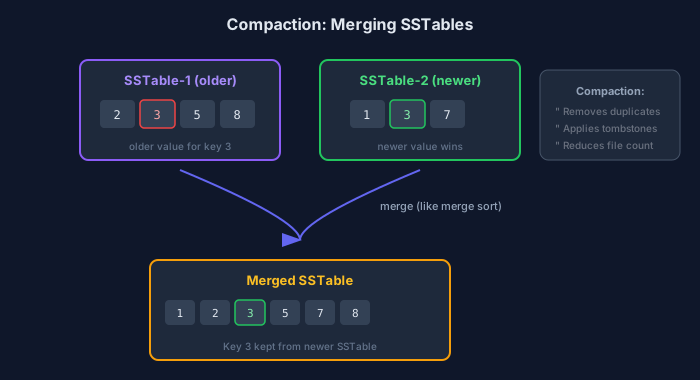
Section titled “Compaction”Instead of letting SSTables accumulate indefinitely, we periodically merge them. While merging, we clean up redundant data:
- If the same key appears multiple times, keep only the newest version
- If a key has a tombstone, remove older values during merge
Compaction is not just about reducing files—it’s how the system corrects itself over time.
How Merging Works
Section titled “How Merging Works”Because every SSTable is sorted, merging is efficient—similar to the merge step in merge sort. We walk through files in order and produce a new sorted output.
Example: Duplicate Keys
SSTable-1 (older): [2, 3, 5, 8]SSTable-2 (newer): [1, 3, 7]When key 3 appears in both, we keep the newer value:
Merged result: [1, 2, 3, 5, 7, 8]Example: With Tombstone
SSTable-1 (older): [2, 3, 5, 8]SSTable-2 (newer): [3 → TOMBSTONE, 7]The tombstone takes precedence. Key 3 disappears from final output:
Merged result: [2, 5, 7, 8]This is when deletion becomes permanent. Until compaction, old values still exist on disk. After compaction, they’re gone.
We Need Levels
Section titled “We Need Levels”It might seem tempting to merge everything into a single SSTable. But that doesn’t scale—merging large files repeatedly is expensive.
Instead, we organize SSTables into levels and compact gradually.
L0 (Memtable): active memory layerL1: newest SSTables, smallL2: older, mediumL3: oldest, large...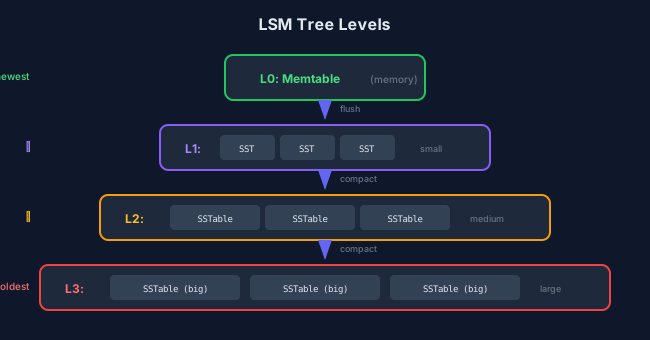
New SSTables are created at L1. As files accumulate, they’re merged and pushed into deeper levels. Each level contains larger, more compacted data than the one above.
The flow: Data starts small and recent, gradually becoming larger and more stable as it moves down.
Optimization 1: Bloom Filters
Section titled “Optimization 1: Bloom Filters”A new inefficiency appears. Searching for a key that doesn’t exist (say, key 42) might require scanning SSTables at multiple levels before concluding it’s not present.
Most of these checks are wasted work. What if we could know whether a key might exist in an SSTable without reading it?
Enter Bloom filters.
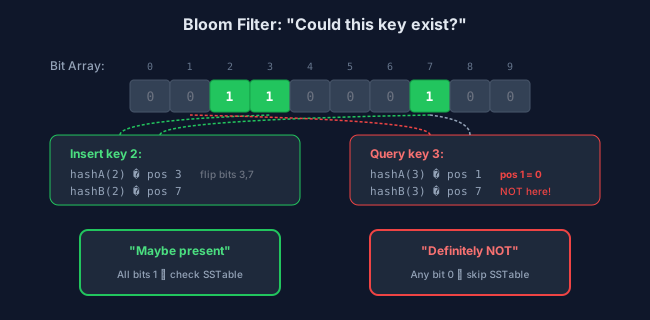
A Bloom filter is a compact bit array with hash functions. It answers: “Could this key exist in this file?”
- “No” → Definitely not present. Skip this file.
- “Maybe” → Possibly present. Check the file.
How It Works
Section titled “How It Works”Think of a Bloom filter as a bit array, initially all zeros:
[0, 0, 0, 0, 0, 0, 0, 0, 0, 0]We have two hash functions, hashA and hashB.
Insert key 2:
hashA(2) → position 3hashB(2) → position 7Flip those bits:
[0, 0, 0, 1, 0, 0, 0, 1, 0, 0]Insert key 8:
hashA(8) → position 2hashB(8) → position 7Updated array:
[0, 0, 1, 1, 0, 0, 0, 1, 0, 0]Query: Does key 3 exist?
hashA(3) → position 1hashB(3) → position 7Check the array:
- Position 1 → 0
- Position 7 → 1
Since at least one position is 0, key 3 is definitely not present.
Each SSTable maintains its own Bloom filter. Before reading a file, we consult its filter first.
Optimization 2: Sparse Index
Section titled “Optimization 2: Sparse Index”Even with Bloom filters, reading an entire SSTable for one key is wasteful.
Solution: Divide each SSTable into smaller blocks. Maintain a compact in-memory sparse index that points to these blocks.
The index stores a sparse set of keys (e.g., every 100th key) with pointers to their blocks on disk. Think of it as a table of contents, not the full book.
Sparse Index: key 100 → Block 1 key 200 → Block 2 key 300 → Block 3Lookup for key 175:
- Consult sparse index → closest match is key 100 (Block 1) or key 200 (Block 2)
- Jump directly to Block 2
- Search only within that block
Blocks are small and sorted, so in-memory search is fast. We don’t load the entire SSTable, yet lookups are predictable.
Complete Read Flow
Section titled “Complete Read Flow”With all pieces in place, a read becomes a structured process:
Read(key): 1. Check Memtable (freshest data) 2. For each level (newest to oldest): a. Consult Bloom filter b. If "no" → skip this SSTable c. If "maybe" → use sparse index to find block d. Search block for key 3. Return first match (or tombstone = deleted)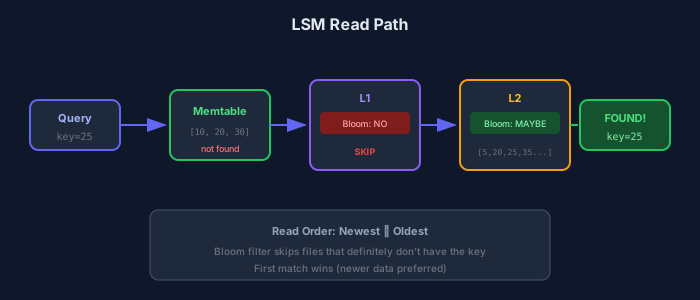
Example
Section titled “Example”L0 (Memtable): emptyL1: [10, 20, 30]L2: [5, 20, 25, 35, 45, 55]L3: [1, 2, 3, 10, 15, 20, 21, 22, 23, 24]Query: key = 20
- L1 Bloom filter: maybe present
- Find key 20 in L1 → return immediately
Query: key = 25
- L1 Bloom filter: not present → skip
- L2 Bloom filter: maybe present
- Find key 25 in L2 → return
Query: key = 99
- All Bloom filters say “not present”
- Return “not found” without touching disk blocks
Query: key = 20 (with tombstone)
If a newer SSTable contains 20 → TOMBSTONE while an older one has the value:
- Encounter tombstone first → key is deleted
- Older value is never considered
Where You See This
Section titled “Where You See This”What we’ve built is not theoretical. This is the soul of:
| System Type | Examples |
|---|---|
| Storage Engines | RocksDB, LevelDB |
| Distributed Databases | Apache Cassandra, Apache HBase |
| Streaming/Logging | Apache Kafka, Apache Pulsar |
| Analytics | ClickHouse, Bigtable |
The details vary and optimizations are layered on top, but the core idea remains the same.
Terminology Differences
Section titled “Terminology Differences”| Concept | RocksDB/LevelDB | Cassandra | HBase |
|---|---|---|---|
| Durability log | WAL | Commit Log | WAL |
| In-memory buffer | Memtable | Memtable | MemStore |
| Disk file | SSTable | SSTable | HFile |
Summary
Section titled “Summary”An LSM Tree is a write-optimized storage architecture where:
- Writes go to a WAL for durability
- Then to a Memtable in memory (sorted)
- Memtable flushes to immutable, sorted SSTables on disk
- Multiple SSTables are merged through compaction
- Reads are optimized using Bloom filters and sparse indexes
One-line summary: LSM Trees convert random writes into sequential writes, then use compaction and indexing to make reads efficient later.
| Aspect | Advantage | Trade-off |
|---|---|---|
| Writes | Sequential, very fast | Compaction overhead |
| Reads | Bloom filters skip files | May check multiple levels |
| Space | Compaction reclaims | Temporary duplication |
| Deletes | Immediate logical delete | Physical cleanup delayed |
Final Intuition
- WAL = safety logbook
- Memtable = active working desk
- SSTables = organized filing cabinets
- Compaction = background cleanup and reorganization
New data arrives quickly, gets stored safely, and is organized later without slowing down the write path.