Apache Kafka
Kafka is a distributed, durable, real-time event log. Producers append events; consumers read them at their own pace and can replay history. One log in the middle replaces a tangle of point-to-point connections.
Why it exists — decoupling
Section titled “Why it exists — decoupling”Picture LinkedIn around 2010. Every profile view, job click, or headline edit has to reach a dozen systems at once:
- analytics — count page views
- recommendations — refresh “People You May Know”
- activity feed — log what you did
- search — re-index your updated profile
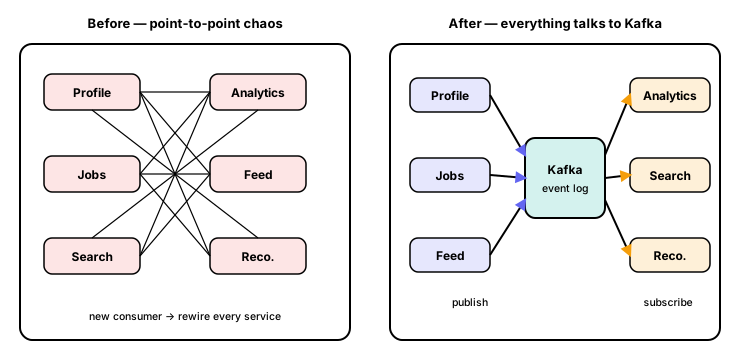
The obvious approach is point-to-point: whoever produces an event calls everyone who cares. Fine for 3 services — but at 40+ systems it becomes a spaghetti of up to ~1,600 wires, and every new consumer means editing every producer. Worse, a lost message or one slow downstream service could stall the whole chain, and replaying old events was impossible.
Kafka (built by Jay Kreps, Neha Narkhede & Jun Rao) flips it: everything talks to one log, never to each other. Producers append, consumers read at their own pace, and neither side knows the other exists. The log becomes the single source of truth for “what just happened” — so you can add a consumer without touching a single producer.
A mental model: the post office
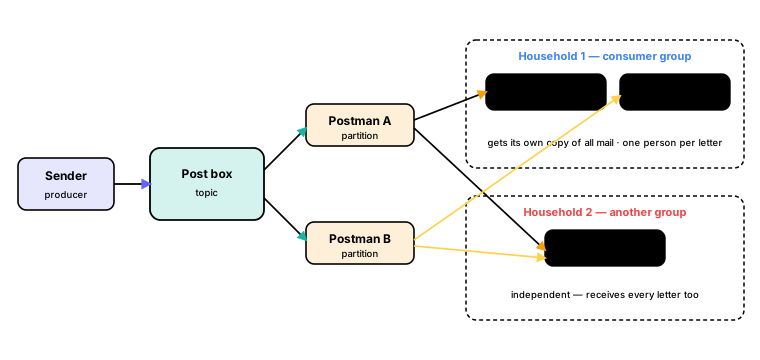
Section titled “A mental model: the post office”Mail flows one way — sender → post box → postmen → households — and that’s exactly Kafka’s shape:
- A producer is the sender; it drops letters into a topic, the district post box.
- A partition is a postman — each carries a share of the letters, so delivery runs in parallel.
- A consumer group is a household: every household gets its own copy of all the mail (fan-out).
- A consumer is a person in the household — within one home, only one person opens each letter (work is split, never duplicated).
So adding a household never affects the others, and adding people to a household just splits the load faster — up to one person per postman.
Core building blocks
Section titled “Core building blocks”- Producer — sends messages (a key + value) to Kafka.
- Topic — a named channel, e.g.
orders. - Partition — one ordered, append-only log inside a topic.
- Offset — a message’s position within a partition.
- Broker — a Kafka server that stores partitions.
- Consumer — one instance reading its assigned partitions.
- Consumer group — a team of consumers that together cover a topic.
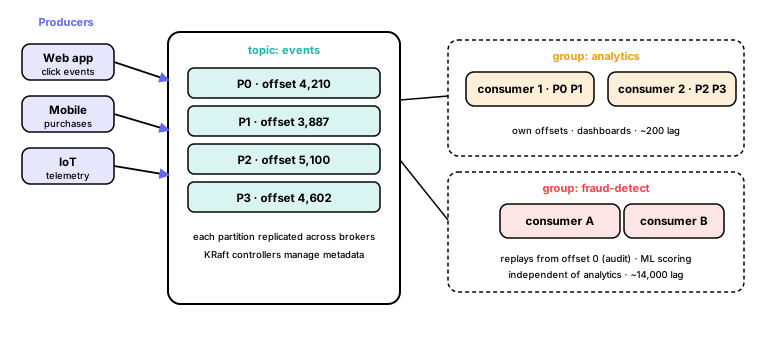
Producers publish into a cluster of brokers. Each partition has a leader (handles reads and writes) and replicas on other brokers for fault tolerance. Consumer groups read the same topic independently, each tracking its own offsets.
Topics, partitions & offsets
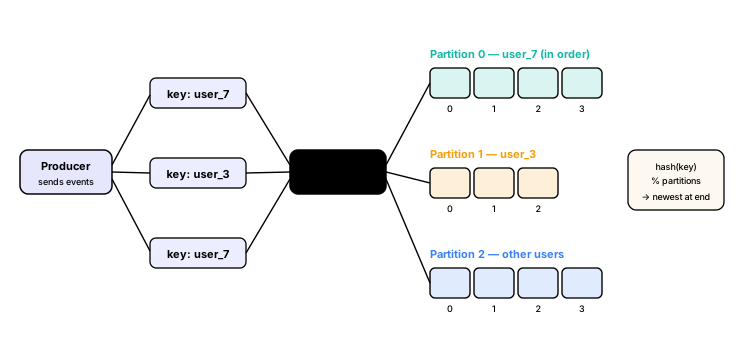
Section titled “Topics, partitions & offsets”A topic is split into partitions, each an independent append-only log. A partition numbers its messages with an offset starting at 0, and new writes only ever append at the end — that offset is the consumer’s bookmark.
- Same key → same partition → ordered for that key, via
hash(key) % partitions. Use a key when per-entity order matters (e.g. one user’s events). - No key spreads records across partitions for throughput.
- A message lands in exactly one partition; it never splits. Ordering is only guaranteed within a partition, so partitions are the unit of parallelism.
Consumer groups
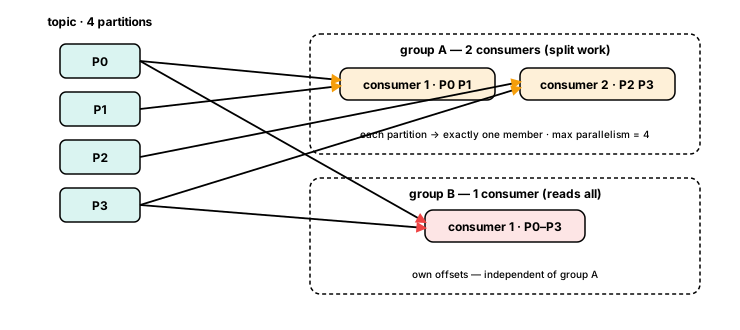
Section titled “Consumer groups”A consumer group is a set of consumers that together consume a topic. Within a group, each partition is read by exactly one consumer, so the work is split across members — which means parallelism is capped at the partition count (extra consumers just sit idle).
Different groups are independent: each reads the whole topic and keeps its own offsets. That gives you parallelism within a group and fan-out across groups.
Rebalancing
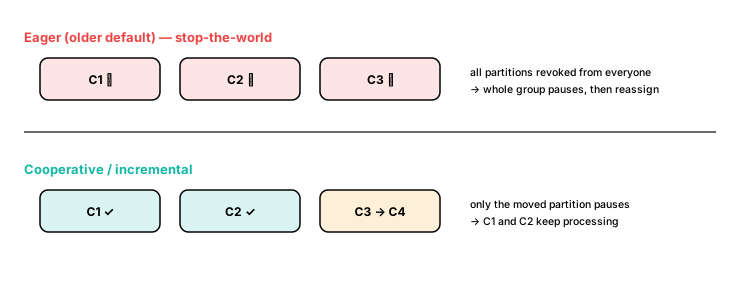
Section titled “Rebalancing”Partitions get reassigned when a consumer joins, leaves or crashes, or partitions are added.
- Eager (older default): every consumer drops all its partitions, then everything is reassigned — a stop-the-world pause.
- Cooperative / incremental: only the partitions that actually move are paused; the rest of the group keeps processing.
Kafka vs RabbitMQ
Section titled “Kafka vs RabbitMQ”The core difference: a queue deletes a message once it’s read; Kafka keeps it and lets each group track its own offset, so events can be replayed.
| Kafka | RabbitMQ | |
|---|---|---|
| Model | Pull-based log | Push-based queue |
| Retention | Configurable (days / forever) | Deleted once consumed |
| Replay | Yes — rewind the offset | No |
| Throughput | Millions/sec | Thousands/sec |
| Best for | Event streaming, audit logs | Task queues, RPC |
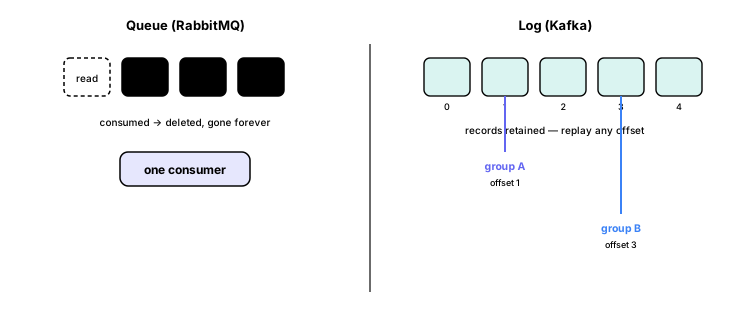
Interview one-liner: Kafka is a durable log (messages persist and replay); RabbitMQ is a queue (gone once delivered). Pick Kafka when several systems need the same events or you need to replay history.
Durability — acks
Section titled “Durability — acks”The producer’s acks setting decides how many replicas must confirm a write before it’s considered sent:
acks=0— fire and forget. Fastest, but lost if the broker crashes.acks=1— the leader confirms. Lost only if the leader dies before followers catch up.acks=all— every in-sync replica confirms. Slowest, but no data loss.
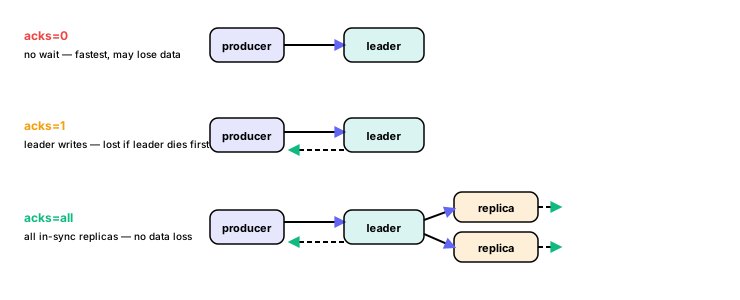
Pair acks=all with min.insync.replicas — the minimum replicas that must acknowledge for the write to succeed (typically 2 in a 3-replica setup).
KRaft mode
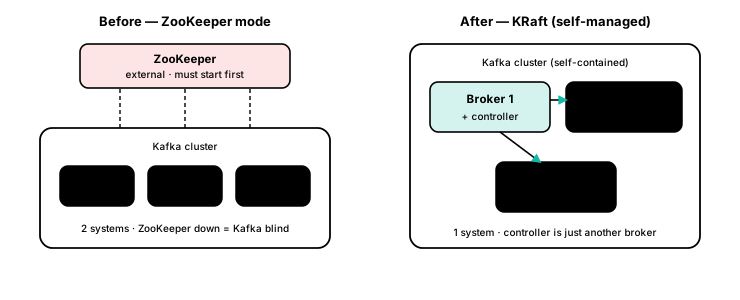
Section titled “KRaft mode”Kafka used to depend on ZooKeeper to track which brokers are alive, who leads each partition, and where offsets live. That meant two systems to run and start in order — and if ZooKeeper went down, Kafka went blind.
Kafka 3.3+ made KRaft (Kafka Raft) production-ready: Kafka manages its own metadata using the Raft consensus algorithm. A quorum of brokers acts as the controller internally — no external dependency, one system to operate.