Scale from Zero to Millions of Users
Designing a system to support millions of users is a challenging, iterative process requiring continuous refinement. This chapter starts with a single user and scales step-by-step to millions.
Overview
Section titled “Overview”- Designing a system to support millions of users is a challenging, iterative process requiring continuous refinement.
- This chapter focuses on building a system starting with a single user and scaling it to millions.
Single Server Setup
Section titled “Single Server Setup”- Starting Point: Begin with a simple setup where everything runs on a single server.
- Components on the Server:
- Web application
- Database
- Cache
Request Flow
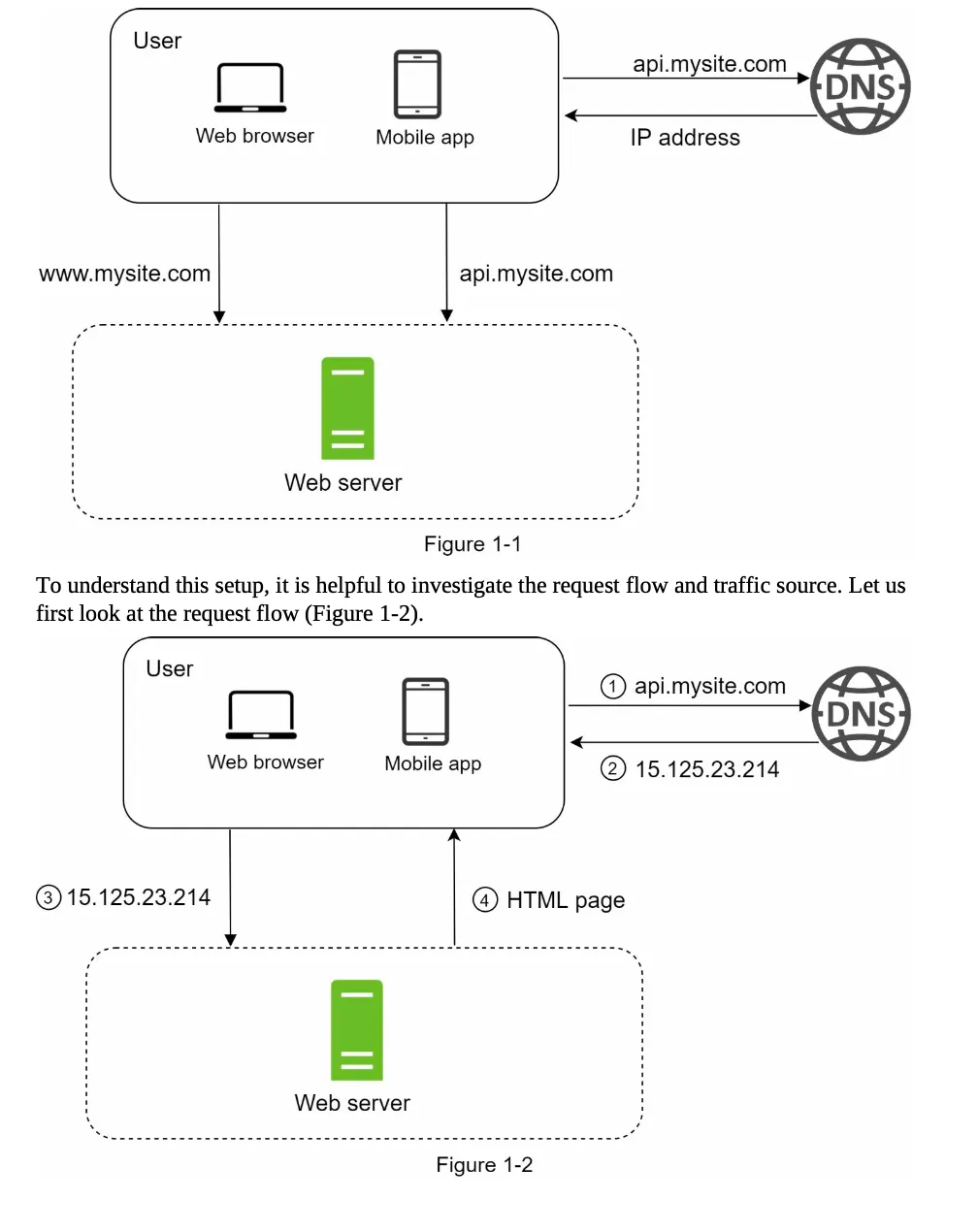
Section titled “Request Flow”The process of handling a user request involves the following steps (Figure 1-2):
-
Domain Name Resolution:
- Users access websites via domain names (e.g.,
api.mysite.com). - DNS (Domain Name System) resolves the domain name to an IP address.
- DNS is typically a paid service provided by third parties.
- Users access websites via domain names (e.g.,
-
IP Address Retrieval:
- Example: The IP address
15.125.23.214is returned to the browser or mobile app.
- Example: The IP address
-
HTTP Request:
- The browser or app sends an HTTP request to the web server using the IP address.
-
Response:
- The web server returns either:
- HTML pages (for web apps)
- JSON responses (for APIs or mobile apps)
- The web server returns either:
Traffic Sources
Section titled “Traffic Sources”Traffic to the web server originates from two main sources:
a. Web Application
- Server-Side: Handles business logic and storage using languages like Java, Python, etc.
- Client-Side: Manages presentation using HTML and JavaScript.
b. Mobile Application
- Communication Protocol: HTTP is used for communication between the mobile app and the web server.
- Data Format: JSON is the preferred format for API responses due to its simplicity.
- Example API Request:
GET /users/12retrieves the user object forid = 12.
- Example API Request:
Database
Section titled “Database”1. Scaling Beyond a Single Server
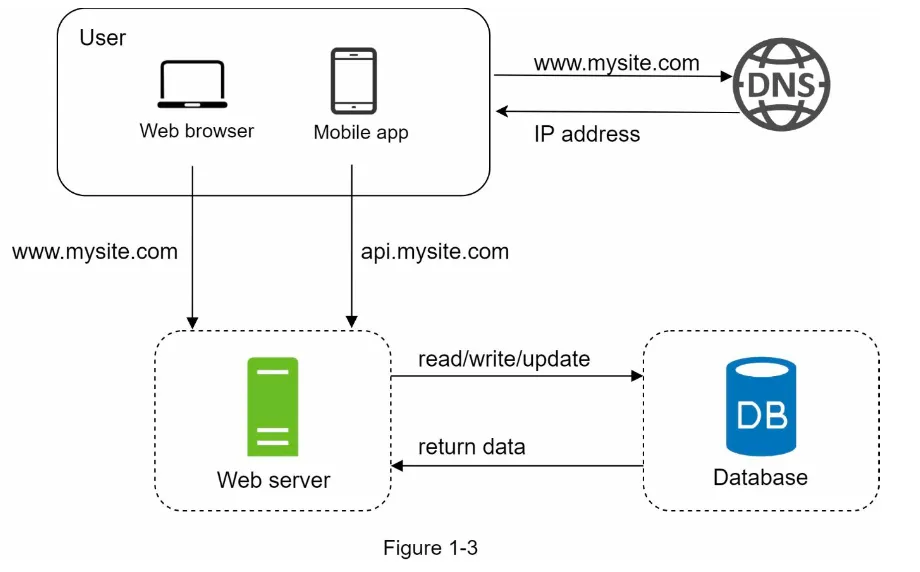
Section titled “1. Scaling Beyond a Single Server”- As the user base grows, a single server becomes insufficient.
- Solution: Use multiple servers:
- Web Tier: Handles web/mobile traffic.
- Data Tier: Dedicated to the database.
- Benefit: Web and database servers can be scaled independently (Figure 1-3).
2. Types of Databases
Section titled “2. Types of Databases”You can choose between Relational Databases (RDBMS) and Non-Relational Databases (NoSQL).
a. Relational Databases (RDBMS)
Section titled “a. Relational Databases (RDBMS)”- Examples: MySQL, PostgreSQL, Oracle Database.
- Structure: Data is stored in tables and rows.
- Key Feature: Supports SQL join operations across tables.
- Best For: Most developers prefer RDBMS due to its 40+ years of reliability and proven performance.
b. Non-Relational Databases (NoSQL)
Section titled “b. Non-Relational Databases (NoSQL)”- Examples: CouchDB, Neo4j, Cassandra, HBase, Amazon DynamoDB.
- Categories:
- Key-Value Stores
- Graph Stores
- Column Stores
- Document Stores
- Key Feature: Does not support join operations.
- Best For:
- Applications requiring super-low latency.
- Unstructured data or non-relational data.
- Serialization/deserialization of data (e.g., JSON, XML).
- Storing massive amounts of data.
3. Scaling Approaches
Section titled “3. Scaling Approaches”Scaling can be achieved through Vertical Scaling or Horizontal Scaling.
a. Vertical Scaling (Scale-Up)
Section titled “a. Vertical Scaling (Scale-Up)”- Definition: Add more power (CPU, RAM, etc.) to a single server.
- Advantages:
- Simple to implement.
- Suitable for low traffic.
- Limitations:
- Hard limit on CPU and memory upgrades.
- No failover or redundancy (if the server fails, the system goes down).
b. Horizontal Scaling (Scale-Out)
Section titled “b. Horizontal Scaling (Scale-Out)”- Definition: Add more servers to the resource pool.
- Advantages:
- Overcomes the limitations of vertical scaling.
- Provides failover and redundancy.
- Best For: Large-scale applications.
Load Balancer
Section titled “Load Balancer”1. Functionality
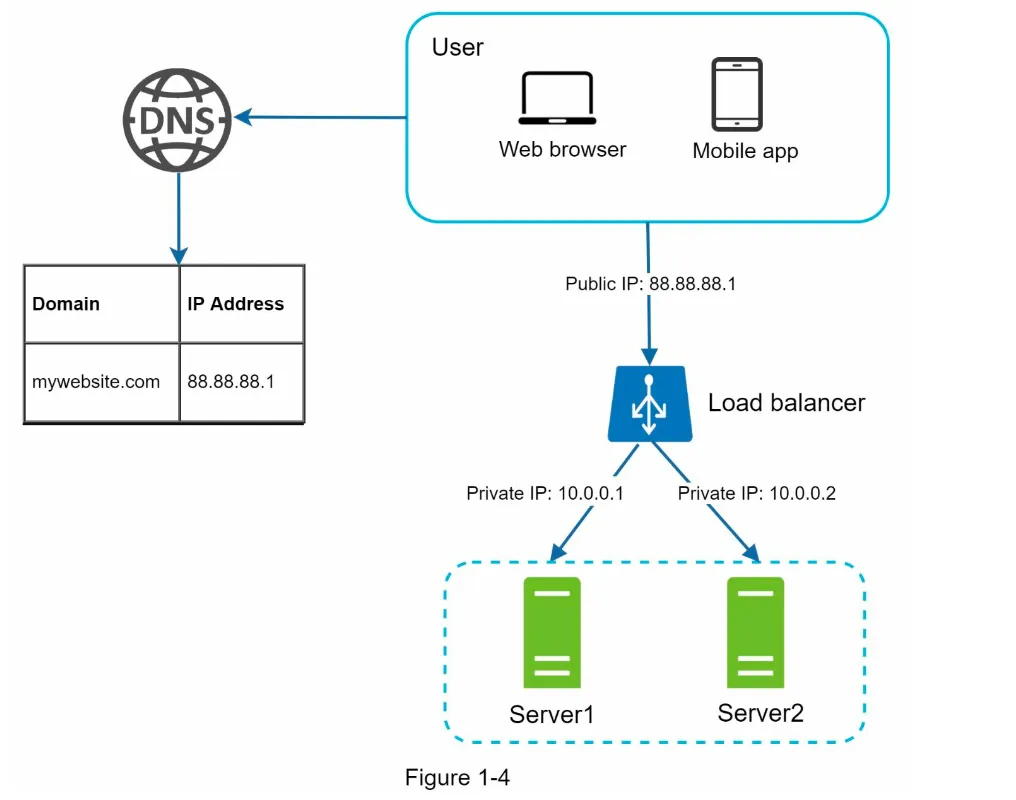
Section titled “1. Functionality”- A load balancer evenly distributes incoming traffic among web servers in a load-balanced set (Figure 1-4).
- How it Works:
- Users connect to the public IP of the load balancer.
- Web servers are no longer directly accessible by clients.
- Private IPs are used for communication between the load balancer and web servers (enhances security).
2. Benefits
Section titled “2. Benefits”- Failover:
- If one server goes offline, traffic is routed to another healthy server.
- New servers can be added to the pool to balance the load.
- Scalability:
- As traffic grows, more servers can be added to the pool, and the load balancer automatically distributes requests.
3. Limitations of Current Data Tier
Section titled “3. Limitations of Current Data Tier”- A single database does not support failover or redundancy.
- Solution: Use Database Replication.
Database Replication
Section titled “Database Replication”1. Overview
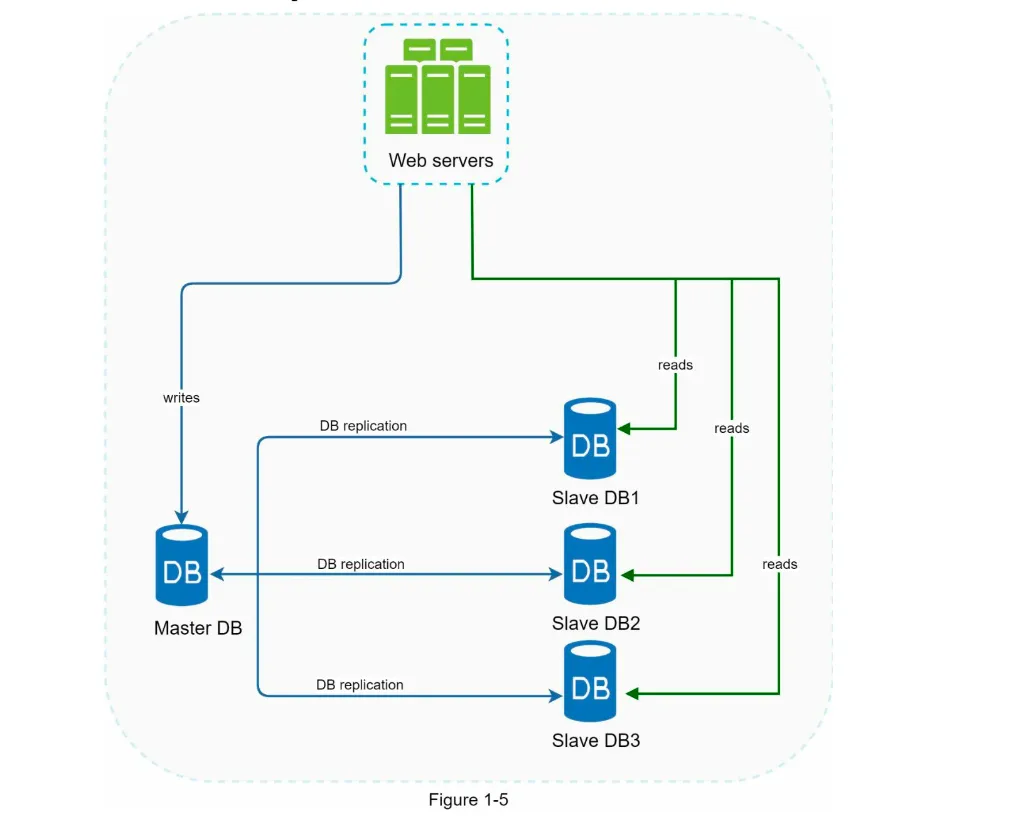
Section titled “1. Overview”- Definition: Replicating data across multiple databases, typically in a master-slave model (Figure 1-5).
- Master Database: Handles all write operations (insert, update, delete).
- Slave Databases: Handle read operations and replicate data from the master.
2. Advantages
Section titled “2. Advantages”- Performance:
- Write operations are handled by the master.
- Read operations are distributed across multiple slaves, enabling parallel query processing.
- Reliability:
- Data is preserved even if one database server is destroyed (e.g., natural disasters).
- High Availability:
- If one database goes offline, others can take over, ensuring uninterrupted operation.
3. Handling Failures
Section titled “3. Handling Failures”- Slave Database Failure:
- If a slave goes offline, read operations are redirected to the master or other healthy slaves.
- A new slave database replaces the failed one.
- Master Database Failure:
- A slave is promoted to become the new master.
- Data recovery scripts may be required to update missing data.
- Advanced replication methods (e.g., multi-masters, circular replication) can help but are more complex.
System Design After LB and DR
Section titled “System Design After LB and DR”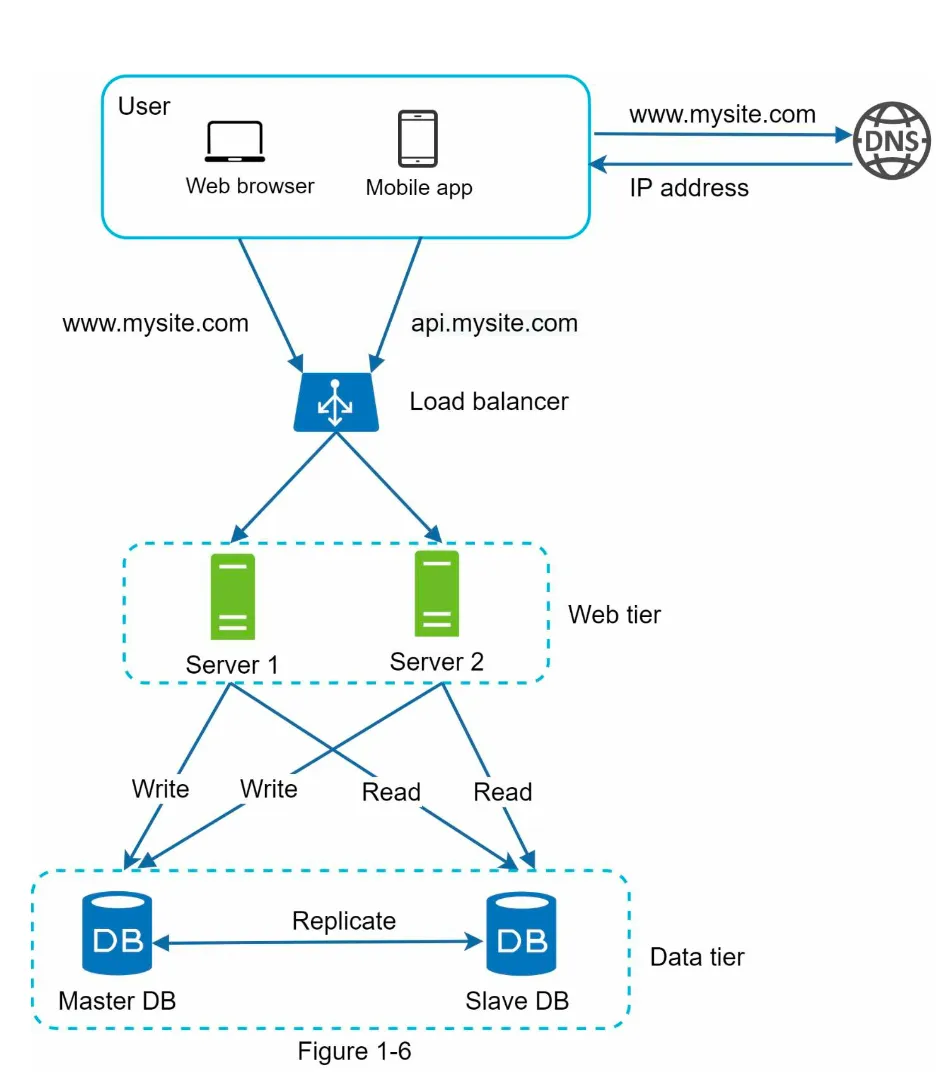
-
Request Flow (Figure 1-6):
- User gets the load balancer’s IP from DNS.
- User connects to the load balancer.
- HTTP requests are routed to either Server 1 or Server 2.
-
Database Operations:
- Web servers read user data from a slave database.
- Data-modifying operations (write, update, delete) are routed to the master database.
Next Steps: Improving Load/Response Time
Section titled “Next Steps: Improving Load/Response Time”- Add a Cache Layer: To store frequently accessed data and reduce database load.
- Use a Content Delivery Network (CDN): Shift static content (JavaScript, CSS, images, videos) to a CDN for faster delivery.
1. Overview
Section titled “1. Overview”- A cache is a temporary storage area that stores results of expensive responses or frequently accessed data in memory for faster subsequent requests.
- Problem Solved: Reduces repeated database calls, improving application performance (Figure 1-6).
2. Cache Tier
Section titled “2. Cache Tier”
- A cache tier is a faster, temporary data store layer that reduces database workloads and improves system performance.
- Workflow (Figure 1-7):
- Web server checks the cache for the requested data.
- If found, data is returned to the client.
- If not, the database is queried, the response is cached, and then sent to the client.
- This is called a read-through cache.
3. Considerations for Using Cache
Section titled “3. Considerations for Using Cache”- When to Use: Use cache for frequently read but infrequently modified data.
- Expiration Policy: Implement expiration to avoid stale data and memory overuse.
- Consistency: Ensure synchronization between the cache and the data store.
- Mitigating Failures:
- Avoid single points of failure (SPOF) by using multiple cache servers.
- Overprovision memory to handle increasing usage.
- Eviction Policy: When the cache is full, policies like LRU, LFU, or FIFO remove old data.
Content Delivery Network (CDN)
Section titled “Content Delivery Network (CDN)”1. Overview
Section titled “1. Overview”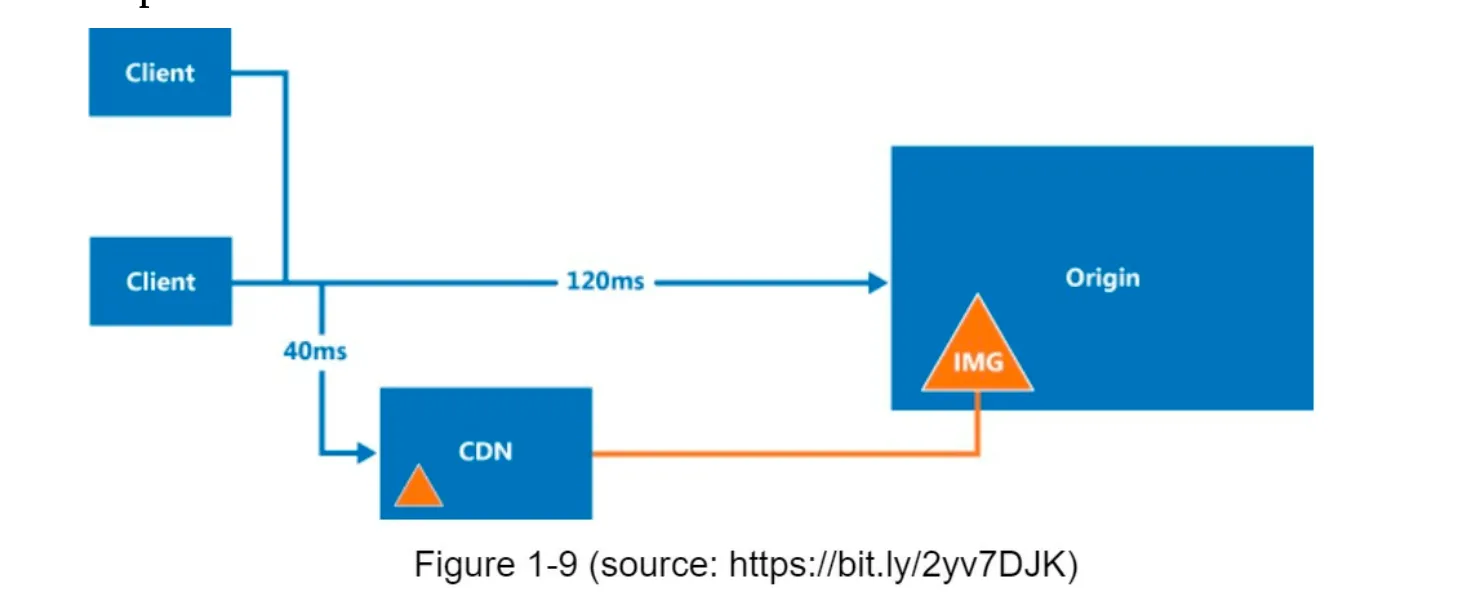
- A CDN is a network of geographically distributed servers that cache and deliver static content (e.g., images, videos, CSS, JavaScript).
- Dynamic Content Caching: Beyond the scope of this book but involves caching HTML pages based on request parameters.
2. How CDN Works (Figure 1-10)
Section titled “2. How CDN Works (Figure 1-10)”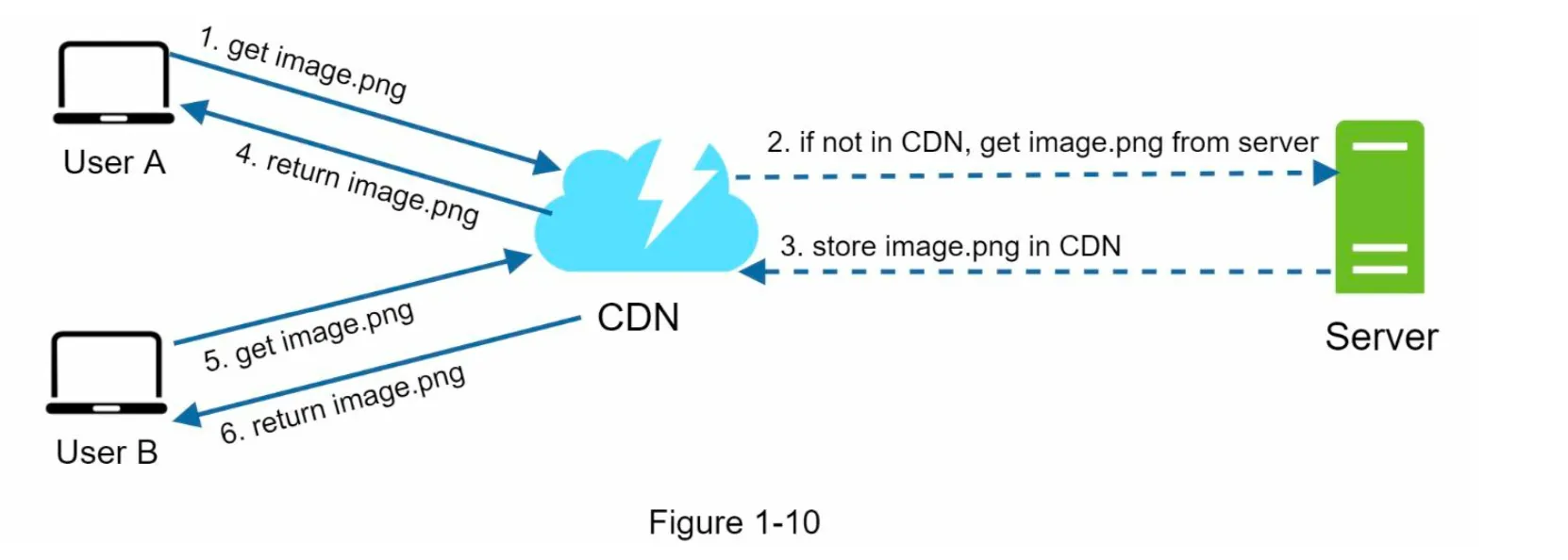
- User requests a static asset (e.g.,
image.png) via a CDN URL. - If the CDN server does not have the asset, it fetches it from the origin server (e.g., web server or Amazon S3).
- The asset is cached in the CDN with a Time-to-Live (TTL) header.
- Subsequent requests for the asset are served from the CDN cache until the TTL expires.
3. Considerations for Using CDN
Section titled “3. Considerations for Using CDN”- Cost: Avoid caching infrequently used assets to reduce costs.
- Cache Expiry: Set appropriate TTL values to balance freshness and performance.
- CDN Fallback: Ensure the system can handle CDN outages by falling back to the origin server.
- Invalidating Files:
- Use CDN APIs to invalidate objects.
- Use object versioning (e.g.,
image.png?v=2) to serve updated content.
4. Benefits of CDN (Figure 1-11)
Section titled “4. Benefits of CDN (Figure 1-11)”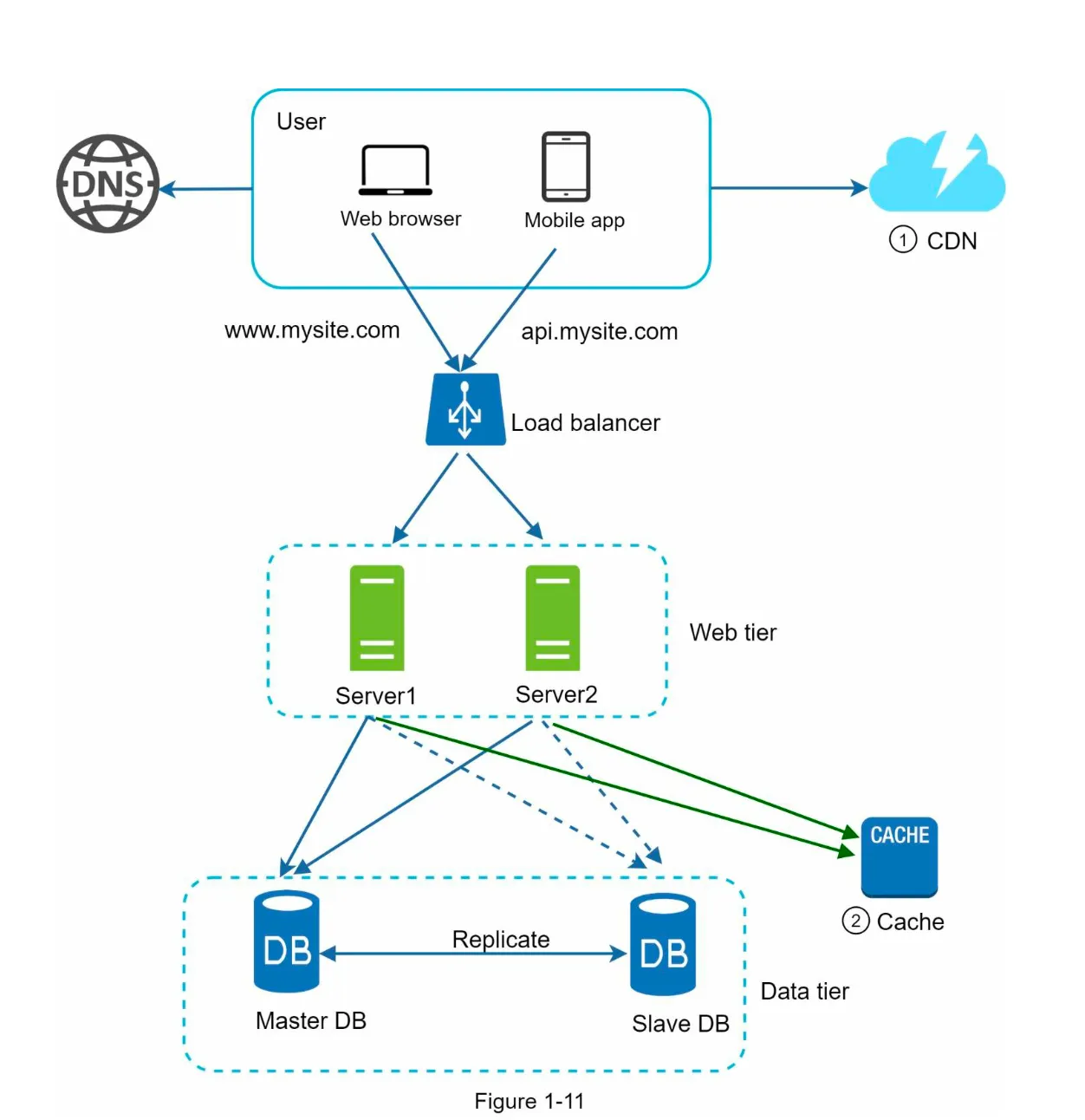
- Static assets are served by the CDN, reducing web server load.
- Faster content delivery due to proximity to users.
Stateless Web Tier
Section titled “Stateless Web Tier”1. Stateless vs Stateful Architecture
Section titled “1. Stateless vs Stateful Architecture”Stateful Architecture (Figure 1-12):
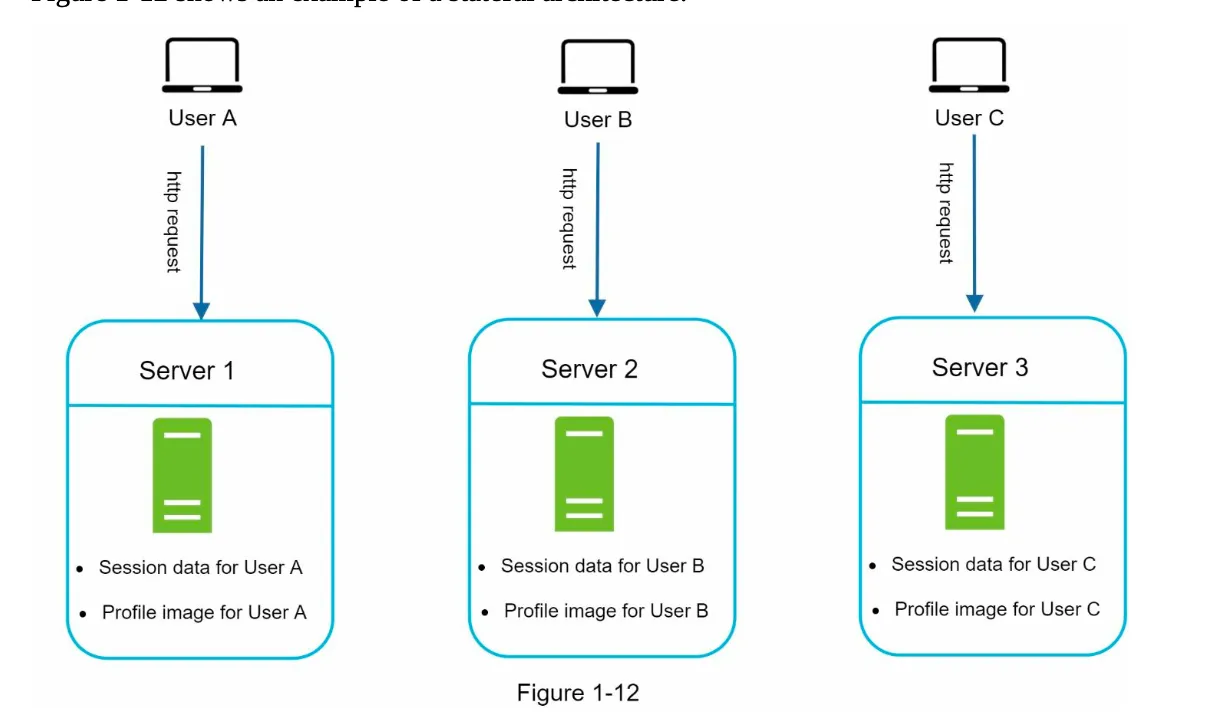
- Servers store client session data locally.
- Requests must always be routed to the same server (sticky sessions).
- Challenges: Difficult to scale, handle failures, and add/remove servers.
Stateless Architecture (Figure 1-13):
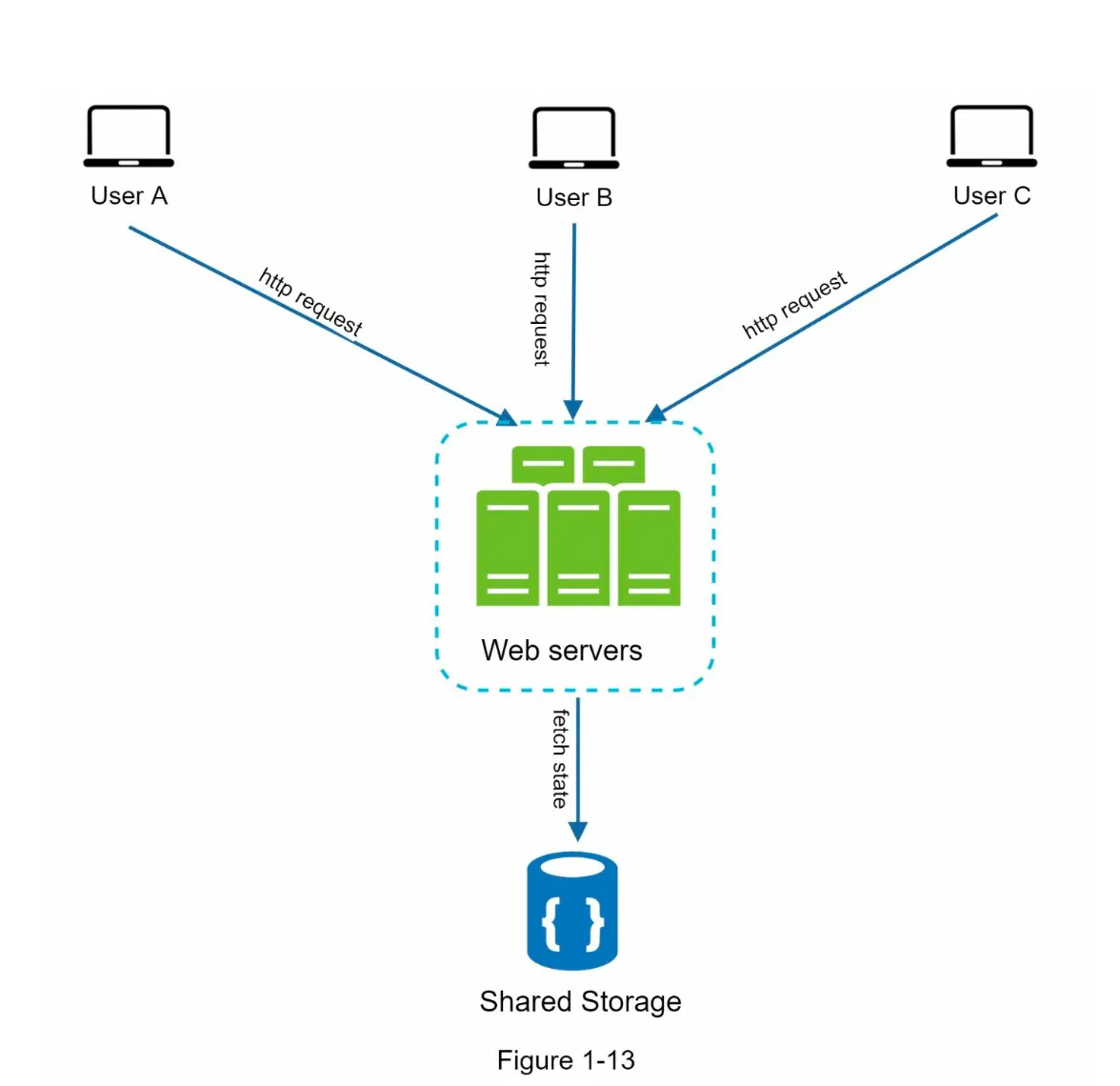
- Session data is stored in a shared data store (e.g., relational database, NoSQL, Memcached, Redis).
- HTTP requests can be routed to any server.
- Benefits:
- Simpler, more robust, and scalable.
- Enables auto-scaling by adding/removing servers based on traffic.
2. Updated Design (Figure 1-14)
Section titled “2. Updated Design (Figure 1-14)”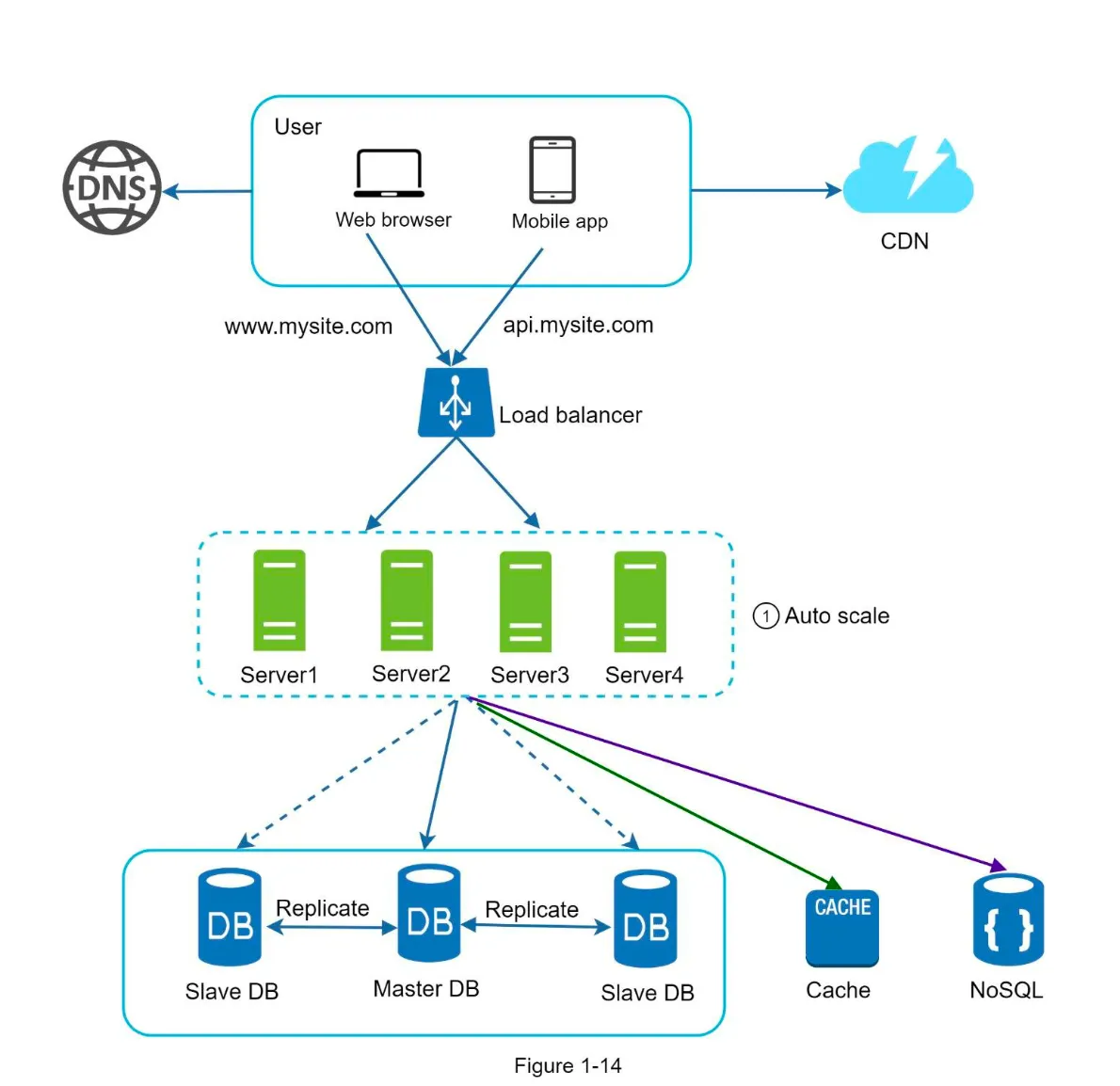
- Session data is moved out of web servers to a persistent data store.
- Autoscaling: Web servers can be added/removed automatically based on traffic.
Data Center
Section titled “Data Center”1. Multi-Data Center Setup
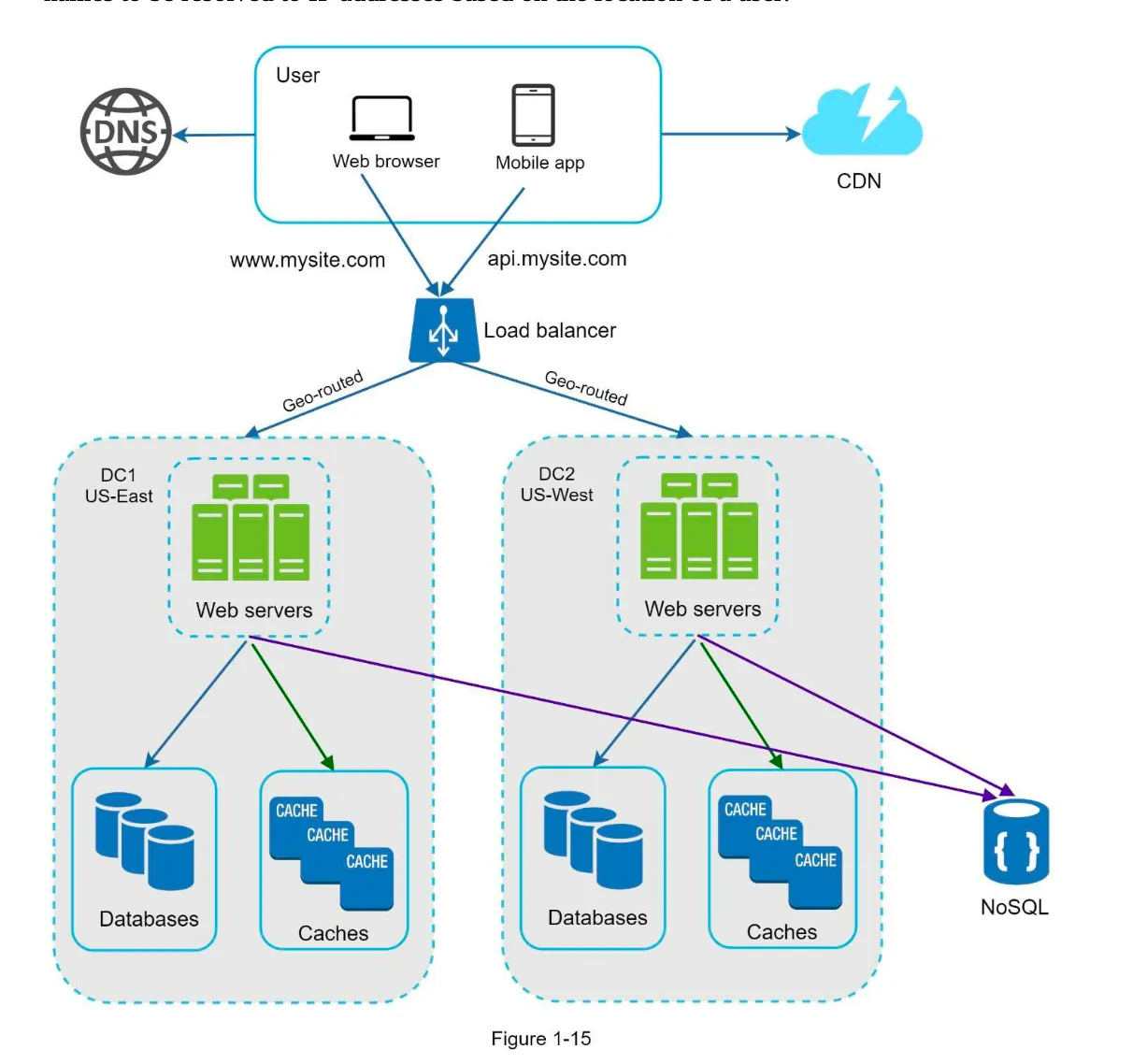
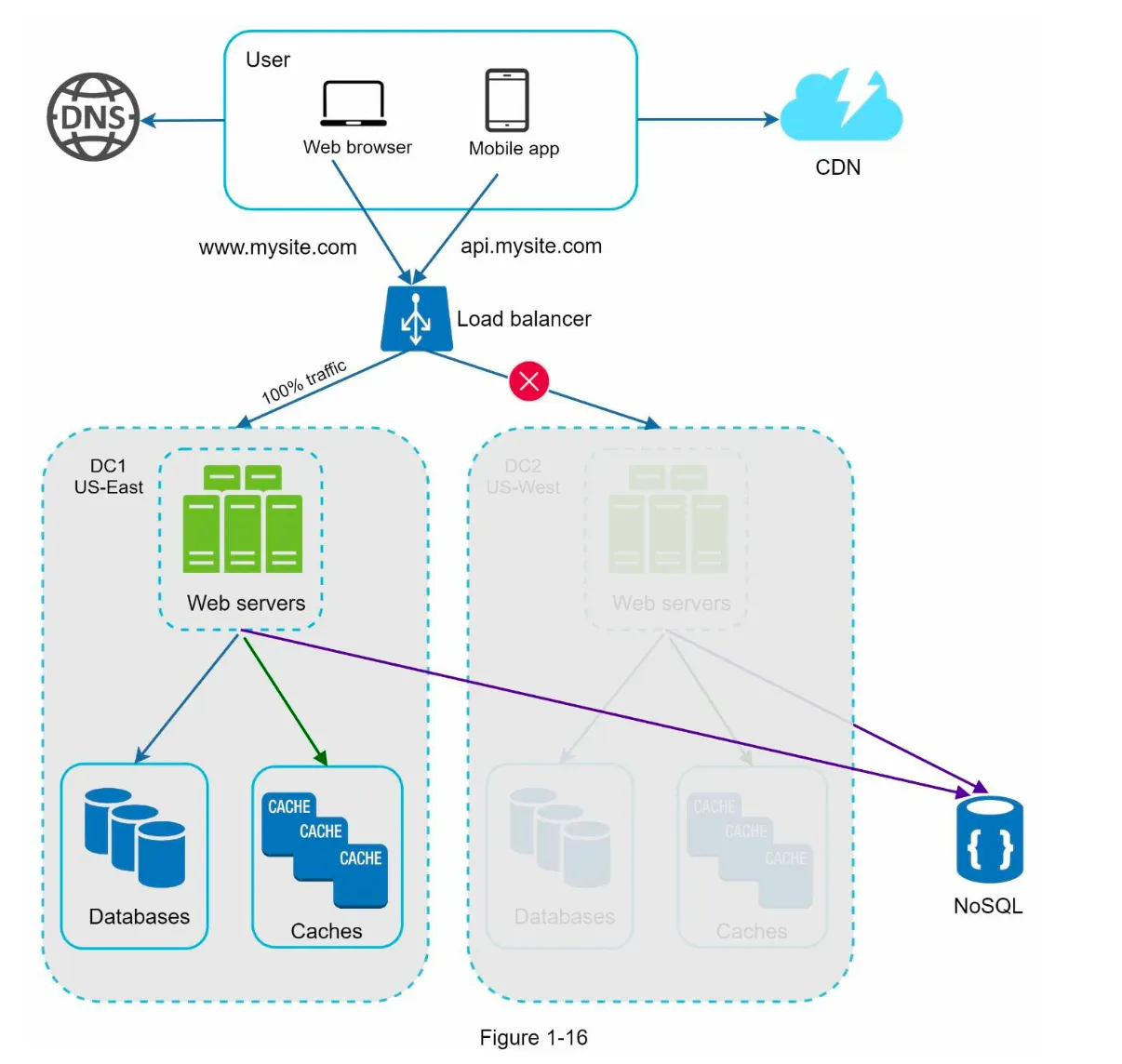
Section titled “1. Multi-Data Center Setup”- Purpose: Improve availability and user experience across geographical regions.
- GeoDNS Routing:
- Users are routed to the nearest data center based on their location.
- Example: x% traffic to US-East, (100-x)% to US-West (Figure 1-15).
2. Handling Data Center Failures (Figure 1-16)
Section titled “2. Handling Data Center Failures (Figure 1-16)”- If one data center goes offline, all traffic is routed to a healthy data center.
3. Challenges
Section titled “3. Challenges”- Traffic Redirection: Use tools like GeoDNS to route traffic effectively.
- Data Synchronization:
- Replicate data across data centers to handle failover scenarios.
- Example: Netflix uses asynchronous multi-data center replication.
- Testing and Deployment:
- Test applications across different locations.
- Use automated deployment tools to maintain consistency across data centers.
Next Steps: Decoupling Components
Section titled “Next Steps: Decoupling Components”- To further scale the system, decouple components so they can be scaled independently.
- Messaging Queues: A key strategy for decoupling in distributed systems.
Message Queue
Section titled “Message Queue”1. Overview
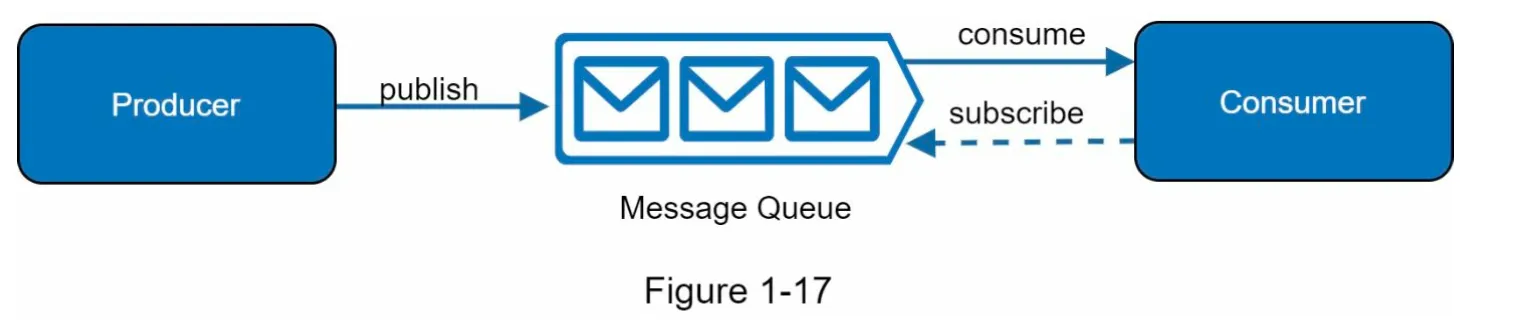
Section titled “1. Overview”- A message queue is a durable, in-memory component that supports asynchronous communication.
- Producers/Publishers: Create and publish messages to the queue.
- Consumers/Subscribers: Connect to the queue and process messages.
- Decoupling: Producers and consumers can operate independently, making the system more scalable and reliable.
2. Use Case Example
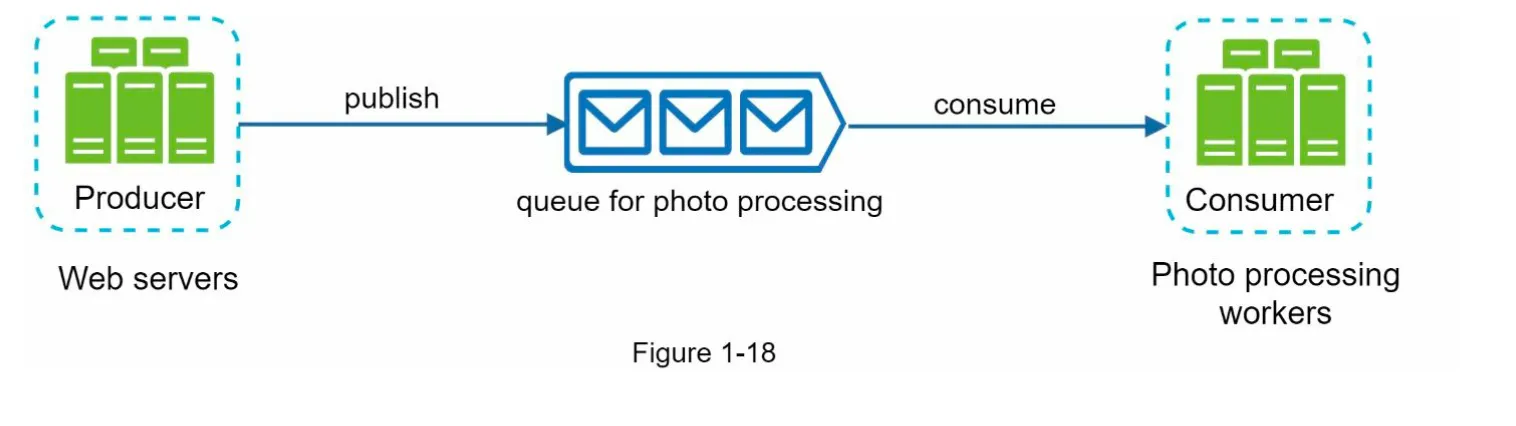
Section titled “2. Use Case Example”- Photo Customization:
- Web servers publish photo processing jobs to the message queue.
- Workers pick up jobs asynchronously and perform tasks like cropping, sharpening, etc.
- Scalability:
- Add more workers if the queue grows large.
- Reduce workers if the queue is mostly empty.
Logging, Metrics, and Automation
Section titled “Logging, Metrics, and Automation”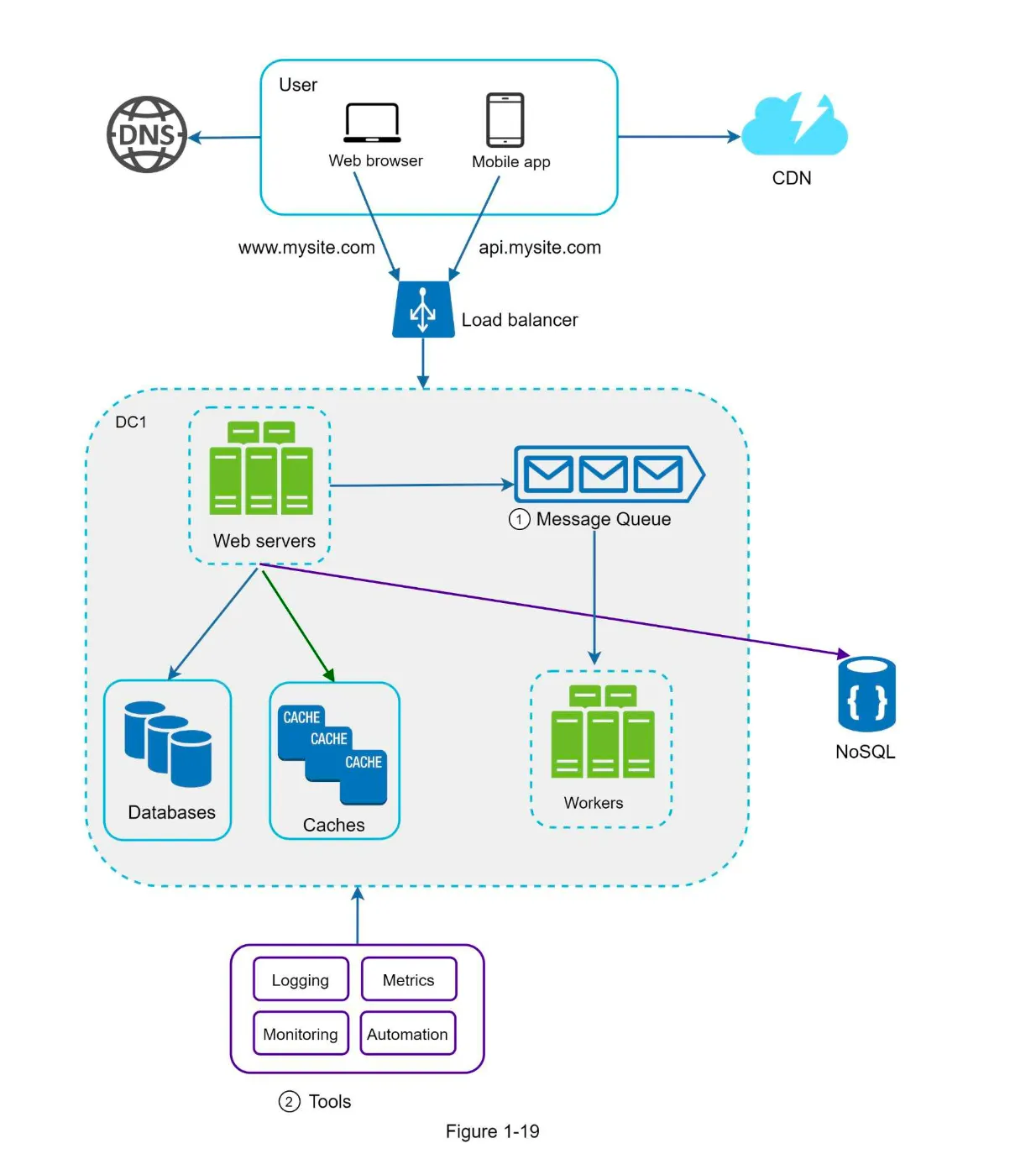
1. Logging
Section titled “1. Logging”- Purpose: Monitor error logs to identify and resolve system issues.
- Implementation:
- Monitor logs at the server level.
- Use centralized tools for aggregating logs for easy search and analysis.
2. Metrics
Section titled “2. Metrics”- Purpose: Gain insights into system health and business performance.
- Types of Metrics:
- Host-Level: CPU, memory, disk I/O, etc.
- Aggregated-Level: Performance of database tier, cache tier, etc.
- Business Metrics: Daily active users, retention, revenue, etc.
3. Automation
Section titled “3. Automation”- Purpose: Improve productivity and efficiency in large, complex systems.
- Examples:
- Continuous Integration: Automate code check-ins to detect issues early.
- Automate build, test, and deployment processes.
Database Scaling
Section titled “Database Scaling”1. Vertical Scaling (Scale-Up)
Section titled “1. Vertical Scaling (Scale-Up)”- Definition: Add more power (CPU, RAM, etc.) to a single database server.
- Advantages:
- Simple to implement.
- Suitable for small-scale systems.
- Drawbacks:
- Hardware limits prevent infinite scaling.
- High cost for powerful servers.
- Single point of failure (SPOF).
2. Horizontal Scaling (Sharding)
Section titled “2. Horizontal Scaling (Sharding)”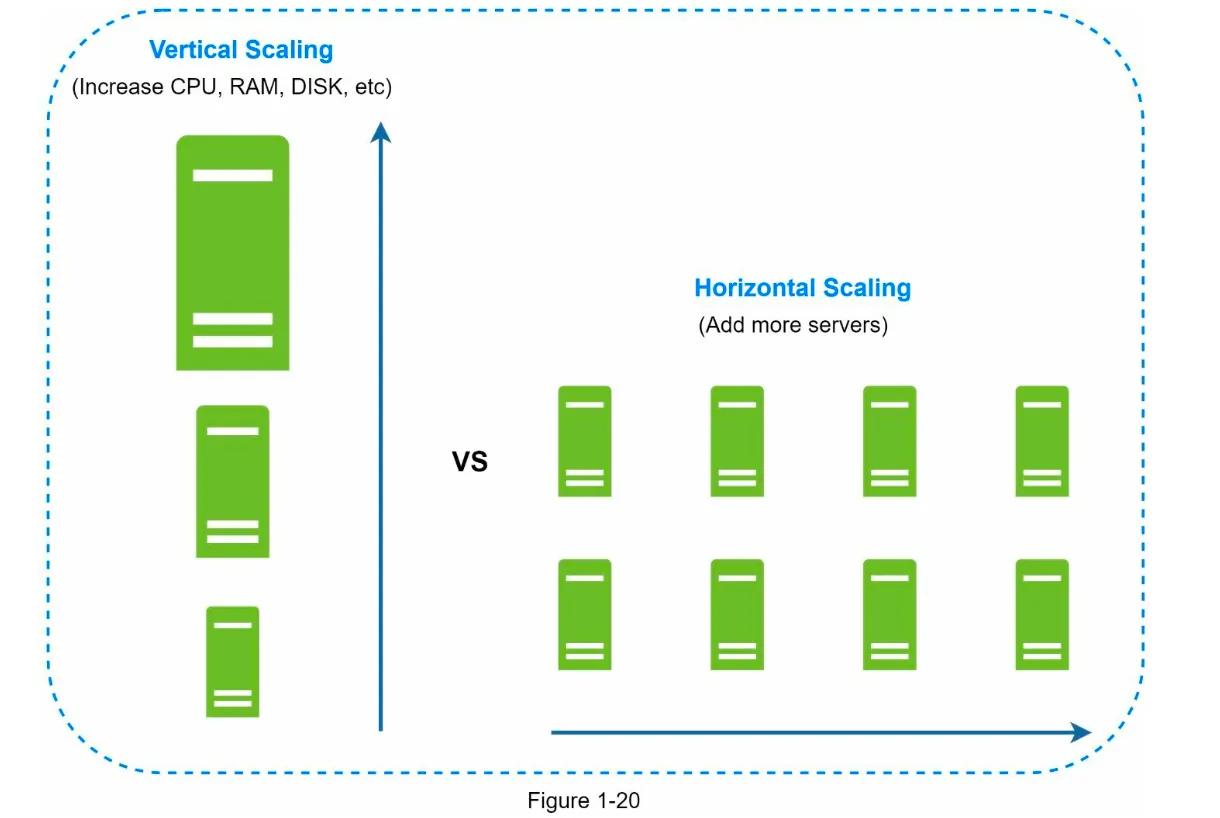
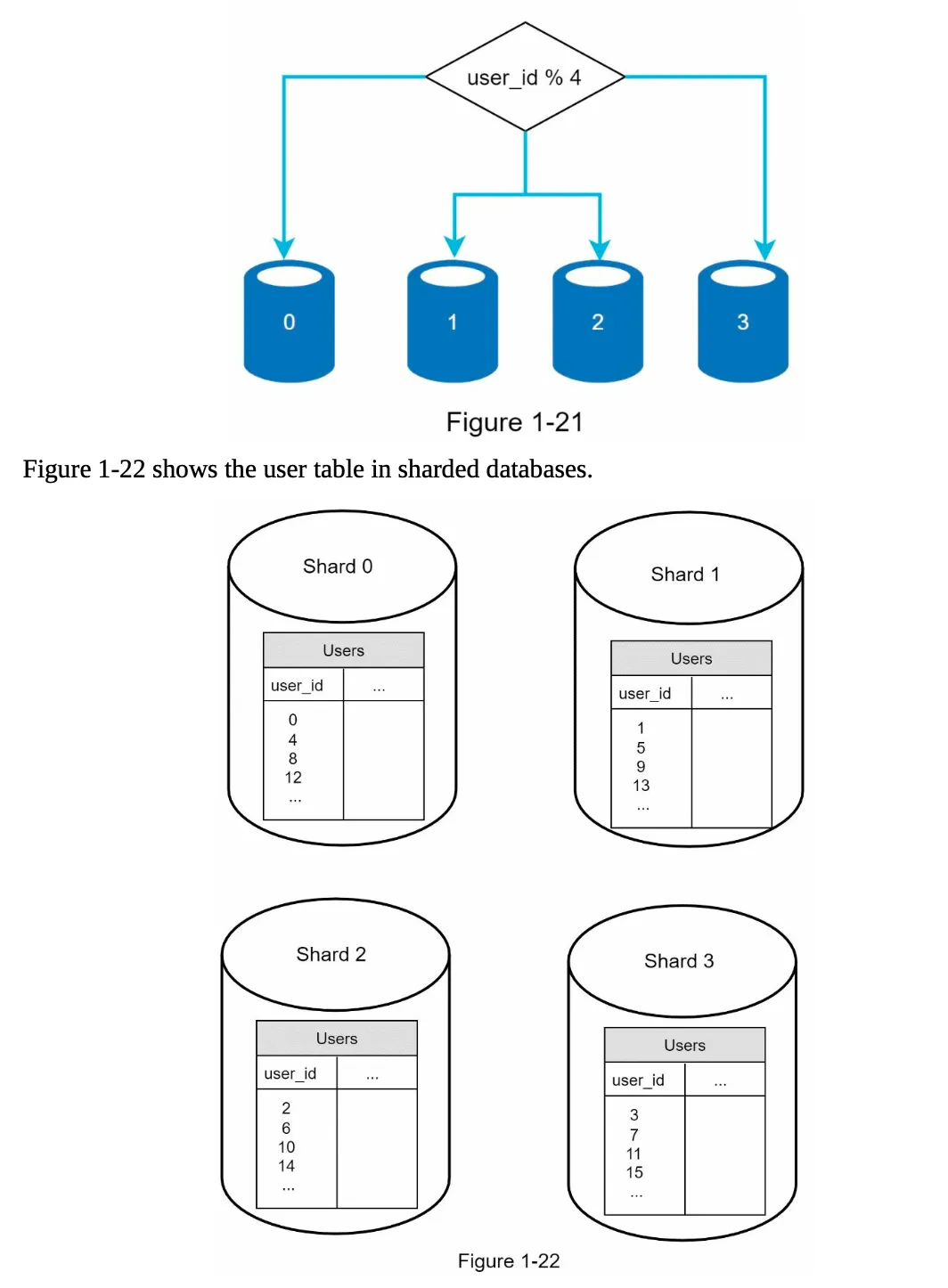
- Definition: Split a large database into smaller, manageable parts called shards.
- How It Works:
- Data is distributed across shards using a sharding key (e.g.,
user_id). - Example:
user_id % 4determines which shard stores the data.
- Data is distributed across shards using a sharding key (e.g.,
- Benefits:
- Scales horizontally by adding more servers.
- Reduces load on individual servers.
- Challenges:
- Resharding: Required when shards grow unevenly or exceed capacity.
- Celebrity Problem: Excessive access to a single shard (hotspot key) can overload it.
- Join Operations: Difficult across shards; often requires database denormalization.
Millions of Users and Beyond
Section titled “Millions of Users and Beyond”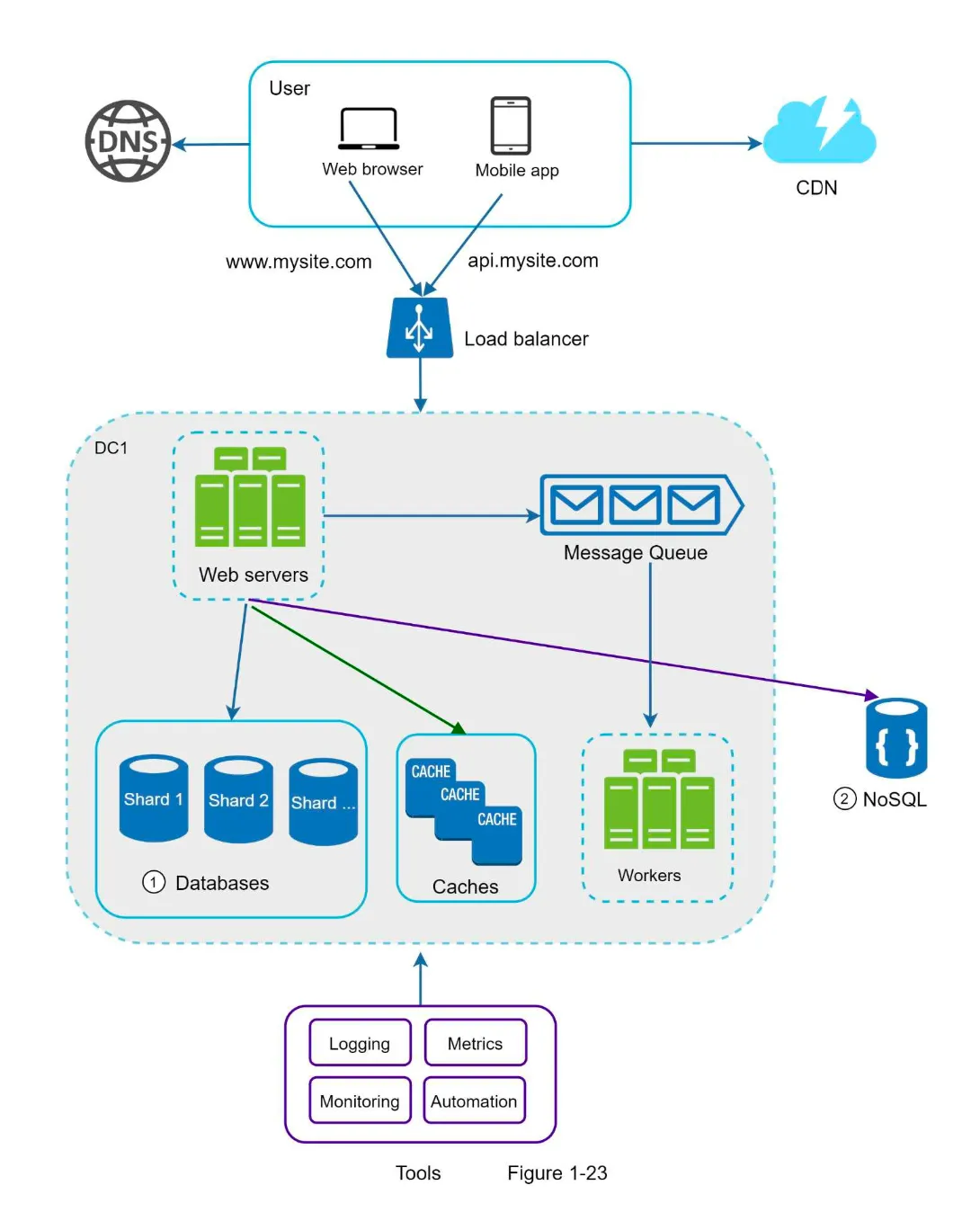
1. Key Strategies for Scaling
Section titled “1. Key Strategies for Scaling”- Keep Web Tier Stateless:
- Store session data in shared data stores (e.g., NoSQL, Redis).
- Enable auto-scaling by adding/removing servers based on traffic.
- Build Redundancy:
- Add failover mechanisms at every tier to ensure high availability.
- Cache Data:
- Use caching layers to reduce database load and improve response times.
- Support Multiple Data Centers:
- Use GeoDNS to route users to the nearest data center.
- Replicate data across data centers for failover and availability.
- Host Static Assets in CDN:
- Serve static content (e.g., images, CSS, JavaScript) from geographically distributed CDN servers.
- Scale Data Tier by Sharding:
- Distribute data across multiple shards to handle large-scale traffic.
- Split Tiers into Individual Services:
- Decouple components to scale them independently.
- Monitor and Automate:
- Use logging, metrics, and automation tools to monitor and optimize the system.