🎯 Java Classes & Objects: Complete Guide
🏗️ What is a Class?
Section titled “🏗️ What is a Class?”A class is a blueprint or template that defines:
- Structure: What data an object contains (fields/attributes)
- Behavior: What actions an object can perform (methods)
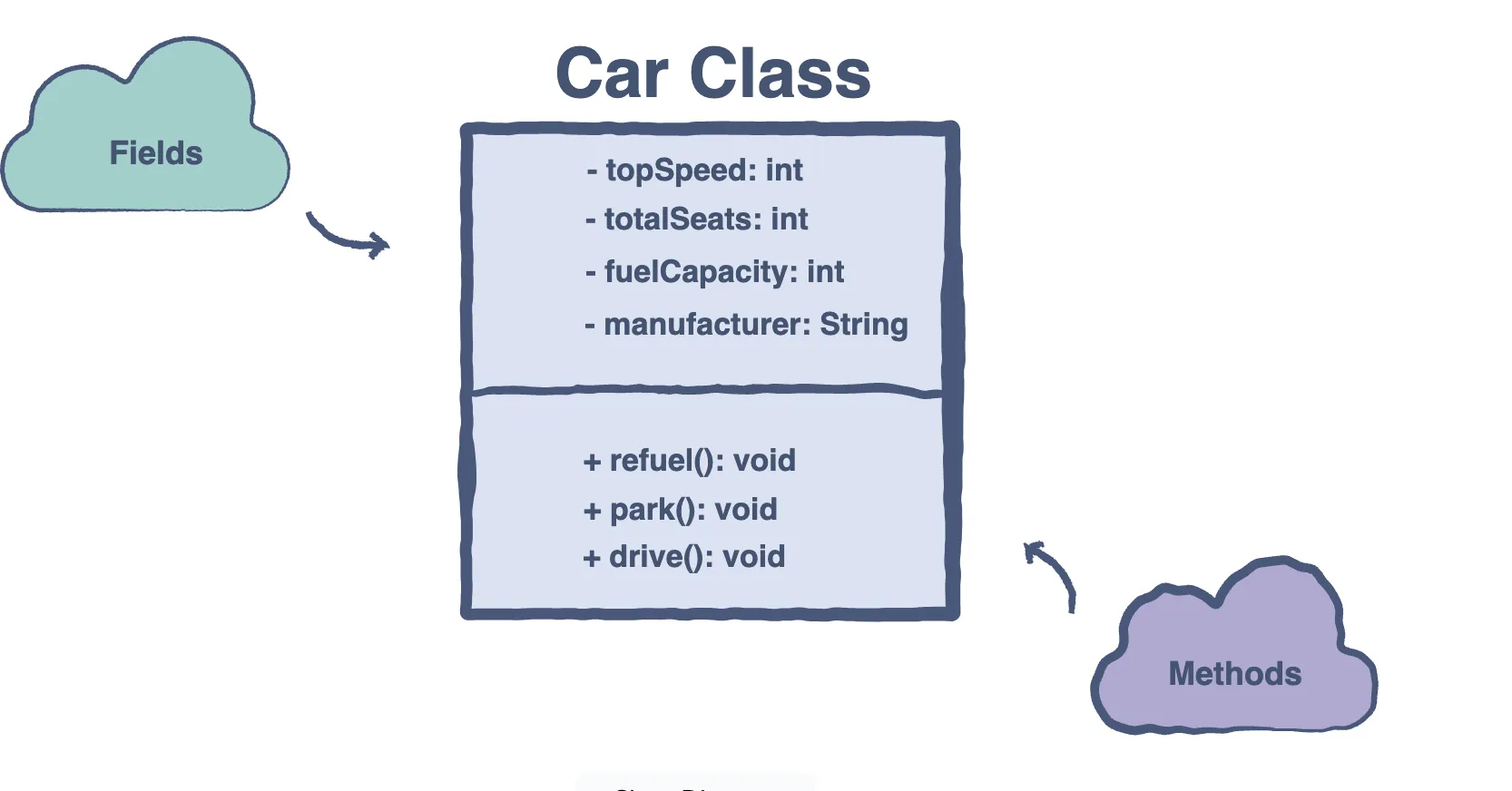
🧠 Simple Analogy
Section titled “🧠 Simple Analogy”Think of a class like a car blueprint:
- The blueprint (class) defines what a car should have: engine, wheels, seats
- Each actual car (object) built from that blueprint has its own values: red color, 4 doors, V6 engine
🔑 Key Points
Section titled “🔑 Key Points”- Classes are user-defined data types
- Every class has at least one constructor
- If no constructor is declared, Java provides a default constructor
- Classes encapsulate related data and functionality
🧩 Class Components
Section titled “🧩 Class Components”1. Class Declaration
Section titled “1. Class Declaration”[access-modifier] class ClassName { // class body}2. Class Naming Conventions
Section titled “2. Class Naming Conventions”- ✅ Start with UPPERCASE letter:
Person,Car,BankAccount - ✅ Use nouns:
Student,Database,FileManager - ✅ Be descriptive:
UserAuthenticationService(not justUAS) - ❌ Avoid:
person,myClass,Class1
🚀 Object Creation & Lifecycle
Section titled “🚀 Object Creation & Lifecycle”The new Operator
Section titled “The new Operator”ClassName objectName = new ClassName();What happens:
- Memory allocation for the new object
- Constructor invocation to initialize the object
- Reference return to the created object
Complete Example
Section titled “Complete Example”public class Dog { // Instance Variables (Attributes) private String name; private String breed; private int age;
// Constructor public Dog(String name, String breed, int age) { this.name = name; this.breed = breed; this.age = age; }
// Methods (Behaviors) public String getName() { return name; }
public void bark() { System.out.println(name + " says: Woof!"); }
@Override public String toString() { return "Dog{name='" + name + "', breed='" + breed + "', age=" + age + "}"; }
public static void main(String[] args) { // Creating objects Dog tuffy = new Dog("Tuffy", "Papillon", 3); Dog max = new Dog("Max", "Golden Retriever", 5);
// Using objects tuffy.bark(); System.out.println(tuffy); System.out.println("Max's name: " + max.getName()); }}Output:
Tuffy says: Woof!Dog{name='Tuffy', breed='Papillon', age=3}Max's name: Max🔒 Access Modifiers
Section titled “🔒 Access Modifiers”| Modifier | Class | Package | Subclass | World | Usage |
|---|---|---|---|---|---|
public | ✅ | ✅ | ✅ | ✅ | Most permissive - accessible everywhere |
protected | ✅ | ✅ | ✅ | ❌ | Inheritance-friendly - accessible by subclasses |
default | ✅ | ✅ | ❌ | ❌ | Package-private - accessible within package only |
private | ✅ | ❌ | ❌ | ❌ | Most restrictive - accessible within class only |
Access Modifier Examples
Section titled “Access Modifier Examples”public class AccessExample { public String publicField; // Accessible everywhere protected int protectedField; // Accessible in package + subclasses String defaultField; // Package-private (no modifier) private boolean privateField; // Only within this class
public void publicMethod() {} // Accessible everywhere protected void protectedMethod() {} // Package + subclasses void defaultMethod() {} // Package-private private void privateMethod() {} // Only within this class}🏗️ Constructors
Section titled “🏗️ Constructors”What is a Constructor?
Section titled “What is a Constructor?”- Special method with the same name as the class
- No return type (not even
void) - Automatically called when creating objects
- Used to initialize object state
- use
thiskeyword to call other constructors
Constructor Types
Section titled “Constructor Types”1. Default Constructor
Section titled “1. Default Constructor”public class Person { private String name; private int age;
// Java automatically provides this if no constructor is declared public Person() { // Default values this.name = "Unknown"; this.age = 0; }}2. Parameterized Constructor
Section titled “2. Parameterized Constructor”public class Person { private String name; private int age;
public Person(String name, int age) { this.name = name; this.age = age; }}3. Constructor Overloading
Section titled “3. Constructor Overloading”public class Person { private String name; private int age; private String email;
// Constructor 1: Name only public Person(String name) { this.name = name; this.age = 0; this.email = ""; }
// Constructor 2: Name and age public Person(String name, int age) { this.name = name; this.age = age; this.email = ""; }
// Constructor 3: All fields public Person(String name, int age, String email) { this.name = name; this.age = age; this.email = email; }}Constructor Best Practices
Section titled “Constructor Best Practices”- Use
thiskeyword to distinguish between instance variables and parameters - Provide meaningful default values
- Consider using builder pattern for classes with many fields
- Make constructors
privateif you want to control object creation
📊 Fields & Methods
Section titled “📊 Fields & Methods”Fields (Member Variables)
Section titled “Fields (Member Variables)”Instance Variables
Section titled “Instance Variables”- Unique to each object
- Stored in heap memory
- Accessible through object reference
public class Student { // Instance variables - each student has their own copy private String name; private int rollNumber; private double gpa;}Static Variables (Class Variables)
Section titled “Static Variables (Class Variables)”- Shared across all instances
- Stored in method area
- Accessible through class name
public class Student {    // Static variable - shared by all students    public static int totalStudents = 0;    public static final String SCHOOL_NAME = "Java Academy";
    private String name;
    public Student(String name) {        this.name = name;        totalStudents++; // Increment shared counter    }}
Methods
Section titled “Methods”Instance Methods
Section titled “Instance Methods”- Can access both instance and static members
- Must be called on an object
public class Calculator {    private int result;
    public void add(int a, int b) {        this.result = a + b;    }
    public int getResult() {        return this.result;    }}
Static Methods
Section titled “Static Methods”- Can only access static members
- Can be called without creating an object
- Cannot use
thiskeyword
public class MathUtils {    public static int add(int a, int b) {        return a + b;    }
    public static double calculateArea(double radius) {        return Math.PI * radius * radius;    }}
// Usageint sum = MathUtils.add(5, 3);double area = MathUtils.calculateArea(5.0);
🔄 Pass-by-Value in Java
Section titled “🔄 Pass-by-Value in Java”Primitive Types
Section titled “Primitive Types”public class PassByValueDemo { public static void modifyPrimitive(int x) { x = 10; // Modifies the COPY of x System.out.println("Inside method: " + x); }
public static void main(String[] args) { int a = 5; System.out.println("Before method call: " + a); modifyPrimitive(a); System.out.println("After method call: " + a); }}Output:
Before method call: 5Inside method: 10After method call: 5 ← 'a' is unchanged!Reference Types (Objects)
Section titled “Reference Types (Objects)”public class PassByValueDemo { public static void modifyObject(Person person) { person.setName("Modified"); // Modifies the object the reference points to person = new Person("New Person", 25); // Modifies the COPY of the reference }
public static void main(String[] args) { Person original = new Person("Original", 30); System.out.println("Before: " + original.getName());
modifyObject(original); System.out.println("After: " + original.getName()); }}Output:
Before: OriginalAfter: Modified ← Object was modified!🔗 Object Relationships
Section titled “🔗 Object Relationships”1. Association (Uses-A)
Section titled “1. Association (Uses-A)”- General relationship between classes
- Loose coupling
public class Student {    private Course[] courses; // Student uses courses}
public class Course {    private Student[] students; // Course has students}
Types:
- One-to-One:
Person↔Passport - One-to-Many:
School↔Students - Many-to-Many:
Student↔Course
2. Aggregation (Has-A)
Section titled “2. Aggregation (Has-A)”- Weak ownership - child can exist independently
- Hollow diamond in UML
public class Library {    private List<Book> books; // Library has books
    public void addBook(Book book) {        books.add(book);    }
    public void removeBook(Book book) {        books.remove(book); // Book can exist without library    }}
3. Composition (Strong Has-A)
Section titled “3. Composition (Strong Has-A)”- Strong ownership - child cannot exist without parent
- Filled diamond in UML
public class House {    private List<Room> rooms; // House has rooms
    public House() {        rooms = new ArrayList<>();        // Rooms are created when house is created        rooms.add(new Room("Living Room"));        rooms.add(new Room("Kitchen"));    }
    // Rooms are destroyed when house is destroyed}
Composition vs Inheritance
Section titled “Composition vs Inheritance”| Aspect | Composition | Inheritance |
|---|---|---|
| Coupling | Loose | Tight |
| Flexibility | High | Low |
| Runtime Behavior | Dynamic | Fixed |
| Reuse | Through delegation | Through hierarchy |
| Best For | Has-A relationship | Is-A relationship |