Concurrency vs Parallelism
🏗️ What is Concurrency?
Section titled “🏗️ What is Concurrency?”Concurrency is the ability to run several programs or several parts of a program in parallel. If a time consuming task can be performed asynchronously or in parallel, this improves the throughput and the interactivity of the program.
🌟 Why Concurrency Matters
Section titled “🌟 Why Concurrency Matters”A modern computer has several CPU’s or several cores within one CPU. The ability to leverage these multi-cores can be the key for a successful high-volume application.
🧱 Program vs Process vs Thread
Section titled “🧱 Program vs Process vs Thread”📘 Program
Section titled “📘 Program”🔹 Analogy: A recipe book 📖
🔹 Example: chrome.exe before launch
Characteristics:
- Static set of instructions
- Stored on disk
- Not actively executing
- No memory allocation
⚙️ Process
Section titled “⚙️ Process”🔹 Analogy: Baking a cake using a recipe 🎂
🔹 Example: Running chrome.exe → Chrome browser launches
🧠 Key Points:
- Independent execution
- Has its own memory space
- Managed by the OS
- Can contain multiple threads
🧵 Thread
Section titled “🧵 Thread”🔹 Analogy: Multiple bakers doing parts of the same cake 🍰
🔹 Example: Chrome browser:
- 1 thread for UI
- 1 thread for network
- 1 thread for user input
Characteristics:
- Lightweight execution unit
- Shares memory with other threads in the same process
- Has its own call stack
- Managed by the process
🔍 Detailed Comparison
Section titled “🔍 Detailed Comparison”Program vs Process
Section titled “Program vs Process”- A program is a set of instructions and associated data that resides on the disk and is loaded by the operating system to perform some task.
- In order to run a program, the operating system’s kernel is first asked to create a new process, which is an environment in which a program executes.
A process is a program in execution.
Process vs Threads
Section titled “Process vs Threads”| Process 🧱 | Thread 🧵 |
|---|---|
| Independent program | Part of a process |
| Own memory | Shares memory with others |
| Heavyweight | Lightweight |
| Harder communication | Easy communication |
| Crash doesn’t affect others | Crash may affect other threads |
| Example: PostgreSQL server | Example: Chrome tabs inside one process |
Memory and Resource Management
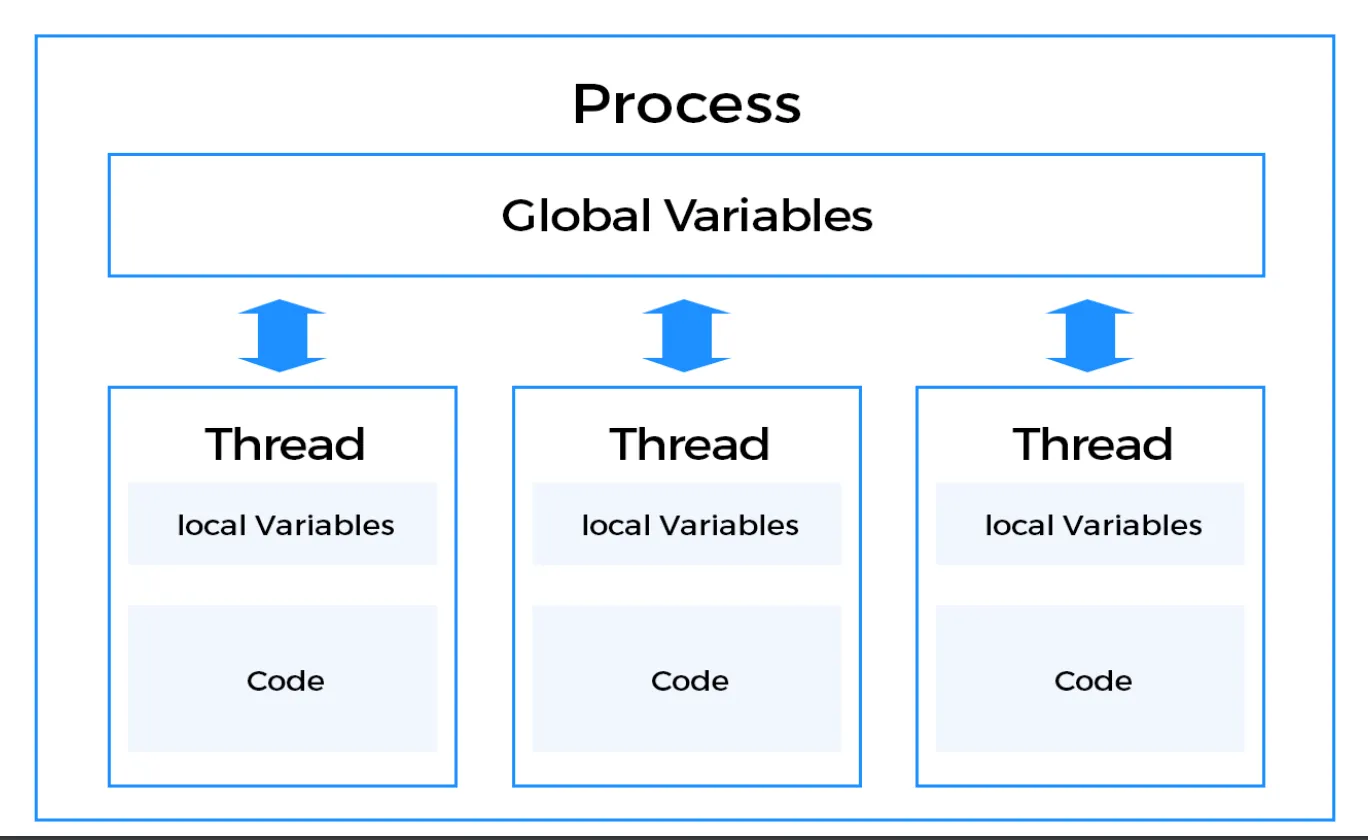
Section titled “Memory and Resource Management”A process runs independently and isolated of other processes. It cannot directly access shared data in other processes. The resources of the process, e.g. memory and CPU time, are allocated to it via the operating system. Process can have Multiple thread, Initially when the process is created, it starts with the one thread call Main thread.
A thread is a so called lightweight process. It has its own call stack, but can access shared data of other threads in the same process. Every thread has its own memory cache. If a thread reads shared data, it stores this data in its own memory cache.
Thread Creation Methods:
- Extending the
Threadclass. - Implementing the
Runnableinterface.
A thread can re-read the shared data.
A Java application runs by default in one process. Within a Java application you work with several threads to achieve parallel processing or asynchronous behavior.
🔄 Concurrency vs Parallelism
Section titled “🔄 Concurrency vs Parallelism”Concurrency
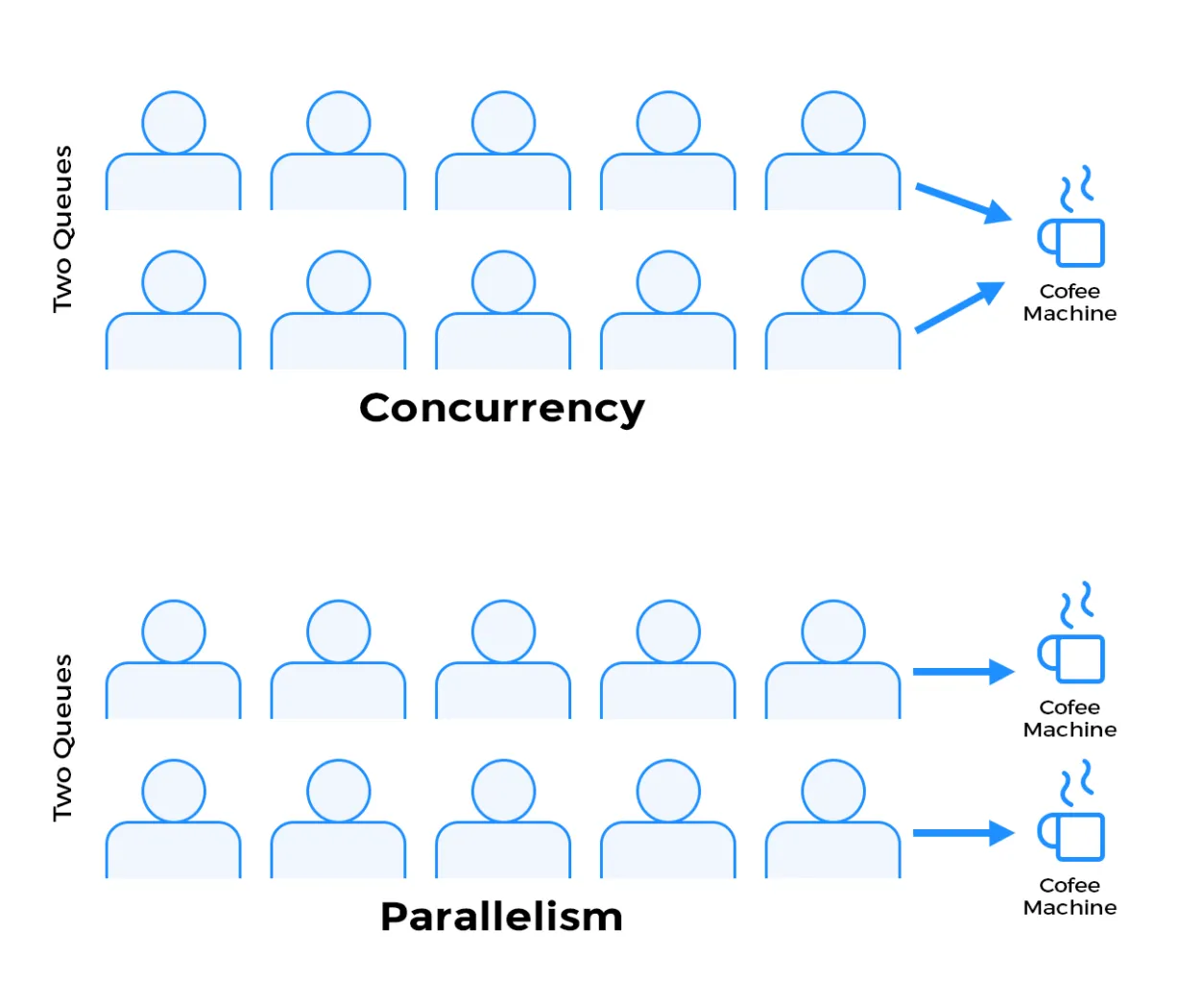
Section titled “Concurrency”Concurrency is about managing multiple tasks within the same time period. It doesn’t necessarily mean they are all running simultaneously. Think of it as juggling: you’re handling multiple balls (tasks), but you’re not holding them all in the air at the exact same instant. You switch between them rapidly.
Example of Concurrency:
Section titled “Example of Concurrency:”Imagine you are a single chef preparing two dishes. You chop vegetables for one dish, then stir a pot for the other, and keep switching between the two tasks. You are not cooking both dishes at the same time, but you are making progress on both.
Key Characteristics:
- Tasks appear to run together
- Can work on a single core
- Uses context switching
- Focus: Managing tasks
Parallelism
Section titled “Parallelism”Parallelism refers to the simultaneous execution of multiple tasks. This requires multiple processing units (e.g., multi-core processors) so that tasks can truly run at the same time.
Parallelism is about doing multiple tasks at the same time. It is a subset of concurrency, but it specifically requires hardware support for simultaneous execution.
Example of Parallelism:
Section titled “Example of Parallelism:”Imagine you are two chefs in a kitchen, each preparing a dish. Both dishes are being cooked at the same time, and progress is made simultaneously.
Key Characteristics:
- Tasks truly run simultaneously
- Requires multiple cores
- Each core runs a task independently
- Focus: Executing tasks
⚔️ Concurrency vs. Parallelism Comparison
Section titled “⚔️ Concurrency vs. Parallelism Comparison”| Concurrency 🧩 | Parallelism 🚀 |
|---|---|
| Tasks appear to run together | Tasks truly run simultaneously |
| Can work on a single core | Requires multiple cores |
| Uses context switching | Each core runs a task independently |
| Focus: Managing tasks | Focus: Executing tasks |
⏱️ Synchronous vs Asynchronous
Section titled “⏱️ Synchronous vs Asynchronous”Synchronous Execution
Section titled “Synchronous Execution”- Synchronous execution refers to line-by-line execution of code. If a function is invoked, the program execution waits until the function call is completed
- Blocking behavior - program waits for each operation to complete
- Simple to understand and debug
- Can cause UI freezing in single-threaded applications
Asynchronous Execution
Section titled “Asynchronous Execution”- Asynchronous programming is a means of parallel programming in which a unit of work runs separately from the main application thread and notifies the calling thread of its completion, failure or progress
- Non-blocking behavior - program continues execution while waiting
- Better user experience - UI remains responsive
- More complex to implement and debug
🚨 Critical Section & Race Conditions
Section titled “🚨 Critical Section & Race Conditions”What is Critical Section?
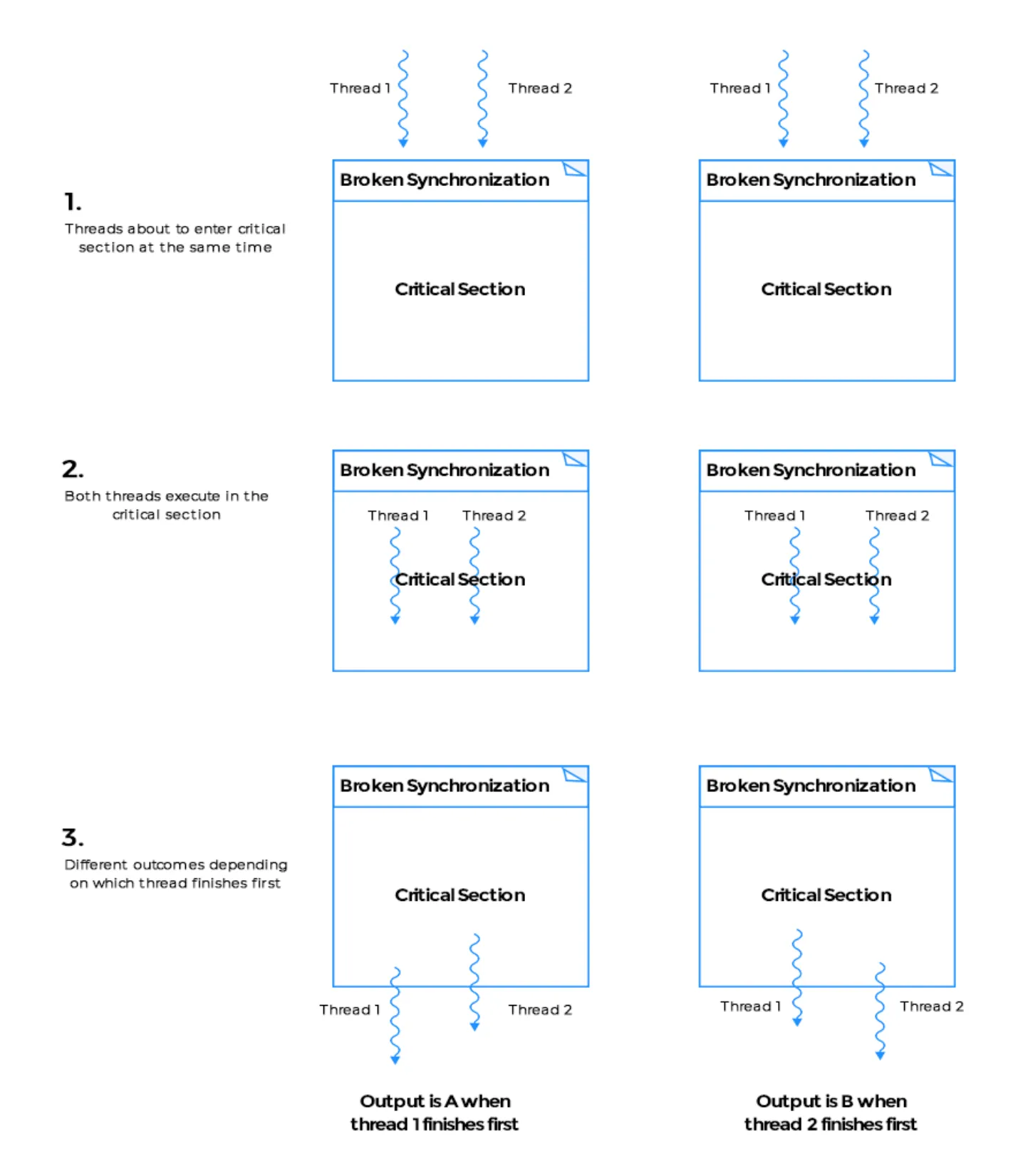
Section titled “What is Critical Section?”Critical section is any piece of code that has the possibility of being executed Concurrently by more than one thread of the application and exposes any shared data or resources used by the application for access.
Examples of Critical Sections:
- Shared variable access
- Database operations
- File I/O operations
- Resource allocation
What is Race Condition?
Section titled “What is Race Condition?”Race conditions happen when threads run through critical sections without thread synchronization. The threads “race” through the critical section to write or read shared resources and depending on the order in which threads finish the “race”, the program output changes.
Common Race Condition Scenarios:
- Incrementing a shared counter
- Adding/removing from a shared collection
- Updating shared configuration
- Resource allocation
🔄 Context Switching
Section titled “🔄 Context Switching”What is Context Switching?
Section titled “What is Context Switching?”Switching between threads by saving and restoring states
🔹 Analogy: A chef switching between cooking soup and checking the roast 🍲🔥
🔹 Enables: Multitasking on a single core
Context Switching Process
Section titled “Context Switching Process”🧠 Steps:
- Interrupt: OS decides to pause a thread
- Save state: Register values, program counter saved
- Load new state: Load data of the new thread
- Execute: Resume from last point
Performance Considerations
Section titled “Performance Considerations”⚠️ Performance Consideration:
- Adds overhead
- Too much switching = ⛔ performance hit
- Context switch time varies by OS (typically 1-30 microseconds)
- Cache misses can occur after context switches
🧮 Thread Scheduler
Section titled “🧮 Thread Scheduler”What is Thread Scheduler?
Section titled “What is Thread Scheduler?”OS component that manages which thread runs when
Scheduling Algorithms
Section titled “Scheduling Algorithms”📋 Uses algorithms like:
- Round-robin: Each thread gets equal time slices
- Priority-based scheduling: Higher priority threads run first
- FIFO (First In, First Out): Threads run in order of arrival
- Preemptive scheduling: OS can interrupt running threads
Scheduler Overhead
Section titled “Scheduler Overhead”🚨 Overhead:
- Too many threads = more time spent switching than doing actual work
- Scheduling decisions add computational overhead
- Priority inversion can occur in complex systems
🤹♂️ Multithreading
Section titled “🤹♂️ Multithreading”What is Multithreading?
Section titled “What is Multithreading?”Allows multiple threads to run concurrently inside one process
Problems Multithreading Solves
Section titled “Problems Multithreading Solves”🔍 What it solves:
- Blocking operations - UI remains responsive during I/O
- Inefficient CPU use - better utilization of available cores
- UI freezing - background tasks don’t block user interface
Benefits of Multithreading
Section titled “Benefits of Multithreading”🧠 Benefits:
- ✅ Better performance - parallel execution of tasks
- ⛔ Non-blocking behavior - responsive applications
- 🧩 Shared memory = fast communication between threads
- 🖥 Responsive UI - user interface remains interactive
- 📡 Real-time apps (games, streaming)
- 💥 Better CPU core utilization - leverages multiple cores
Challenges of Multithreading
Section titled “Challenges of Multithreading”Common Challenges:
- Race conditions - unpredictable behavior
- Deadlocks - threads waiting for each other indefinitely
- Memory consistency - visibility issues between threads
- Debugging complexity - non-deterministic behavior
📊 Performance Metrics
Section titled “📊 Performance Metrics”Throughput vs Latency
Section titled “Throughput vs Latency”| Metric | Definition | Example |
|---|---|---|
| Throughput | Number of tasks completed per unit time | Files processed per second |
| Latency | Time taken to complete a single task | Time to process one file |
| Concurrency | Number of tasks in progress simultaneously | Number of active threads |
| Parallelism | Number of tasks executing simultaneously | Number of CPU cores utilized |
Moore’s Law and Modern Computing
Section titled “Moore’s Law and Modern Computing”Modern Implications:
- Single-thread performance improvements are slowing
- Multi-core processors are becoming the norm
- Concurrent programming is increasingly important
- Parallel algorithms are essential for performance