Threads
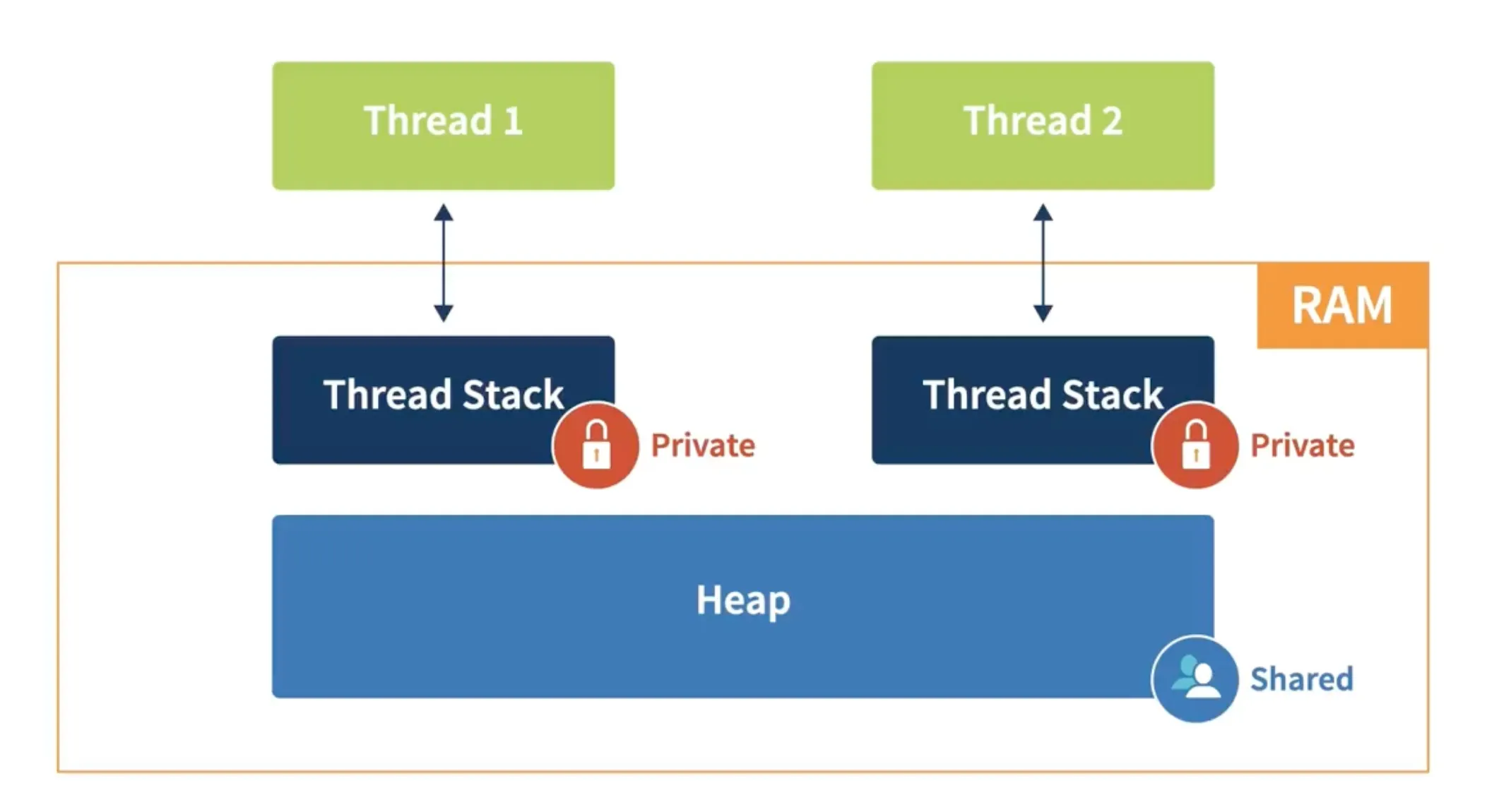
“Threads are the basic unit of execution in Java. They allow you to perform multiple tasks concurrently, making applications more responsive and efficient
Threads help developers build responsive, scalable, and efficient applications by leveraging multi-core processors and avoiding blocking operations.
Thread Creation
Section titled “Thread Creation”Threads can be created in three main ways:
a) Extending Thread
Section titled “a) Extending Thread”-
Inherit the
Threadclass and overriderun(). -
Simple, but less flexible because Java doesn’t support multiple inheritance.
class MyThread extends Thread {    public void run() {        System.out.println("Thread is running...");    }
    public static void main(String[] args) {        MyThread t1 = new MyThread();        t1.start(); // Start the thread    }}
b) Implementing Runnable
Section titled “b) Implementing Runnable”-
Implement the
Runnableinterface and pass it to aThread. -
More flexible than extending
Thread.
class MyRunnable implements Runnable {    public void run() {        System.out.println("Thread is running...");    }
    public static void main(String[] args) {        MyRunnable myRunnable = new MyRunnable();        Thread t1 = new Thread(myRunnable);        t1.start(); // Start the thread    }}
c) Using Lambda (Recommended)
Section titled “c) Using Lambda (Recommended)”-
Most concise way when the task is simple.
-
Enhances readability.
public class EasyThreadExample { public static void main(String[] args) { Thread t1 = new Thread(() -> { System.out.println("Thread is running..."); }); t1.start(); }}Best Practice: Use lambda expressions for simple thread creation as they’re more concise and readable.
Thread Lifecycle
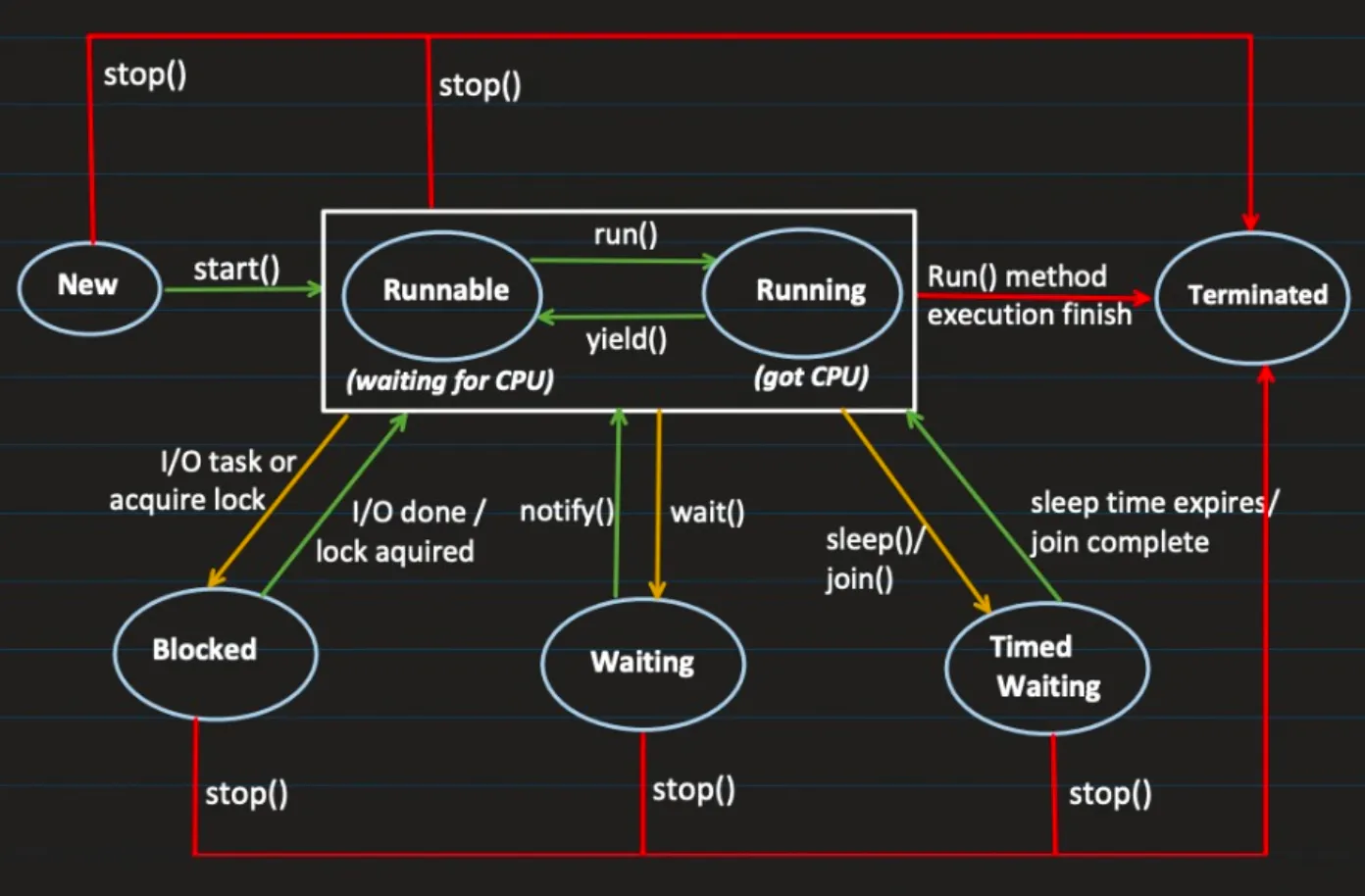
Section titled “Thread Lifecycle”“Understanding thread states is crucial for debugging and designing concurrent applications.”
A thread can be in one of these states:
-
New → Created but not started (
new Thread(...)). -
Runnable → Eligible to run, waiting for CPU scheduling.
-
Blocked → Waiting for a monitor lock (e.g., inside
synchronized). -
Waiting → Waiting indefinitely for another thread’s signal.
-
Timed Waiting → Waiting for a specified time (e.g.,
sleep(ms)). -
Terminated → Execution completed.
Thread Joining
Section titled “Thread Joining”“Joining threads ensures proper sequencing and coordination between concurrent tasks.”
The join() method allows one thread to wait for the completion of another thread. When t1.join() is called from thread t2, t2 enters the WAITING state until t1 completes.
class JoinExample implements Runnable {    private String threadName;
    JoinExample(String threadName) {        this.threadName = threadName;    }
    public void run() {        for (int i = 0; i < 5; i++) {            System.out.println(threadName + " is running.");            try {                Thread.sleep(500);            } catch (InterruptedException e) {                e.printStackTrace();            }        }    }
    public static void main(String[] args) {        Thread t1 = new Thread(new JoinExample("Thread-1"));        Thread t2 = new Thread(new JoinExample("Thread-2"));
        t1.start();        try {            t1.join();  // Main thread waits for t1 to finish        } catch (InterruptedException e) {            e.printStackTrace();        }        t2.start(); // t2 starts only after t1 completes    }}
Thread Priority
Section titled “Thread Priority”“Thread priority is a hint to the scheduler, not a guarantee of execution order.”
Thread priorities range from Thread.MIN_PRIORITY (1) to Thread.MAX_PRIORITY (10), with Thread.NORM_PRIORITY (5) as default.
class PriorityExample implements Runnable {    private String threadName;
    PriorityExample(String threadName) {        this.threadName = threadName;    }
    public void run() {        for (int i = 0; i < 3; i++) {            System.out.println(threadName + " is running with priority " + Thread.currentThread().getPriority());        }    }
    public static void main(String[] args) {        Thread t1 = new Thread(new PriorityExample("Thread-1"));        Thread t2 = new Thread(new PriorityExample("Thread-2"));        Thread t3 = new Thread(new PriorityExample("Thread-3"));
        t1.setPriority(Thread.MIN_PRIORITY); // Priority 1        t2.setPriority(Thread.NORM_PRIORITY); // Priority 5        t3.setPriority(Thread.MAX_PRIORITY); // Priority 10
        t1.start();        t2.start();        t3.start();    }}
Deadlocks
Section titled “Deadlocks”“Deadlocks are the silent killers of concurrent applications. Prevention is always better than detection.”
A deadlock occurs when two or more threads are blocked forever, waiting for each other to release resources due to circular dependency on synchronized objects.
class DeadlockExample {    private final Object lock1 = new Object();    private final Object lock2 = new Object();
    public void method1() {        synchronized (lock1) {            System.out.println("Thread 1: Holding lock 1...");            try { Thread.sleep(10); } catch (InterruptedException e) {}            System.out.println("Thread 1: Waiting for lock 2...");            synchronized (lock2) {                System.out.println("Thread 1: Holding lock 1 and 2...");            }        }    }
    public void method2() {        synchronized (lock2) {            System.out.println("Thread 2: Holding lock 2...");            try { Thread.sleep(10); } catch (InterruptedException e) {}            System.out.println("Thread 2: Waiting for lock 1...");            synchronized (lock1) {                System.out.println("Thread 2: Holding lock 1 and 2...");            }        }    }
    public static void main(String[] args) {        DeadlockExample example = new DeadlockExample();        Thread t1 = new Thread(example::method1);        Thread t2 = new Thread(example::method2);
        t1.start();        t2.start();    }}
Prevention Strategies
Section titled “Prevention Strategies”- Avoid Nested Locks: Don’t hold multiple locks simultaneously
- Lock Ordering: Ensure consistent lock acquisition order across threads
- Timeouts: Use timed locks to prevent indefinite waiting
Note: Starvation occurs when a thread never gets CPU time due to other threads continuously hogging resources.
ThreadLocal
Section titled “ThreadLocal”“ThreadLocal provides thread isolation, ensuring each thread has its own copy of a variable.”
ThreadLocal enables creation of variables that can only be read/written by the same thread, achieving thread safety.
public class ThreadLocalExample {    private static ThreadLocal<Integer> threadLocalValue = ThreadLocal.withInitial(() -> 1);
    public static void main(String[] args) {        Runnable task = () -> {            System.out.println(Thread.currentThread().getName() + " initial value: " + threadLocalValue.get());            threadLocalValue.set(threadLocalValue.get() + 1);            System.out.println(Thread.currentThread().getName() + " updated value: " + threadLocalValue.get());        };
        Thread thread1 = new Thread(task, "Thread 1");        Thread thread2 = new Thread(task, "Thread 2");
        thread1.start();        thread2.start();    }}
Output:
Thread 1 initial value: 1Thread 1 updated value: 2Thread 2 initial value: 1Thread 2 updated value: 2Use Cases
Section titled “Use Cases”- User Sessions: Maintain user-specific data in web applications
- Locale Settings: Store locale-specific settings for internationalization
Thread Lifecycle Management
Section titled “Thread Lifecycle Management”“Proper thread management prevents resource leaks and ensures clean application shutdown.”
Handling InterruptedException
Section titled “Handling InterruptedException”class WorkerThread implements Runnable { @Override public void run() { try { while (!Thread.currentThread().isInterrupted()) { System.out.println("Checking for updates..."); Thread.sleep(2000); } } catch (InterruptedException e) { System.out.println("Thread interrupted, shutting down gracefully."); } }}
public class ThreadInterruptionExample { public static void main(String[] args) throws InterruptedException { Thread thread = new Thread(new WorkerThread()); thread.start(); Thread.sleep(5000); thread.interrupt(); // Interrupt the thread }}Avoiding Thread Leaks
Section titled “Avoiding Thread Leaks”class SafeLock { private final Object lock = new Object();
void waitForSignal() { synchronized (lock) { try { System.out.println(Thread.currentThread().getName() + " is waiting..."); lock.wait(3000); // Wait with timeout to prevent leak } catch (InterruptedException e) { Thread.currentThread().interrupt(); } } }}
public class ThreadLeakExample { public static void main(String[] args) { SafeLock safeLock = new SafeLock(); new Thread(safeLock::waitForSignal, "WorkerThread").start(); }}Key Takeaways
Section titled “Key Takeaways”- Thread Creation: Prefer lambda expressions for simple tasks
- State Management: Understand all thread states for effective debugging
- Synchronization: Use proper locking mechanisms to avoid deadlocks
- Resource Management: Always handle InterruptedException and use timeouts
- Thread Safety: Leverage ThreadLocal for thread-specific data
- Modern APIs: Use Callable and Future for tasks that return results