
OOP Concepts
Object-Oriented Programming (OOP) is a programming paradigm that organizes code around objects rather than functions and logic. These objects bundle data (attributes) and behavior (methods) together, making code more modular, reusable, and easier to maintain.
1. Classes and Objects
Section titled “1. Classes and Objects”A class is a blueprint; an object is an instance of that blueprint.
A class defines the structure (attributes) and behavior (methods) that its objects will have. You can create multiple objects from a single class, each with its own state.
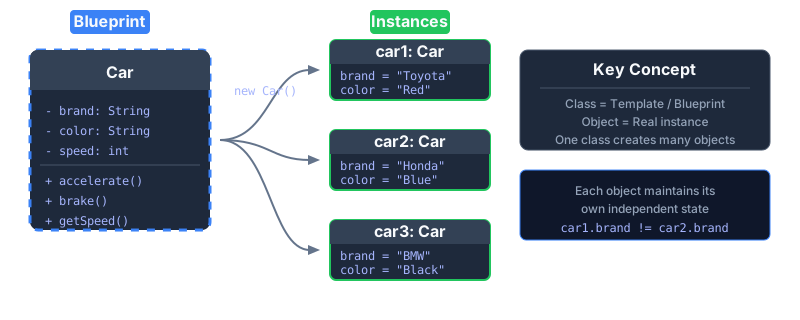 A class is like a blueprint; objects are the actual houses built from it.
// Class: The Blueprintclass Car {    String brand;    String color;    int speed;
    void accelerate() {        speed += 10;        System.out.println(brand + " accelerating to " + speed + " km/h");    }}
// Objects: Instances of the BlueprintCar car1 = new Car();car1.brand = "Toyota";car1.color = "Red";
Car car2 = new Car();car2.brand = "Honda";car2.color = "Blue";
car1.accelerate(); // Toyota accelerating to 10 km/hcar2.accelerate(); // Honda accelerating to 10 km/h
2. Encapsulation
Section titled “2. Encapsulation”Encapsulation bundles data and methods together, hiding internal state and requiring all interaction through well-defined interfaces.
Think of it as a protective capsule: the internal workings are hidden, and access is controlled through public methods (getters/setters).
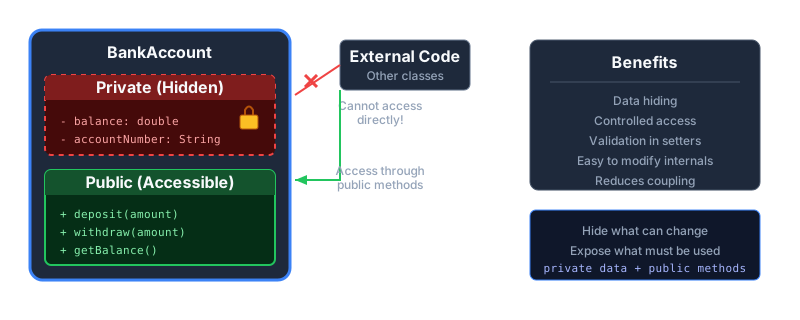 Private data is protected; access is only through controlled public methods.
class BankAccount {    private double balance; // Hidden from outside
    public BankAccount(double initialBalance) {        this.balance = initialBalance;    }
    public void deposit(double amount) {        if (amount > 0) {            balance += amount;        }    }
    public void withdraw(double amount) {        if (amount > 0 && amount <= balance) {            balance -= amount;        }    }
    public double getBalance() {        return balance; // Controlled read access    }}
// UsageBankAccount account = new BankAccount(1000);account.deposit(500);// account.balance = -9999; // ERROR: balance is private!System.out.println(account.getBalance()); // 1500
3. Abstraction
Section titled “3. Abstraction”Abstraction hides complex implementation details and exposes only the essential features.
Like a car dashboard: you see the speedometer and steering wheel, not the engine internals. Users interact with a simple interface without needing to understand the complexity underneath.
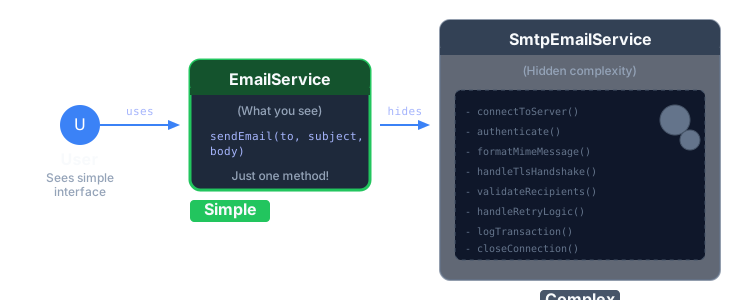 Simple interface hides the complex machinery beneath.
// Abstract interface - what users seeinterface EmailService {    void sendEmail(String to, String subject, String body);}
// Complex implementation - hidden from usersclass SmtpEmailService implements EmailService {    private void connectToServer() { /* SMTP handshake */ }    private void authenticate() { /* Login credentials */ }    private void formatMessage() { /* MIME encoding */ }    private void handleRetry() { /* Retry logic */ }
    @Override    public void sendEmail(String to, String subject, String body) {        connectToServer();        authenticate();        formatMessage();        // ... complex SMTP protocol        System.out.println("Email sent to " + to);    }}
// Usage - simple!EmailService email = new SmtpEmailService();email.sendEmail("user@example.com", "Hello", "Welcome!");
4. Inheritance
Section titled “4. Inheritance”Inheritance allows a child class to inherit attributes and methods from a parent class, promoting code reuse.
The child class (subclass) gets all the functionality of the parent class (superclass) and can add or override behavior.
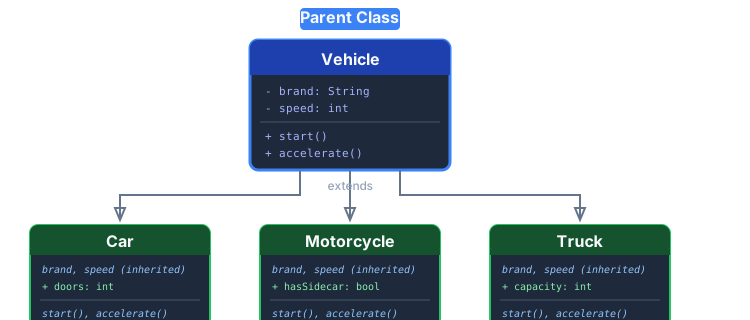 Child classes inherit from and extend the parent class.
// Parent Classclass Vehicle {    String brand;    int speed;
    void start() {        System.out.println(brand + " starting...");    }
    void accelerate() {        speed += 10;    }}
// Child Class - inherits from Vehicleclass Car extends Vehicle {    int doors;
    void openTrunk() {        System.out.println("Trunk opened");    }}
// Another Child Classclass Motorcycle extends Vehicle {    boolean hasSidecar;
    void wheelie() {        System.out.println("Doing a wheelie!");    }}
// UsageCar car = new Car();car.brand = "Toyota";car.start();      // Inherited methodcar.accelerate(); // Inherited methodcar.openTrunk();  // Car-specific method
5. Polymorphism
Section titled “5. Polymorphism”Polymorphism means “many forms” — the same interface can have different implementations.
A single method name (draw()) behaves differently depending on which object calls it. This enables flexible, extensible code.
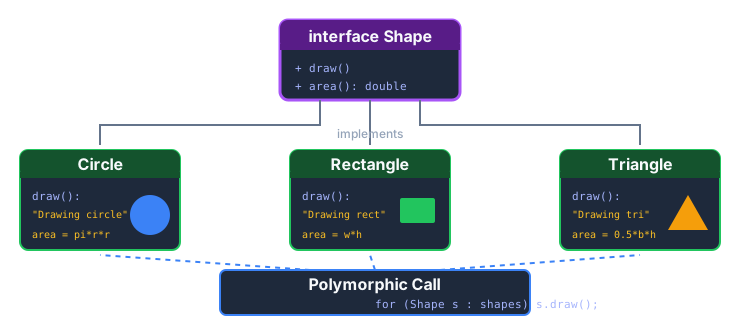 Same method call, different behaviors based on the actual object type.
// Common Interfaceinterface Shape {    void draw();    double area();}
// Different Implementationsclass Circle implements Shape {    private double radius;
    public Circle(double radius) { this.radius = radius; }
    @Override    public void draw() { System.out.println("Drawing a circle"); }
    @Override    public double area() { return Math.PI * radius * radius; }}
class Rectangle implements Shape {    private double width, height;
    public Rectangle(double w, double h) { width = w; height = h; }
    @Override    public void draw() { System.out.println("Drawing a rectangle"); }
    @Override    public double area() { return width * height; }}
// Polymorphic UsageShape[] shapes = { new Circle(5), new Rectangle(4, 6) };
for (Shape shape : shapes) {    shape.draw();  // Calls the correct implementation!    System.out.println("Area: " + shape.area());}// Output:// Drawing a circle// Area: 78.54// Drawing a rectangle// Area: 24.0
6. Constructors
Section titled “6. Constructors”A constructor is a special method that initializes an object when it’s created.
Constructors have the same name as the class and no return type. They set up the initial state of an object.
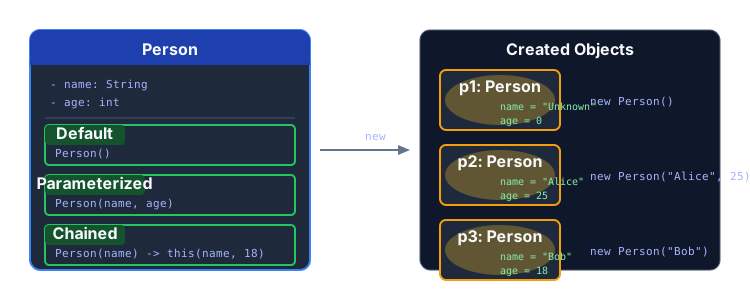 Constructors initialize object state at creation time.
class Person {    String name;    int age;
    // Default Constructor    public Person() {        this.name = "Unknown";        this.age = 0;    }
    // Parameterized Constructor    public Person(String name, int age) {        this.name = name;        this.age = age;    }
    // Constructor Chaining    public Person(String name) {        this(name, 18); // Calls the parameterized constructor    }}
// UsagePerson p1 = new Person();              // Unknown, 0Person p2 = new Person("Alice", 25);   // Alice, 25Person p3 = new Person("Bob");         // Bob, 18 (default age)
7. Access Modifiers
Section titled “7. Access Modifiers”Access modifiers control the visibility of classes, methods, and fields.
Java has four access levels, from most restrictive to most open:
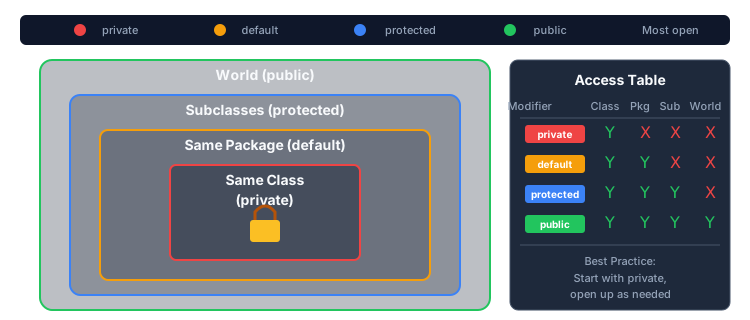 Access modifiers define visibility boundaries.
| Modifier | Same Class | Same Package | Subclass | World |
|---|---|---|---|---|
private | ✅ | ❌ | ❌ | ❌ |
default (no modifier) | ✅ | ✅ | ❌ | ❌ |
protected | ✅ | ✅ | ✅ | ❌ |
public | ✅ | ✅ | ✅ | ✅ |
class Example {    private int privateField;      // Only this class    int defaultField;              // Same package only    protected int protectedField;  // Same package + subclasses    public int publicField;        // Accessible everywhere
private void privateMethod() { } void defaultMethod() { } protected void protectedMethod() { } public void publicMethod() { }}8. Static vs Instance Members
Section titled “8. Static vs Instance Members”Static members belong to the class itself; instance members belong to individual objects.
Static members are shared across all instances, while instance members are unique to each object.
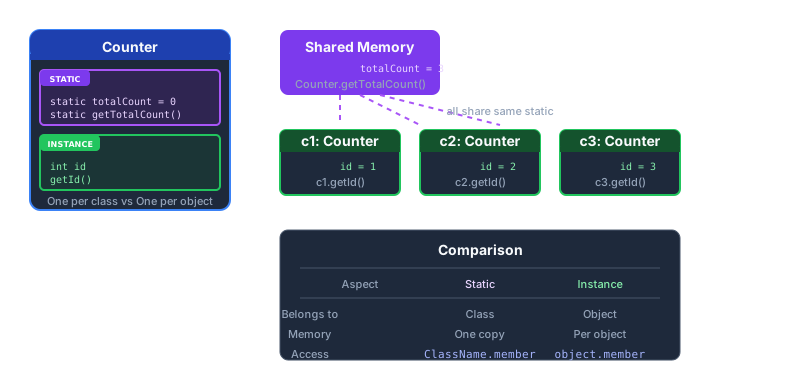 Static members are shared; instance members are unique per object.
class Counter {    // Static: shared across ALL instances    private static int totalCount = 0;
    // Instance: unique to EACH object    private int id;
    public Counter() {        totalCount++;        // Increment shared counter        this.id = totalCount; // Assign unique ID    }
    public static int getTotalCount() {        return totalCount;   // Access static member    }
    public int getId() {        return id;           // Access instance member    }}
// UsageCounter c1 = new Counter(); // id=1, totalCount=1Counter c2 = new Counter(); // id=2, totalCount=2Counter c3 = new Counter(); // id=3, totalCount=3
System.out.println(c1.getId()); // 1 (instance)System.out.println(c2.getId()); // 2 (instance)System.out.println(Counter.getTotalCount()); // 3 (static, shared)| Aspect | Static | Instance |
|---|---|---|
| Belongs to | Class | Object |
| Memory | One copy | One per object |
| Access | ClassName.member | object.member |
| Use case | Shared data, utility methods | Object-specific state |