
Structural Patterns
Structural patterns explain how to assemble objects and classes into larger, more complex structures, all while keeping these structures flexible and efficient. They rely heavily on object composition rather than deep inheritance trees.
1. Adapter Pattern
Section titled “1. Adapter Pattern”Intent: Allows objects with incompatible interfaces to collaborate. It acts as a bridge or wrapper.
Just like a travel power adapter lets your US plug work in a European socket without rewiring the building, the Adapter pattern lets two incompatible software classes work together without modifying their source code.
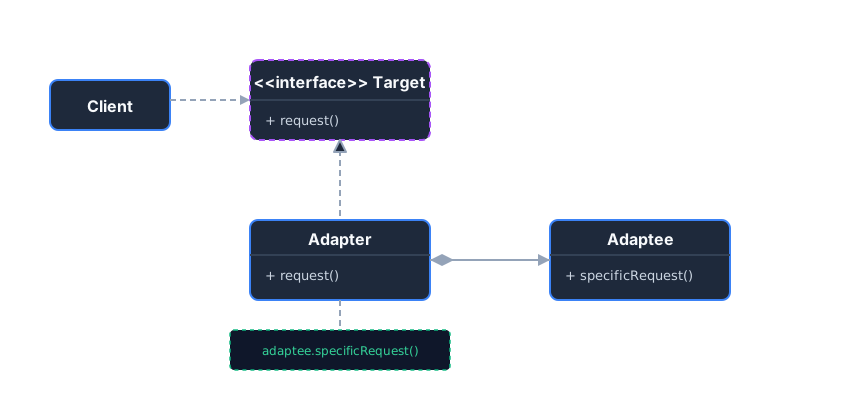 The Adapter implements the Target interface and translates requests into a format the Adaptee understands.
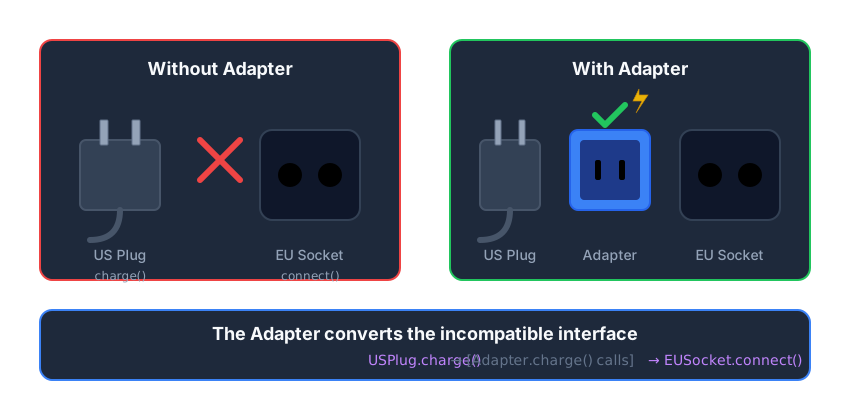 Like a travel power adapter: converts one plug type to work with another socket.
Example: Power Sockets
Section titled “Example: Power Sockets”Without Pattern - Can’t use incompatible interface:
// Your phone charger expects this interfaceinterface Socket {    void charge();}
// But the hotel only has this European socketclass EuropeanSocket {    public void connect() { System.out.println("220V European power connected."); }}
// Problem: EuropeanSocket doesn't implement Socket!Socket socket = new EuropeanSocket(); // COMPILE ERROR!socket.charge(); // Can't call charge() on EuropeanSocket
With Pattern - Adapter bridges the gap:
// 1. Target Interface (What the client expects)interface Socket {    void charge();}
// 2. Adaptee (The incompatible existing code)class EuropeanSocket {    public void connect() { System.out.println("220V European power connected."); }}
// 3. Adapter (The bridge)class SocketAdapter implements Socket {    private EuropeanSocket europeanSocket;
    public SocketAdapter(EuropeanSocket europeanSocket) {        this.europeanSocket = europeanSocket;    }
    @Override    public void charge() {        europeanSocket.connect(); // Translates the call!    }}
// Usage - Now it works!EuropeanSocket wallSocket = new EuropeanSocket();Socket adapter = new SocketAdapter(wallSocket);adapter.charge(); // Output: 220V European power connected.
Key Takeaways
Section titled “Key Takeaways”- Wraps incompatible objects to make them work together
- Single Responsibility: Separates interface conversion from business logic
- Open/Closed: Add new adapters without changing existing code
2. Composite Pattern
Section titled “2. Composite Pattern”Intent: Compose objects into tree structures to represent part-whole hierarchies. Composite lets clients treat individual objects and compositions of objects uniformly.
If you have a tree structure (like a filesystem with Folders and Files, or UI components with Panels and Buttons), the Composite pattern lets you execute a command (like draw()) on the root node, which recursively cascades down to all leaf nodes.
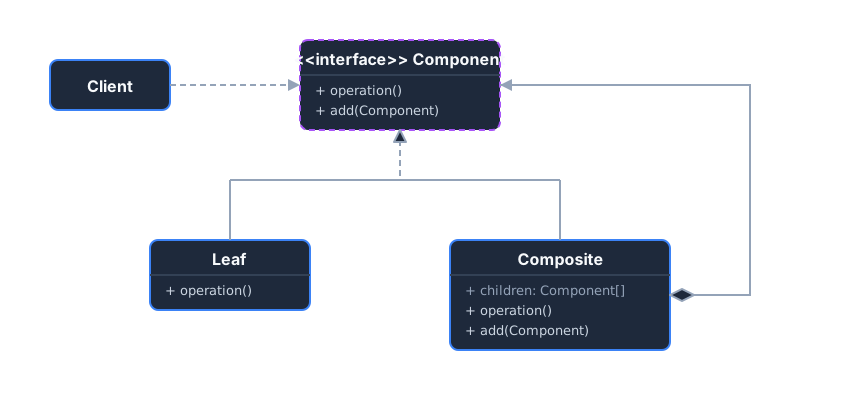 A Composite contains multiple Components (which can be Leaves or other Composites).
Example: Computer Parts
Section titled “Example: Computer Parts”Without Pattern - Different handling for items vs groups:
class Part {    String name;    int price;}
class Box {    String name;    List<Part> parts;    List<Box> boxes; // Nested boxes}
// Problem: Need separate logic for parts and boxesvoid displayPrice(Object item) {    if (item instanceof Part) {        Part p = (Part) item;        System.out.println(p.name + ": $" + p.price);    } else if (item instanceof Box) {        Box b = (Box) item;        for (Part p : b.parts) displayPrice(p);        for (Box sub : b.boxes) displayPrice(sub); // Messy recursion    }}
With Pattern - Uniform treatment of items and groups:
// Common interface for bothinterface Component {    void displayPrice();}
// Leaf (End node, has no children)class Part implements Component {    private String name;    private int price;
    public Part(String name, int price) {        this.name = name;        this.price = price;    }
    public void displayPrice() {        System.out.println(name + " : $" + price);    }}
// Composite (A node that contains other nodes)class Box implements Component {    private String name;    private List<Component> contents = new ArrayList<>();
    public Box(String name) { this.name = name; }    public void add(Component c) { contents.add(c); }
    public void displayPrice() {        System.out.println("Box: " + name);        for (Component c : contents) {            c.displayPrice(); // Same method for parts AND nested boxes!        }    }}
// Usage - Treat everything uniformlyBox computer = new Box("Computer");computer.add(new Part("CPU", 300));computer.add(new Part("RAM", 100));
Box peripherals = new Box("Peripherals");peripherals.add(new Part("Mouse", 25));peripherals.add(new Part("Keyboard", 75));
computer.add(peripherals); // Box inside box!computer.displayPrice();   // Recursively displays all prices
Key Takeaways
Section titled “Key Takeaways”- Uniform treatment: Clients don’t need to know if they’re working with a leaf or composite
- Recursive structure: Operations cascade through the tree automatically
- Flexible depth: Add/remove nodes dynamically at any level
3. Decorator Pattern
Section titled “3. Decorator Pattern”Intent: Attach additional responsibilities to an object dynamically at runtime. Decorators provide a flexible alternative to subclassing.
Instead of creating massive inheritance hierarchies (CoffeeWithMilk, CoffeeWithSugar, CoffeeWithMilkAndSugar), you “wrap” the base object with decorator objects.
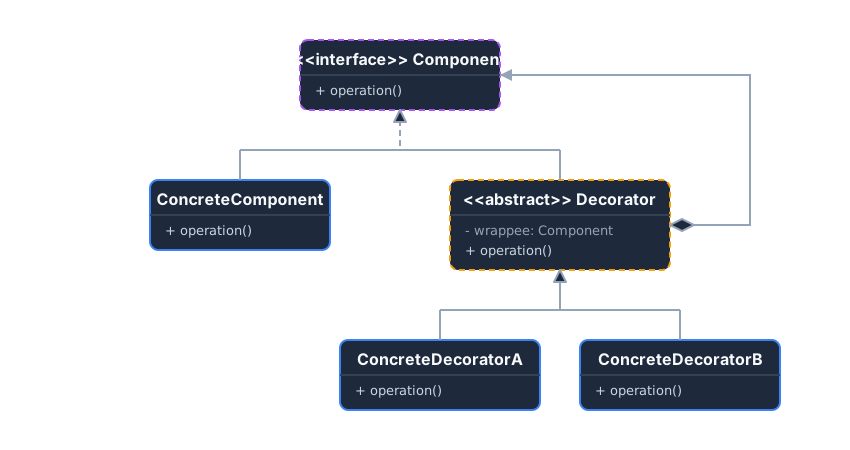 A Decorator implements the Component interface AND holds a reference to a Component, allowing them to be chained.
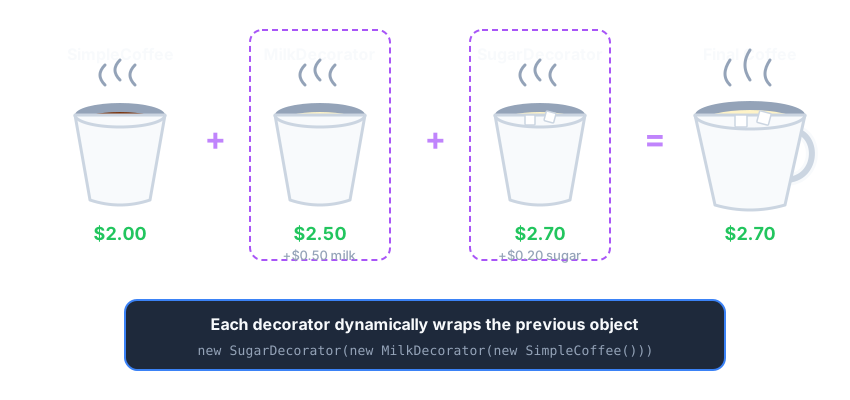 Like coffee toppings: each decorator wraps the previous, adding behavior and cost.
Example: Coffee Shop
Section titled “Example: Coffee Shop”Without Pattern - Class explosion:
// Need a class for every combination!class SimpleCoffee { double getCost() { return 2.0; } }class CoffeeWithMilk { double getCost() { return 2.5; } }class CoffeeWithSugar { double getCost() { return 2.2; } }class CoffeeWithMilkAndSugar { double getCost() { return 2.7; } }class CoffeeWithMilkAndSugarAndWhip { double getCost() { return 3.2; } }// ... 10 toppings = 1024 combinations = 1024 classes!With Pattern - Stackable decorators:
interface Coffee { double getCost(); }
class SimpleCoffee implements Coffee {    public double getCost() { return 2.0; }}
// Base Decoratorabstract class CoffeeDecorator implements Coffee {    protected Coffee wrappee;    public CoffeeDecorator(Coffee c) { this.wrappee = c; }    public double getCost() { return wrappee.getCost(); }}
// Concrete Decorators - just one class per topping!class MilkDecorator extends CoffeeDecorator {    public MilkDecorator(Coffee c) { super(c); }    public double getCost() { return super.getCost() + 0.5; }}
class SugarDecorator extends CoffeeDecorator {    public SugarDecorator(Coffee c) { super(c); }    public double getCost() { return super.getCost() + 0.2; }}
// Usage: Stack any combination dynamically!Coffee myCoffee = new SimpleCoffee();           // $2.0myCoffee = new MilkDecorator(myCoffee);         // $2.5myCoffee = new SugarDecorator(myCoffee);        // $2.7myCoffee = new SugarDecorator(myCoffee);        // $2.9 (double sugar!)System.out.println(myCoffee.getCost());         // 2.9
Key Takeaways
Section titled “Key Takeaways”- Stackable: Wrap decorators around other decorators for combined behavior
- Same interface: Decorated objects are transparent to clients
- Runtime flexibility: Add/remove behaviors without changing the object’s class
4. Facade Pattern
Section titled “4. Facade Pattern”Intent: Provide a unified, simplified interface to a complex subsystem.
When a system gets too complicated (many classes, many initialization steps), a Facade acts as a simplified front door.
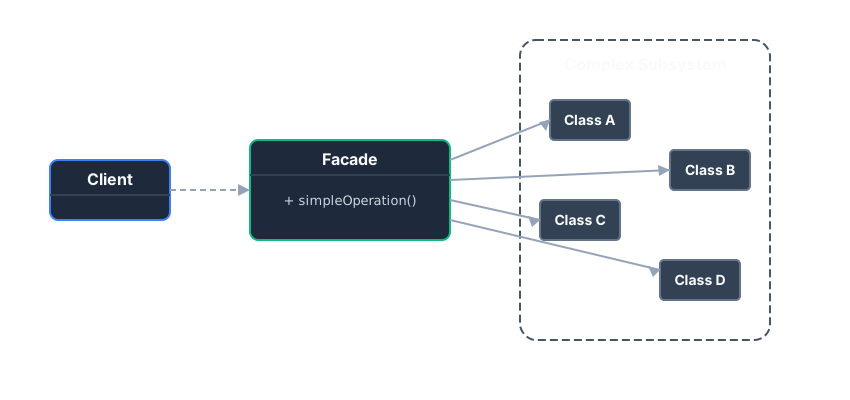 The Client only talks to the Facade, shielding it from the complexity of the subsystem.
Example: Computer Startup
Section titled “Example: Computer Startup”Without Pattern - Client must know all subsystem details:
// Client needs to know the exact sequence and all classesCPU cpu = new CPU();Memory memory = new Memory();HardDrive hd = new HardDrive();
// Every client must repeat this complex sequencecpu.freeze();byte[] bootData = hd.read(0, 1024);memory.load(0, bootData);cpu.jump(0);cpu.execute();
// Problem: What if boot sequence changes? Fix EVERY client!
With Pattern - Simple interface hides complexity:
// Complex subsystem classes (hidden from client)class CPU {    void freeze() { /* ... */ }    void jump(long address) { /* ... */ }    void execute() { /* ... */ }}
class Memory {    void load(long position, byte[] data) { /* ... */ }}
class HardDrive {    byte[] read(long sector, int size) { /* ... */ return new byte[0]; }}
// The Facade - one simple methodclass ComputerFacade {    private CPU cpu = new CPU();    private Memory memory = new Memory();    private HardDrive hd = new HardDrive();
    public void startComputer() {        cpu.freeze();        memory.load(0, hd.read(0, 1024));        cpu.jump(0);        cpu.execute();    }}
// Usage - Client doesn't need to know the details!ComputerFacade computer = new ComputerFacade();computer.startComputer(); // One simple call
Key Takeaways
Section titled “Key Takeaways”- Simplifies complex subsystems into one easy-to-use interface
- Decouples clients from subsystem implementation details
- Not restrictive: Clients can still access subsystem directly if needed
5. Proxy Pattern
Section titled “5. Proxy Pattern”Intent: Provide a surrogate or placeholder for another object to control access to it.
Proxies are heavily used for:
- Lazy Initialization (Virtual Proxy): Delaying creation of a heavy object until absolutely necessary.
- Access Control (Protection Proxy): Checking permissions before allowing a method call.
- Caching Proxy: Returning cached results to bypass expensive calls.
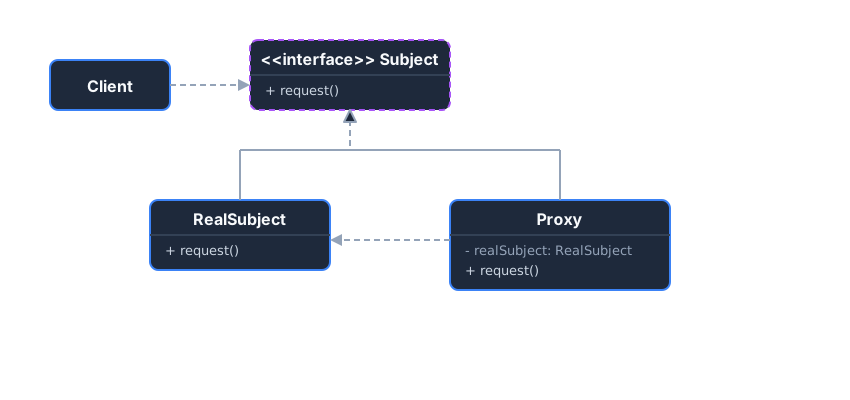 The Proxy implements the same interface as the RealSubject, allowing it to intercept calls.
Example: Image Loading (Virtual Proxy)
Section titled “Example: Image Loading (Virtual Proxy)”Without Pattern - Eager loading wastes resources:
class HighResolutionImage {    private String filename;
    public HighResolutionImage(String filename) {        this.filename = filename;        loadFromDisk(); // ALWAYS loads immediately!    }
    private void loadFromDisk() {        System.out.println("Loading " + filename + " (5 seconds)...");    }
    public void display() {        System.out.println("Displaying " + filename);    }}
// Problem: All images load even if user never scrolls to them!List<HighResolutionImage> gallery = new ArrayList<>();for (int i = 0; i < 1000; i++) {    gallery.add(new HighResolutionImage("photo" + i + ".jpg")); // 1000 loads!}// User only views first 10 images... wasted 990 loads!
With Pattern - Lazy loading saves resources:
// 1. Subject Interfaceinterface Image {    void display();}
// 2. RealSubject (Expensive to create)class HighResolutionImage implements Image {    private String filename;
    public HighResolutionImage(String filename) {        this.filename = filename;        loadFromDisk();    }
    private void loadFromDisk() {        System.out.println("Loading " + filename + " (5 seconds)...");    }
    public void display() {        System.out.println("Displaying " + filename);    }}
// 3. Proxy (Lazy loading)class ImageProxy implements Image {    private String filename;    private HighResolutionImage realImage;
    public ImageProxy(String filename) {        this.filename = filename;        // NOT loaded yet!    }
    public void display() {        if (realImage == null) {            realImage = new HighResolutionImage(filename);        }        realImage.display();    }}
// Usage - Only loads when displayed!List<Image> gallery = new ArrayList<>();for (int i = 0; i < 1000; i++) {    gallery.add(new ImageProxy("photo" + i + ".jpg")); // Instant! No loading}gallery.get(0).display(); // Only NOW loads photo0.jpggallery.get(5).display(); // Only NOW loads photo5.jpg// Only 2 images loaded instead of 1000!
Key Takeaways
Section titled “Key Takeaways”- Transparent: Client doesn’t know it’s using a proxy
- Controls access: Add behavior before/after delegating to the real object
- Same interface: Proxy and RealSubject are interchangeable
6. Bridge Pattern
Section titled “6. Bridge Pattern”Intent: Decouple an abstraction from its implementation so that the two can vary independently.
Without Bridge, combining dimensions (e.g., Shape and Color or Shape and RenderingAPI) leads to an explosion of subclasses (RedCircle, BlueCircle, RedSquare, BlueSquare). Bridge favors composition.
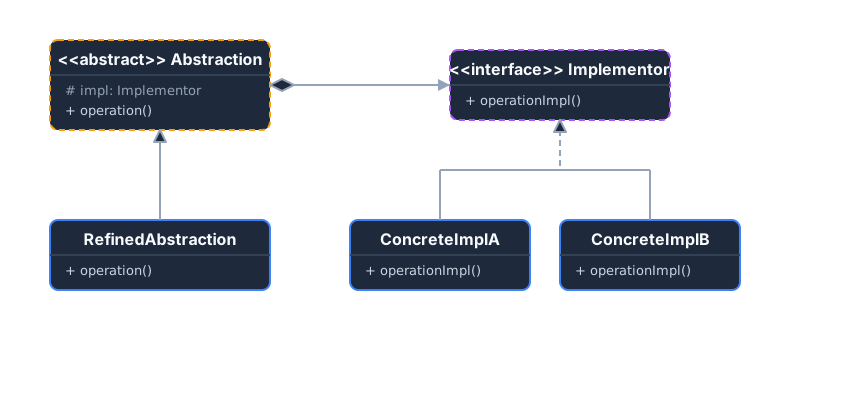 The Abstraction contains a reference to the Implementor. They evolve independently.
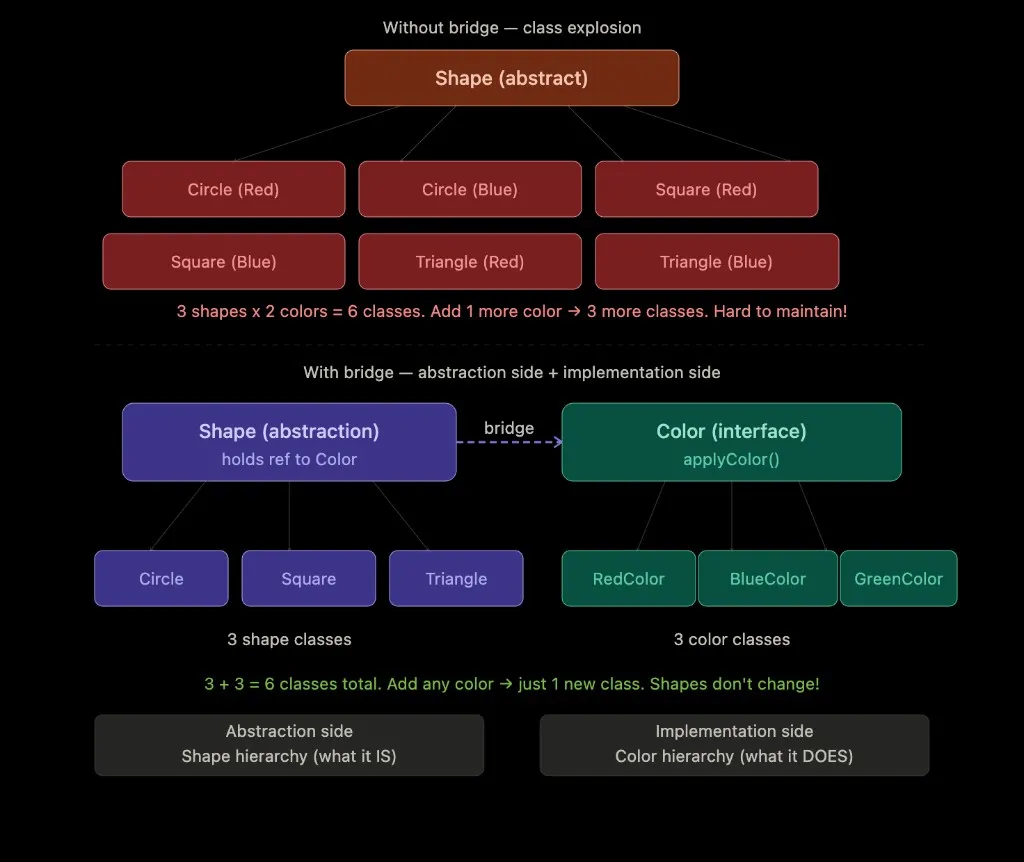 Without bridge: M × N class explosion. With bridge: M + N classes via composition.
Example: Devices and Remote Controls
Section titled “Example: Devices and Remote Controls”Without Pattern - Class explosion (M × N classes):
// 2 remote types × 3 device types = 6 classes!class BasicTVRemote { /* TV-specific code */ }class BasicRadioRemote { /* Radio-specific code */ }class BasicSpeakerRemote { /* Speaker-specific code */ }class AdvancedTVRemote { /* TV-specific + advanced features */ }class AdvancedRadioRemote { /* Radio-specific + advanced features */ }class AdvancedSpeakerRemote { /* Speaker-specific + advanced features */ }
// Add 1 new device? Need 2 more classes!// Add 1 new remote type? Need 3 more classes!
With Pattern - M + N classes instead:
// 1. Implementor Interface (Device dimension)interface Device { void turnOn(); void turnOff(); void setVolume(int volume);}
// 2. Concrete Implementors (3 classes)class TV implements Device { public void turnOn() { System.out.println("TV is ON"); } public void turnOff() { System.out.println("TV is OFF"); } public void setVolume(int volume) { System.out.println("TV volume: " + volume); }}
class Radio implements Device { public void turnOn() { System.out.println("Radio is ON"); } public void turnOff() { System.out.println("Radio is OFF"); } public void setVolume(int volume) { System.out.println("Radio volume: " + volume); }}
// 3. Abstraction (Remote dimension)abstract class RemoteControl { protected Device device; // Bridge!
public RemoteControl(Device device) { this.device = device; } public void togglePower() { device.turnOn(); } public abstract void mute();}
// 4. Refined Abstractions (2 classes)class BasicRemote extends RemoteControl { public BasicRemote(Device device) { super(device); } public void mute() { device.setVolume(0); }}
class AdvancedRemote extends RemoteControl { public AdvancedRemote(Device device) { super(device); } public void mute() { device.setVolume(0); } public void setVolume(int volume) { device.setVolume(volume); }}
// Usage: Mix and match! 2 remotes × 2 devices = 4 combinations, only 4 classes!RemoteControl tvRemote = new AdvancedRemote(new TV());RemoteControl radioRemote = new BasicRemote(new Radio());tvRemote.togglePower(); // TV is ONradioRemote.mute(); // Radio volume: 0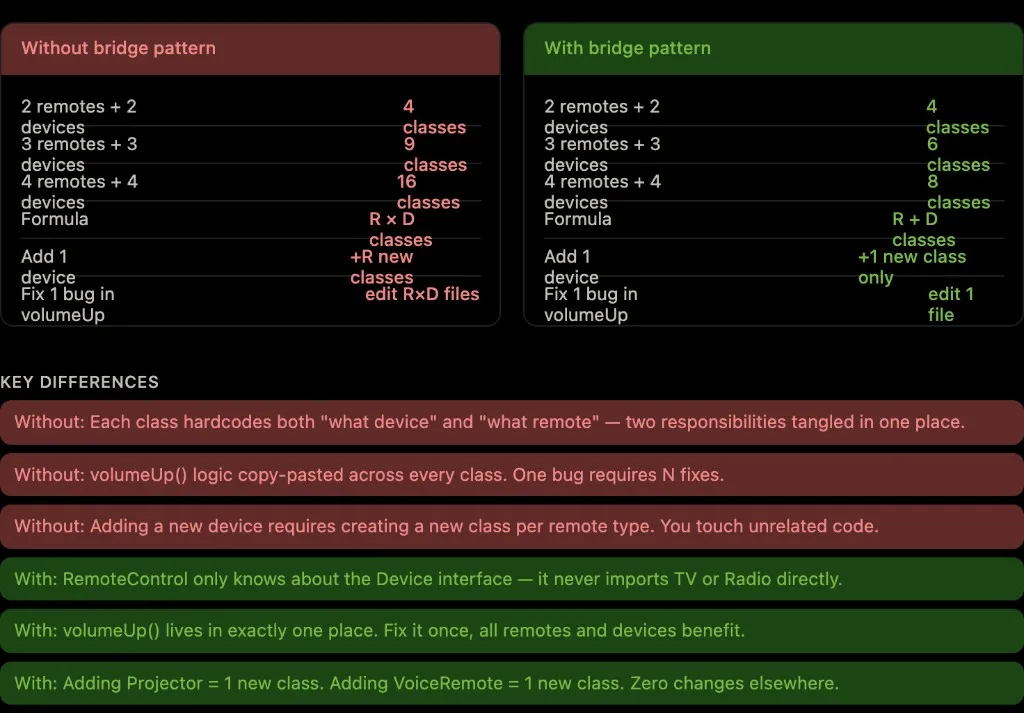 R × D classes without bridge vs R + D classes with bridge. Key differences in maintenance, extensibility, and bug fixes.
Key Takeaways
Section titled “Key Takeaways”- Prevents class explosion: M abstractions × N implementations = M + N classes (not M × N)
- Composition over inheritance: Link dimensions via object composition
- Independent evolution: Change abstraction or implementation without affecting the other
7. Flyweight Pattern
Section titled “7. Flyweight Pattern”Intent: Minimize memory usage by sharing as much data as possible with similar objects.
Separate state into Intrinsic (shared, immutable data like texture or color) and Extrinsic (unique data like X/Y coordinates).
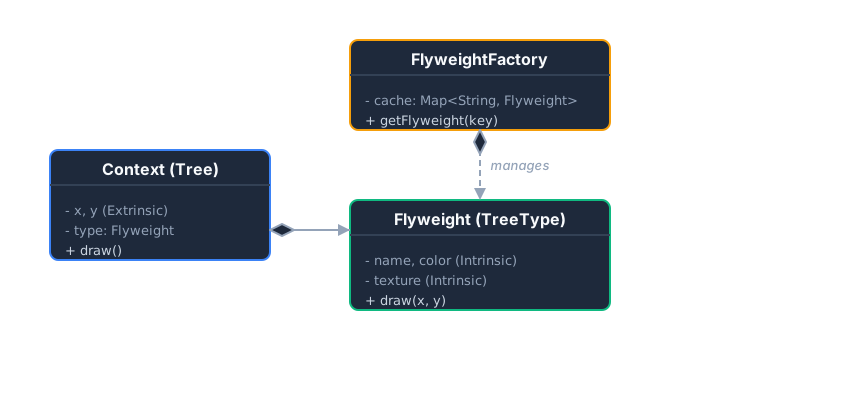 A Factory caches and returns shared Flyweight objects. The Context holds the unique extrinsic state.
Example: A Forest of Trees
Section titled “Example: A Forest of Trees”Without Pattern - Memory explosion:
class Tree {    private int x, y;    private String name;      // "Oak" - duplicated 1 million times!    private String color;     // "Green" - duplicated 1 million times!    private String texture;   // "oak_texture.png" - duplicated 1 million times!
    public Tree(int x, int y, String name, String color, String texture) {        this.x = x;        this.y = y;        this.name = name;        this.color = color;        this.texture = texture;    }}
// 1 million trees = 1 million copies of "Oak", "Green", "oak_texture.png"// Memory: ~500 MB just for redundant strings!List<Tree> forest = new ArrayList<>();for (int i = 0; i < 1000000; i++) {    forest.add(new Tree(i, i, "Oak", "Green", "oak_texture.png"));}
With Pattern - Share common data:
// 1. Flyweight (Shared, Immutable data)class TreeType {    private String name;    private String color;    private String texture;
    public TreeType(String name, String color, String texture) {        this.name = name;        this.color = color;        this.texture = texture;    }
    public void draw(int x, int y) {        System.out.println("Drawing " + name + " at (" + x + "," + y + ")");    }}
// 2. Flyweight Factory (Caches shared objects)class TreeFactory {    private static Map<String, TreeType> cache = new HashMap<>();
    public static TreeType getTreeType(String name, String color, String texture) {        String key = name + "_" + color;        if (!cache.containsKey(key)) {            cache.put(key, new TreeType(name, color, texture));        }        return cache.get(key);    }}
// 3. Context (Unique data only)class Tree {    private int x, y;          // Only unique data stored    private TreeType type;     // Reference to shared flyweight
    public Tree(int x, int y, TreeType type) {        this.x = x;        this.y = y;        this.type = type;    }}
// Usage: 1 million trees, but only ONE TreeType object!List<Tree> forest = new ArrayList<>();for (int i = 0; i < 1000000; i++) {    TreeType oak = TreeFactory.getTreeType("Oak", "Green", "oak_texture.png");    forest.add(new Tree(i, i, oak)); // All share same TreeType!}// Memory: ~16 MB (just x, y, and reference) instead of ~500 MB!
Key Takeaways
Section titled “Key Takeaways”- Massive memory savings when sharing intrinsic state across many objects
- Trade-off: CPU time to look up flyweights vs. RAM to store duplicates
- Immutable intrinsic state is key—shared objects must not be modified
Adapter vs Decorator vs Proxy (one line each)
Section titled “Adapter vs Decorator vs Proxy (one line each)”These patterns all wrap another object, but they answer different questions:
- Adapter — Converts one interface into another so a client can call code that was written for a different shape of API (translation between incompatible abstractions).
- Decorator — Keeps the same public interface but stacks wrappers to add or tweak behavior or responsibilities at runtime (feature composition).
- Proxy — Presents the same interface as the real object but sits in front of it to control access: lazy creation, caching, permission checks, logging, or remote indirection—not primarily to add new features.