
Behavioral Patterns
Behavioral patterns focus on the assignment of responsibilities between objects and how they communicate. They manage complex control flows and algorithm structures, shifting the developer’s focus from the specific objects to how they interact.
1. Strategy Pattern
Section titled “1. Strategy Pattern”Intent: Define a family of algorithms, encapsulate each one, and make them interchangeable. Strategy lets the algorithm vary independently from clients that use it.
When you have a class performing a specific task in different ways (like sorting, or paying), do not use giant if-else or switch statements. Instead, extract the algorithms into separate classes (Strategies) that implement a common interface.
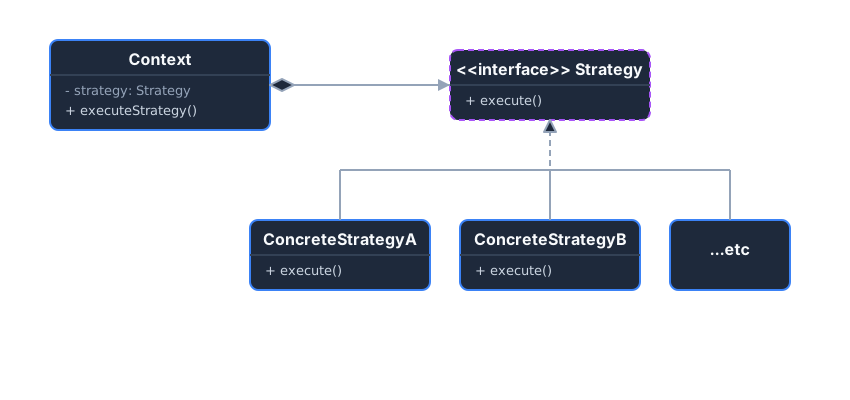 The Context maintains a reference to a Strategy interface. It can dynamically swap out the concrete strategy at runtime.
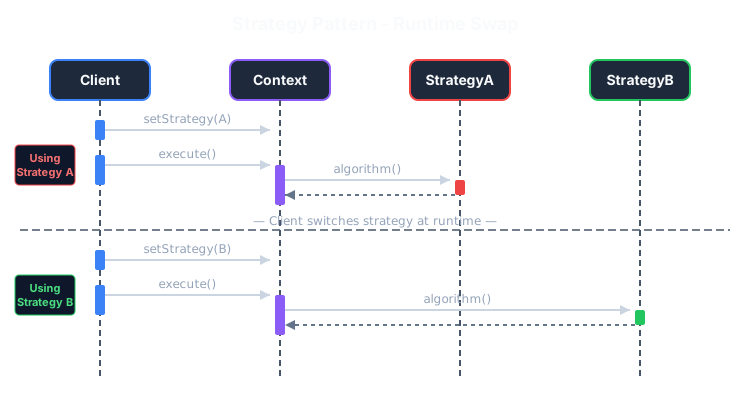 Sequence diagram: Client swaps strategies at runtime, Context delegates to current strategy.
Example: E-commerce Payments
Section titled “Example: E-commerce Payments”Without Pattern - Conditionals everywhere, hard to extend:
class ShoppingCart { public void checkout(int amount, String paymentType) { // Problem: Adding new payment = modify this method! if (paymentType.equals("creditcard")) { System.out.println("Connecting to credit card gateway..."); System.out.println("Paid " + amount + " via Credit Card."); } else if (paymentType.equals("paypal")) { System.out.println("Redirecting to PayPal..."); System.out.println("Paid " + amount + " via PayPal."); } else if (paymentType.equals("crypto")) { // Adding this required changing ShoppingCart! System.out.println("Paid " + amount + " via Crypto."); } // More payment types = bigger if-else mess! }}With Pattern - Open for extension, closed for modification:
// 1. The Strategy Interfaceinterface PaymentStrategy {    void pay(int amount);}
// 2. Concrete Strategies - each in its own classclass CreditCardPayment implements PaymentStrategy {    public void pay(int amount) {        System.out.println("Paid " + amount + " via Credit Card.");    }}
class PaypalPayment implements PaymentStrategy {    public void pay(int amount) {        System.out.println("Paid " + amount + " via PayPal.");    }}
// Adding new payment = just add new class, NO changes to ShoppingCart!class CryptoPayment implements PaymentStrategy {    public void pay(int amount) {        System.out.println("Paid " + amount + " via Crypto.");    }}
// 3. The Context - never needs to changeclass ShoppingCart {    private PaymentStrategy strategy;
    public void setPaymentStrategy(PaymentStrategy strategy) {        this.strategy = strategy;    }
    public void checkout(int amount) {        strategy.pay(amount); // Delegates to whatever strategy is set    }}
// Usage - swap strategies at runtime!ShoppingCart cart = new ShoppingCart();cart.setPaymentStrategy(new CreditCardPayment());cart.checkout(100); // Paid 100 via Credit Card.
cart.setPaymentStrategy(new CryptoPayment());cart.checkout(50);  // Paid 50 via Crypto.
Key Takeaways
Section titled “Key Takeaways”- Eliminates conditionals: No more
if (type == "creditcard")scattered everywhere - Open/Closed: Add new strategies without modifying existing code
- Runtime flexibility: Swap algorithms on the fly based on user choice or config
2. Observer Pattern
Section titled “2. Observer Pattern”Intent: Define a one-to-many dependency between objects so that when one object changes state, all its dependents are notified and updated automatically.
Often used in UI frameworks, event-handling systems, and Pub/Sub architectures. Instead of objects polling a data source repeatedly (“Are you done yet?”), the data source pushes updates to the objects when ready.
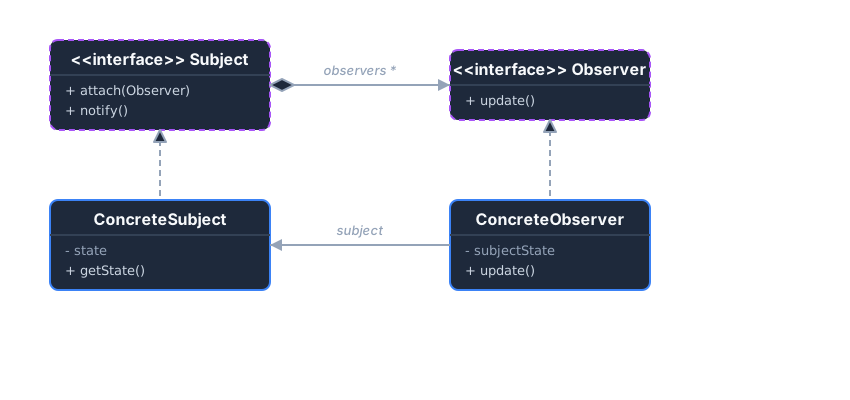 The Subject maintains a list of Observers. When its state changes, it loops through and calls
 update() on all of them.
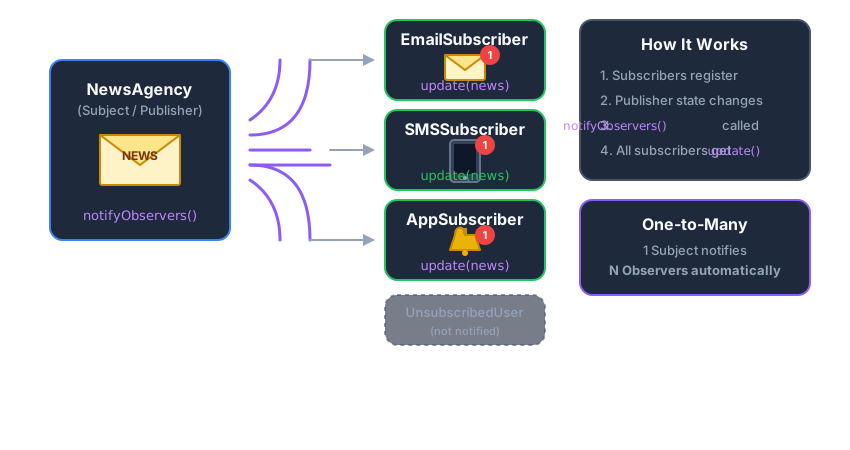 Like a newsletter: subscribers register, and all get notified when news is published.
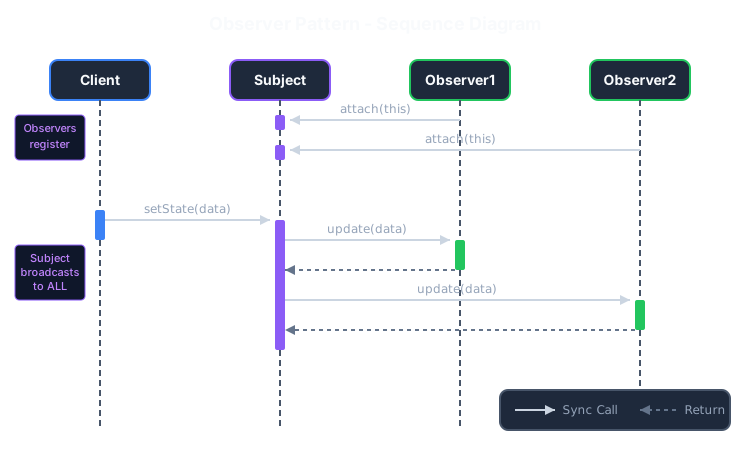 Sequence diagram: Observers subscribe, Subject broadcasts update() to all.
Example: News Agency
Section titled “Example: News Agency”Without Pattern - Tight coupling, polling required:
class NewsAgency {    private String news;    public String getNews() { return news; }    public void setNews(String news) { this.news = news; }}
class EmailClient {    private NewsAgency agency;    private String lastNews = "";
    // Problem: Must constantly poll for updates!    public void checkForUpdates() {        String current = agency.getNews();        if (!current.equals(lastNews)) {            System.out.println("Email: " + current);            lastNews = current;        }    }}
// Usage - wasteful pollingwhile (true) {    emailClient.checkForUpdates();  // Check every second    smsClient.checkForUpdates();    // Each client polls separately    appClient.checkForUpdates();    // Wastes resources!    Thread.sleep(1000);}
With Pattern - Push notifications, loose coupling:
// 1. Observer Interfaceinterface Observer {    void update(String news);}
// 2. Concrete Observersclass EmailSubscriber implements Observer {    public void update(String news) {        System.out.println("Email received: " + news);    }}
class SMSSubscriber implements Observer {    public void update(String news) {        System.out.println("SMS received: " + news);    }}
// 3. Subject Interfaceinterface Subject {    void attach(Observer o);    void detach(Observer o);    void notifyObservers();}
// 4. Concrete Subjectclass NewsAgency implements Subject {    private List<Observer> subscribers = new ArrayList<>();    private String latestNews;
    public void attach(Observer o) { subscribers.add(o); }    public void detach(Observer o) { subscribers.remove(o); }
    public void setNews(String news) {        this.latestNews = news;        notifyObservers(); // Automatically notify all!    }
    public void notifyObservers() {        for (Observer o : subscribers) {            o.update(latestNews);        }    }}
// Usage - no polling needed!NewsAgency agency = new NewsAgency();agency.attach(new EmailSubscriber());agency.attach(new SMSSubscriber());
agency.setNews("Breaking: Design Patterns are awesome!");// Output:// Email received: Breaking: Design Patterns are awesome!// SMS received: Breaking: Design Patterns are awesome!
Key Takeaways
Section titled “Key Takeaways”- Loose coupling: Subject and observers are independent—add/remove observers freely
- Broadcast communication: One event triggers multiple reactions automatically
- Push model: No polling; updates are pushed when state changes
3. State Pattern
Section titled “3. State Pattern”Intent: Allow an object to alter its behavior when its internal state changes. The object will appear to change its class.
Similar to the Strategy pattern, but here, the specific strategies (States) are aware of each other and can trigger state transitions within the Context. It elegantly replaces massive state-machine if-else blocks.
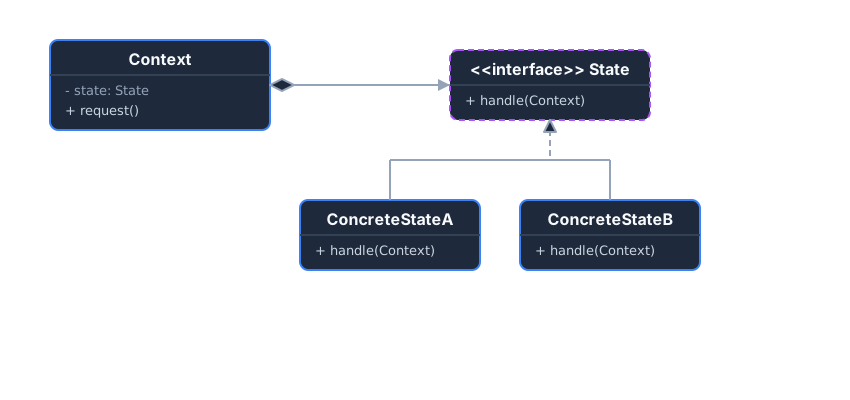 The Context delegates state-specific behavior to the current State object. State objects can replace the Context’s active state.
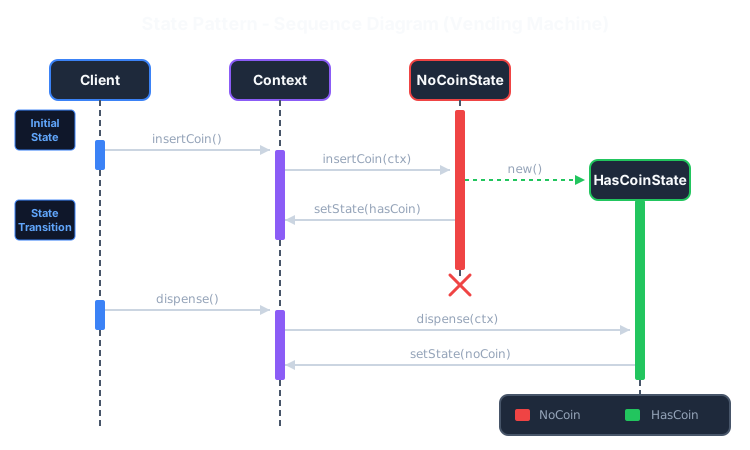 Sequence diagram: State objects trigger transitions, changing Context behavior.
Example: Traffic Light
Section titled “Example: Traffic Light”A traffic light demonstrates cyclic state transitions: Red → Green → Yellow → Red → …
// 1. State Interfaceinterface TrafficLightState {    void change(TrafficLight light);}
// 2. Concrete Statesclass RedState implements TrafficLightState {    @Override    public void change(TrafficLight light) {        System.out.println("Red → Green");        light.setState(new GreenState());    }}
class GreenState implements TrafficLightState {    @Override    public void change(TrafficLight light) {        System.out.println("Green → Yellow");        light.setState(new YellowState());    }}
class YellowState implements TrafficLightState {    @Override    public void change(TrafficLight light) {        System.out.println("Yellow → Red");        light.setState(new RedState());    }}
// 3. Context Classclass TrafficLight {    private TrafficLightState state;
    public TrafficLight() {        state = new RedState(); // Initial state    }
    public void setState(TrafficLightState state) {        this.state = state;    }
    public void change() {        state.change(this);    }}
// 4. Usagepublic class Main {    public static void main(String[] args) {        TrafficLight light = new TrafficLight();
        light.change(); // Red → Green        light.change(); // Green → Yellow        light.change(); // Yellow → Red        light.change(); // Red → Green    }}
Output:
Red → GreenGreen → YellowYellow → RedRed → GreenKey Takeaways
Section titled “Key Takeaways”- Eliminates state conditionals: Each state class handles its own behavior
- Explicit transitions: State changes are clear and controlled
- Single Responsibility: Each state class focuses on one state’s behavior
4. Command Pattern
Section titled “4. Command Pattern”Intent: Encapsulate a request as an object, thereby allowing developers to parameterize clients with queues, requests, and implement undoable operations.
Instead of a button directly calling a method on a device, the button triggers a Command object. This creates a powerful layer of separation, unlocking features like command queuing, logging, and Undo/Redo mechanisms.
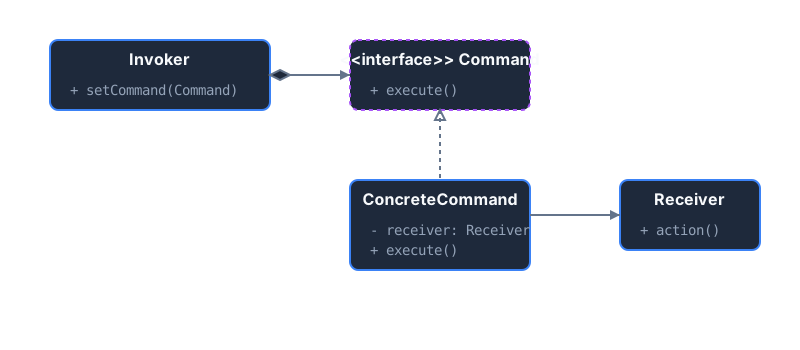 The Invoker executes the Command. The Command knows exactly which method to call on the Receiver.
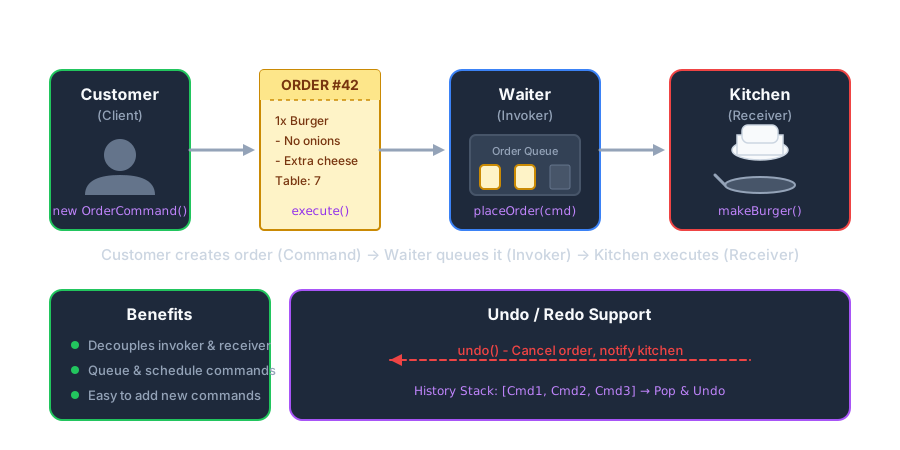 Like restaurant orders: tickets (commands) queue up, enabling undo and history.
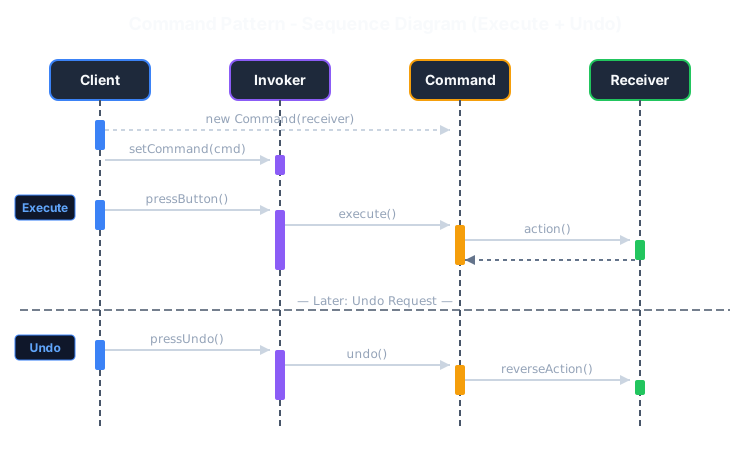 Sequence diagram: Command encapsulates request, enabling execute() and undo().
Example: Smart Home Remote
Section titled “Example: Smart Home Remote”Without Pattern - Tight coupling, no undo:
class RemoteControl {    private Light light;    private Fan fan;    private TV tv;
    // Problem: Remote knows about every device!    public void pressLightButton() {        light.turnOn(); // Direct coupling    }
    public void pressFanButton() {        fan.start(); // Direct coupling    }
    // Can't undo! Can't queue! Can't log!    // Adding new device = modify RemoteControl!}
With Pattern - Decoupled, undoable, queueable:
// 1. Command Interfaceinterface Command {    void execute();    void undo();}
// 2. The Receiver (The actual device)class Light {    public void turnOn() { System.out.println("Light is ON"); }    public void turnOff() { System.out.println("Light is OFF"); }}
class Fan {    public void start() { System.out.println("Fan started"); }    public void stop() { System.out.println("Fan stopped"); }}
// 3. Concrete Commands - one per actionclass TurnOnLightCommand implements Command {    private Light light;
    public TurnOnLightCommand(Light light) {        this.light = light;    }
    public void execute() { light.turnOn(); }    public void undo() { light.turnOff(); }}
class StartFanCommand implements Command {    private Fan fan;
    public StartFanCommand(Fan fan) {        this.fan = fan;    }
    public void execute() { fan.start(); }    public void undo() { fan.stop(); }}
// 4. Invoker - doesn't know what it controls!class RemoteControl {    private Stack<Command> history = new Stack<>();
    public void pressButton(Command cmd) {        cmd.execute();        history.push(cmd); // Save for undo    }
    public void pressUndo() {        if (!history.isEmpty()) {            history.pop().undo();        }    }}
// UsageRemoteControl remote = new RemoteControl();Light light = new Light();Fan fan = new Fan();
remote.pressButton(new TurnOnLightCommand(light)); // Light is ONremote.pressButton(new StartFanCommand(fan));       // Fan startedremote.pressUndo();                                  // Fan stoppedremote.pressUndo();                                  // Light is OFF
Key Takeaways
Section titled “Key Takeaways”- Decouples invoker from receiver—button doesn’t know what it controls
- Enables Undo/Redo: Commands can store state for reversal
- Queueable: Commands are objects that can be stored, logged, or scheduled