
Creational Patterns
Creational patterns provide sophisticated object creation mechanisms. They decouple the system from how its objects are created, composed, and represented. By hiding the instantiation logic, these patterns make the codebase more flexible, reusable, and scalable.
1. Factory Method Pattern
Section titled “1. Factory Method Pattern”Intent: Define an interface for creating an object, but let subclasses decide which class to instantiate. The Factory Method defers instantiation to subclasses.
Think of the Factory Method as a blueprint for creating objects. Instead of calling new directly in your business logic, you call a specialized factory method.
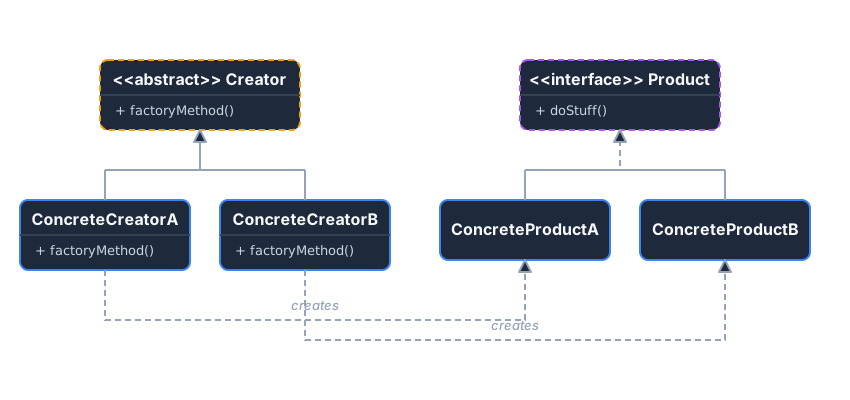 The Creator defines the interface, and Concrete Creators instantiate specific Products.
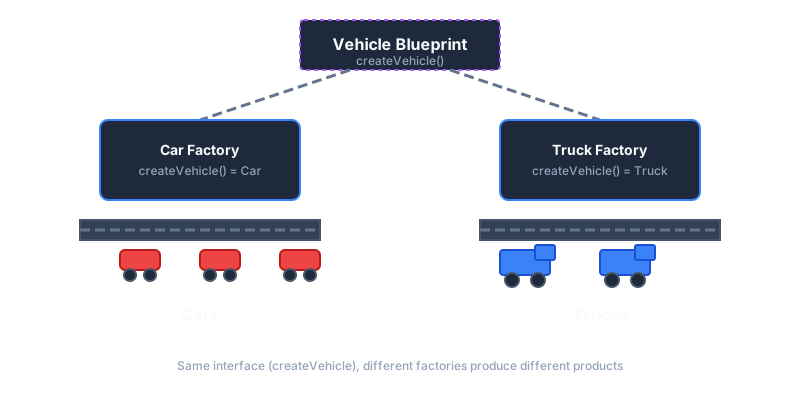 Like assembly lines: same blueprint, different factories produce different vehicles.
Example: Notification Service
Section titled “Example: Notification Service”Imagine you’re building a notification system that can send alerts via Email, SMS, or Push notifications. As your platform grows, you’ll need to add Slack, WhatsApp, and other channels.
Without Pattern - Hardcoded object creation, violates Open/Closed:
class NotificationService { public void sendAlert(String channel, String message) { // Problem: Adding new channel requires modifying this code if (channel.equals("email")) { EmailSender sender = new EmailSender(); sender.configure("smtp.company.com", 587); sender.send(message); } else if (channel.equals("sms")) { SmsSender sender = new SmsSender(); sender.setApiKey("twilio-key-123"); sender.send(message); } else if (channel.equals("push")) { PushSender sender = new PushSender(); sender.initializeFirebase(); sender.send(message); } // Adding "slack" means modifying this class! // Each sender has different setup - this class knows too much }}With Pattern - Decoupled, each factory handles its own complexity:
// 1. Product Interface - What all notifications can dointerface NotificationSender {    void send(String message);}
// 2. Concrete Products - Each with different implementationsclass EmailSender implements NotificationSender {    private String smtpHost;
    public EmailSender(String host, int port) {        this.smtpHost = host;        System.out.println("Connected to SMTP: " + host + ":" + port);    }
    public void send(String message) {        System.out.println("📧 Email sent via " + smtpHost + ": " + message);    }}
class SmsSender implements NotificationSender {    public SmsSender(String apiKey) {        System.out.println("SMS API initialized with key: " + apiKey.substring(0, 4) + "***");    }
    public void send(String message) {        System.out.println("📱 SMS sent: " + message);    }}
class PushSender implements NotificationSender {    public PushSender(String firebaseConfig) {        System.out.println("Firebase initialized");    }
    public void send(String message) {        System.out.println("🔔 Push notification: " + message);    }}
// 3. Creator Interface - Defines the factory methodabstract class NotificationFactory {    // The factory method - subclasses decide what to create    public abstract NotificationSender createSender();
    // Template method that uses the factory method    public void sendNotification(String message) {        NotificationSender sender = createSender();        sender.send(message);    }}
// 4. Concrete Creators - Each encapsulates its creation logicclass EmailNotificationFactory extends NotificationFactory {    private String host;    private int port;
    public EmailNotificationFactory(String host, int port) {        this.host = host;        this.port = port;    }
    public NotificationSender createSender() {        return new EmailSender(host, port);    }}
class SmsNotificationFactory extends NotificationFactory {    private String apiKey;
    public SmsNotificationFactory(String apiKey) {        this.apiKey = apiKey;    }
    public NotificationSender createSender() {        return new SmsSender(apiKey);    }}
class PushNotificationFactory extends NotificationFactory {    public NotificationSender createSender() {        return new PushSender("firebase-config.json");    }}
Usage - Client code is clean and extensible:
// Configuration can come from config file, environment, or user preferenceNotificationFactory factory = new EmailNotificationFactory("smtp.company.com", 587);factory.sendNotification("Your order has shipped!");
// Switch to SMS? Just swap the factory - client code unchangedfactory = new SmsNotificationFactory("twilio-key-123");factory.sendNotification("Your OTP is 847291");
// Adding Slack? Create SlackNotificationFactory - NO changes to existing code!// class SlackNotificationFactory extends NotificationFactory { ... }Key Takeaways
Section titled “Key Takeaways”- Decouples client code from concrete classes it instantiates
- Single Responsibility: Move creation code into one place
- Open/Closed: Add new product types without breaking existing code
2. Singleton Pattern
Section titled “2. Singleton Pattern”Intent: Ensure a class has only one instance and provide a global access point to it.
Singletons are useful for centralized state management, like a database connection pool, a logger, or a configuration manager.
Key Requirements
Section titled “Key Requirements”- A private constructor to prevent direct instantiation using
new. - A static variable to hold the single instance.
- A public static method (
getInstance()) that returns the instance.
The Multi-Threading Problem
Section titled “The Multi-Threading Problem”If two threads call getInstance() simultaneously when the instance is null, they might both create an object, breaking the pattern.
Solution: Double-Checked Locking
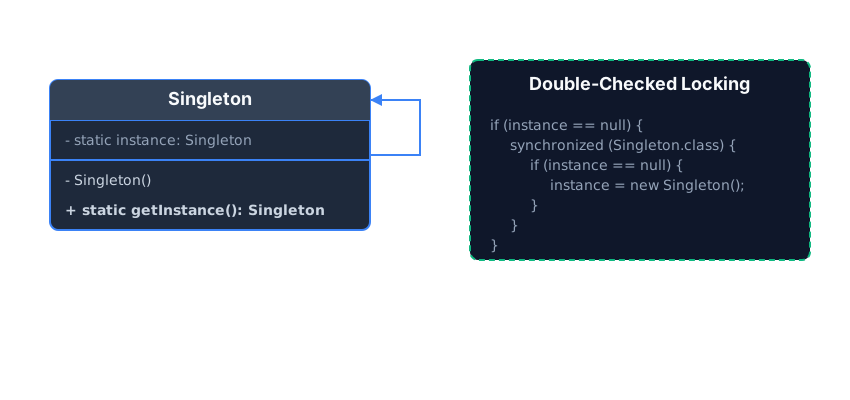 Double-Checked locking ensures thread safety without the performance hit of synchronizing every method call.
Example: Database Connection
Section titled “Example: Database Connection”Without Pattern - Multiple instances, wasted resources:
class Database {    public Database() {        // Expensive: Opens new connection every time        System.out.println("Opening new database connection...");    }
    public void query(String sql) {        System.out.println("Executing: " + sql);    }}
// Problem: Each call creates a new connection!Database db1 = new Database(); // Opens connectionDatabase db2 = new Database(); // Opens ANOTHER connectionDatabase db3 = new Database(); // Opens YET ANOTHER connection// Result: Resource exhaustion, connection pool overflow
With Pattern - Single instance, controlled access:
class Database {    private static volatile Database instance;
    // Private constructor - can't use 'new' from outside    private Database() {        System.out.println("Opening database connection...");    }
    // Thread-safe global access point    public static Database getInstance() {        if (instance == null) {            synchronized (Database.class) {                if (instance == null) {                    instance = new Database();                }            }        }        return instance;    }
    public void query(String sql) {        System.out.println("Executing: " + sql);    }}
// Usage - Always same instanceDatabase db1 = Database.getInstance(); // Opens connectionDatabase db2 = Database.getInstance(); // Returns SAME instanceDatabase db3 = Database.getInstance(); // Returns SAME instance// Result: Only ONE connection, shared across application
Key Takeaways
Section titled “Key Takeaways”- Guarantees only one instance exists throughout the application
- Lazy initialization possible (create instance only when first needed)
- Trade-off: Makes unit testing harder due to global state
3. Builder Pattern
Section titled “3. Builder Pattern”Intent: Separate the construction of a complex object from its representation, allowing the same construction process to create different representations.
The Builder pattern is ideal when an object requires multiple steps to initialize, or when a constructor has too many parameters (the “Telescoping Constructor” anti-pattern).
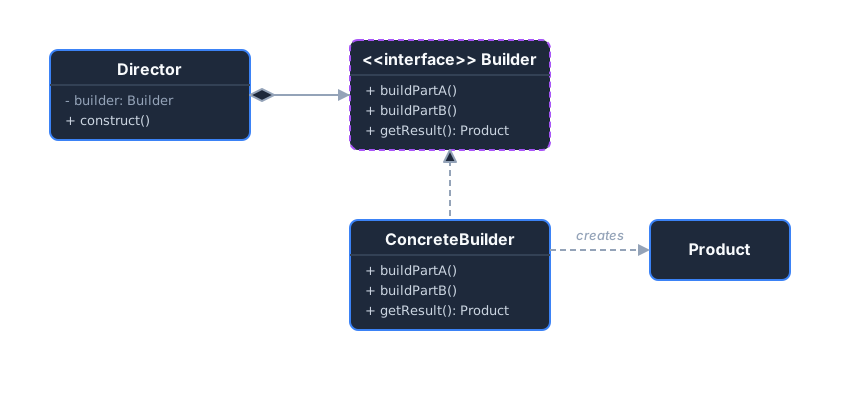 The Director orchestrates the building process, while the Builder handles the step-by-step assembly.
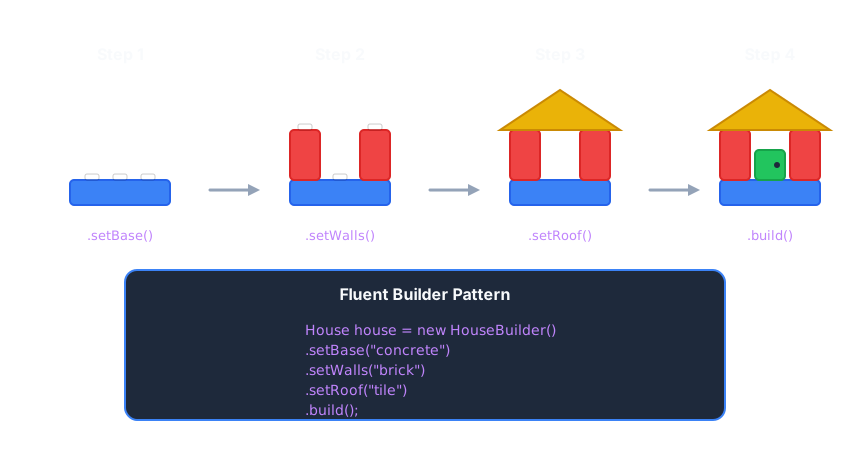 Like LEGO: assemble complex objects step by step with a fluent interface.
Example: Computer Assembly
Section titled “Example: Computer Assembly”Without Pattern - Telescoping constructors, confusing parameters:
class Computer {    private String cpu;    private String ram;    private String storage;    private String gpu;    private boolean hasWifi;    private boolean hasBluetooth;
    // Telescoping constructors - which one to use?    public Computer(String cpu) { ... }    public Computer(String cpu, String ram) { ... }    public Computer(String cpu, String ram, String storage) { ... }    public Computer(String cpu, String ram, String storage, String gpu) { ... }    public Computer(String cpu, String ram, String storage, String gpu,                    boolean hasWifi, boolean hasBluetooth) { ... }}
// Problem: What do these booleans mean? Easy to mix up parameters!Computer pc = new Computer("Intel i7", "16GB", "512GB", null, true, false);
With Pattern - Clear, readable, flexible:
// 1. Productclass Computer {    private String cpu;    private String ram;    private String storage;
    Computer(String cpu, String ram, String storage) {        this.cpu = cpu;        this.ram = ram;        this.storage = storage;    }
    @Override    public String toString() {        return String.format("Computer [CPU=%s, RAM=%s, Storage=%s]", cpu, ram, storage);    }}
// 2. The Builderclass ComputerBuilder {    private String cpu = "Intel i5";    private String ram = "8GB";    private String storage = "256GB SSD";
    public ComputerBuilder setCPU(String cpu) {        this.cpu = cpu;        return this;    }
    public ComputerBuilder setRAM(String ram) {        this.ram = ram;        return this;    }
    public ComputerBuilder setStorage(String storage) {        this.storage = storage;        return this;    }
    public Computer build() {        return new Computer(cpu, ram, storage);    }}
// Usage - Crystal clear what each value means!Computer highEndPC = new ComputerBuilder()        .setCPU("AMD Ryzen 9")        .setRAM("32GB")        .setStorage("2TB NVMe")        .build();
System.out.println(highEndPC);Key Takeaways
Section titled “Key Takeaways”- Fluent interface makes code readable:
.setX().setY().build() - Immutability friendly: Build complex immutable objects step by step
- Validation: Can validate the object in
build()before returning