
Network Fundamentals
IP Addressing
Section titled “IP Addressing”Every internet-connected device receives an IP address to identify it on the network.
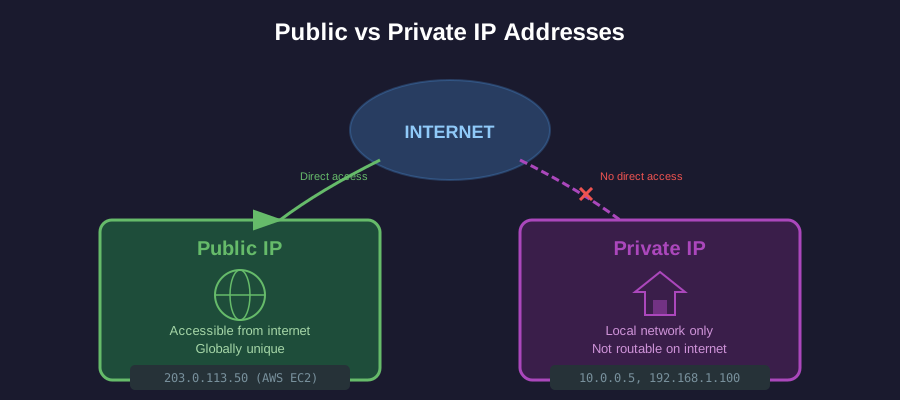
IPv4 Format
Section titled “IPv4 Format”Format: a.b.c.d where each octet is 0–255 (e.g., 192.168.1.100)
| Address | Purpose |
|---|---|
127.0.0.1 | Loopback (localhost) |
0.0.0.0 | All interfaces / unspecified |
255.255.255.255 | Broadcast |
Public vs Private IP
Section titled “Public vs Private IP”| Type | Description | Example |
|---|---|---|
| Public IP | Accessible from internet, globally unique | AWS EC2 public IP, your home router’s WAN IP |
| Private IP | Inside local network only, not routable on internet | 10.0.0.5, 192.168.1.100 |
Private IP Ranges (RFC 1918)
Section titled “Private IP Ranges (RFC 1918)”| Range | CIDR | # of Addresses | Common Use |
|---|---|---|---|
10.0.0.0 – 10.255.255.255 | /8 | ~16.7 million | Large enterprises, cloud VPCs |
172.16.0.0 – 172.31.255.255 | /12 | ~1 million | Medium networks |
192.168.0.0 – 192.168.255.255 | /16 | ~65,000 | Home networks, small offices |
- 128-bit addresses (vs 32-bit IPv4)
- Format:
2001:0db8:85a3:0000:0000:8a2e:0370:7334 - Expands address space massively; design principles remain similar
Subnetting & CIDR (Critical for Cloud)
Section titled “Subnetting & CIDR (Critical for Cloud)”Subnetting divides a network into smaller, manageable segments. CIDR (Classless Inter-Domain Routing) notation makes this precise.
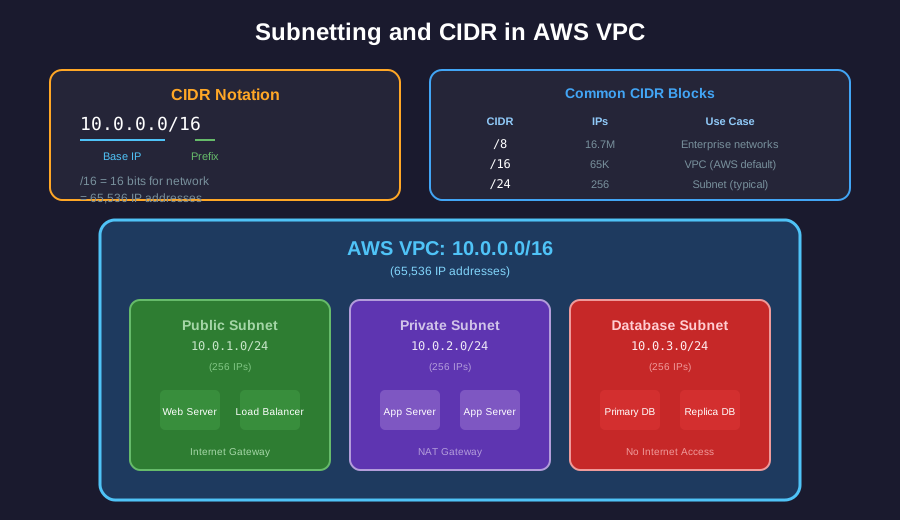
CIDR Notation Explained
Section titled “CIDR Notation Explained”10.0.0.0/16 │ │ │ └── Network bits (16 bits fixed for network) └── Base IP address| CIDR | Network Bits | Host Bits | # of Hosts |
|---|---|---|---|
/8 | 8 | 24 | 16,777,214 |
/16 | 16 | 16 | 65,534 |
/24 | 24 | 8 | 254 |
/28 | 28 | 4 | 14 |
/32 | 32 | 0 | 1 (single host) |
AWS VPC Example
Section titled “AWS VPC Example”VPC: 10.0.0.0/16 (65,536 IPs) │ ├── Public Subnet: 10.0.1.0/24 (256 IPs) ├── Private Subnet: 10.0.2.0/24 (256 IPs) └── Database Subnet: 10.0.3.0/24 (256 IPs)Ports & Sockets
Section titled “Ports & Sockets”Ports distinguish different services running on the same host.
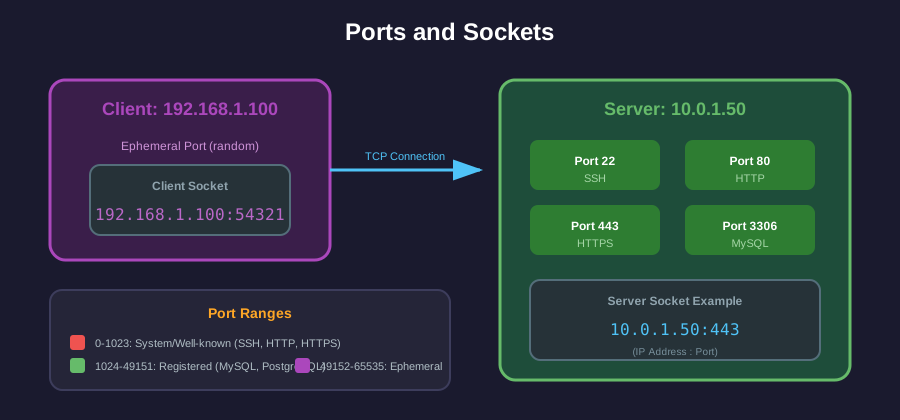
Port Ranges
Section titled “Port Ranges”| Range | Name | Description |
|---|---|---|
| 0–1023 | Well-known/System | Reserved for standard protocols |
| 1024–49151 | Registered | Assigned by IANA for specific services |
| 49152–65535 | Dynamic/Ephemeral | Used by clients for temporary connections |
Common Ports
Section titled “Common Ports”| Port | Protocol | Service |
|---|---|---|
| 22 | TCP | SSH |
| 53 | UDP/TCP | DNS |
| 80 | TCP | HTTP |
| 443 | TCP | HTTPS |
| 3306 | TCP | MySQL |
| 5432 | TCP | PostgreSQL |
| 6379 | TCP | Redis |
| 27017 | TCP | MongoDB |
Sockets
Section titled “Sockets”A socket is an endpoint for communication: (IP Address, Port)
Client Socket: 192.168.1.100:54321                    │          │                    │          └── Ephemeral port                    └── Client IP
Server Socket: 10.0.1.50:443                   │      │                   │      └── Well-known port (HTTPS)                   └── Server IP
Transport Layer Protocols
Section titled “Transport Layer Protocols”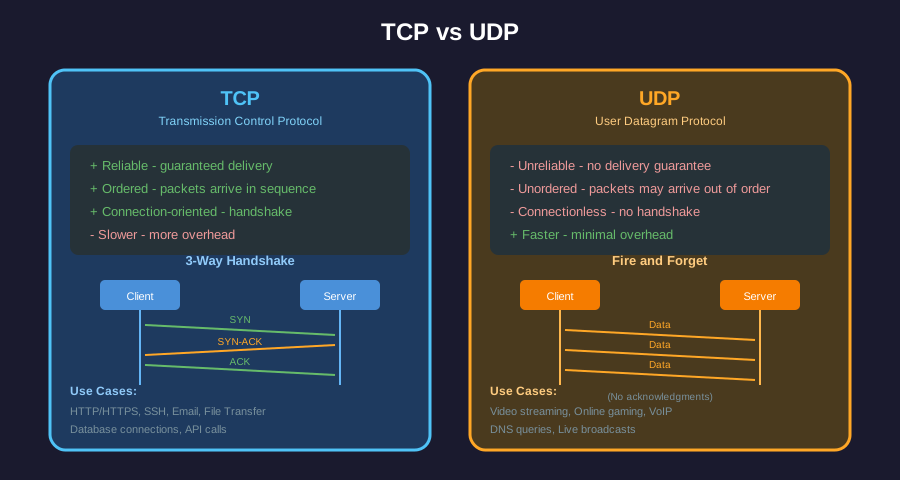
TCP (Transmission Control Protocol)
Section titled “TCP (Transmission Control Protocol)”- Reliable: Guarantees delivery with acknowledgments
- Ordered: Data arrives in sequence
- Connection-oriented: 3-way handshake before data transfer
Client Server │ │ │── SYN ──────────▶│ │◀────── SYN-ACK ──│ │── ACK ──────────▶│ │ │ │◀═══ Data Flow ═══▶│Use cases: HTTP/HTTPS, SSH, email, file transfer
UDP (User Datagram Protocol)
Section titled “UDP (User Datagram Protocol)”- Unreliable: No delivery guarantee
- Unordered: Packets may arrive out of sequence
- Connectionless: No handshake, just send
Use cases: Video streaming, online gaming, DNS queries, VoIP
Comparison
Section titled “Comparison”| Feature | TCP | UDP |
|---|---|---|
| Reliability | Guaranteed | Best-effort |
| Ordering | Yes | No |
| Speed | Slower (overhead) | Faster |
| Use case | Data integrity critical | Real-time, loss-tolerant |
TLS/SSL
Section titled “TLS/SSL”TLS (Transport Layer Security) sits above TCP to provide:
- Encryption: Data is unreadable to eavesdroppers
- Authentication: Server (and optionally client) identity verified
- Integrity: Data tampering is detected
DNS (Domain Name System)
Section titled “DNS (Domain Name System)”DNS translates human-readable domain names to IP addresses.
DNS Resolution Flow
Section titled “DNS Resolution Flow”Browser DNS Resolver Root/TLD/Auth DNS │ │ │ │── "google.com" ───────▶│ │ │ │── Query ──────────────▶│ │ │◀── "142.250.185.78" ───│ │◀── "142.250.185.78" ───│ │DNS Record Types
Section titled “DNS Record Types”| Type | Purpose | Example |
|---|---|---|
| A | IPv4 address | google.com → 142.250.185.78 |
| AAAA | IPv6 address | google.com → 2607:f8b0:4004:... |
| CNAME | Alias to another domain | www.google.com → google.com |
| MX | Mail server | gmail.com → alt1.gmail-smtp-in.l.google.com |
| TXT | Text data (SPF, verification) | v=spf1 include:_spf.google.com ~all |
| NS | Name server | google.com → ns1.google.com |
OSI Model (7 Layers Explained)
Section titled “OSI Model (7 Layers Explained)”The OSI (Open Systems Interconnection) model explains how data travels from your application to another computer across the network. Think of it as 7 steps your data goes through.
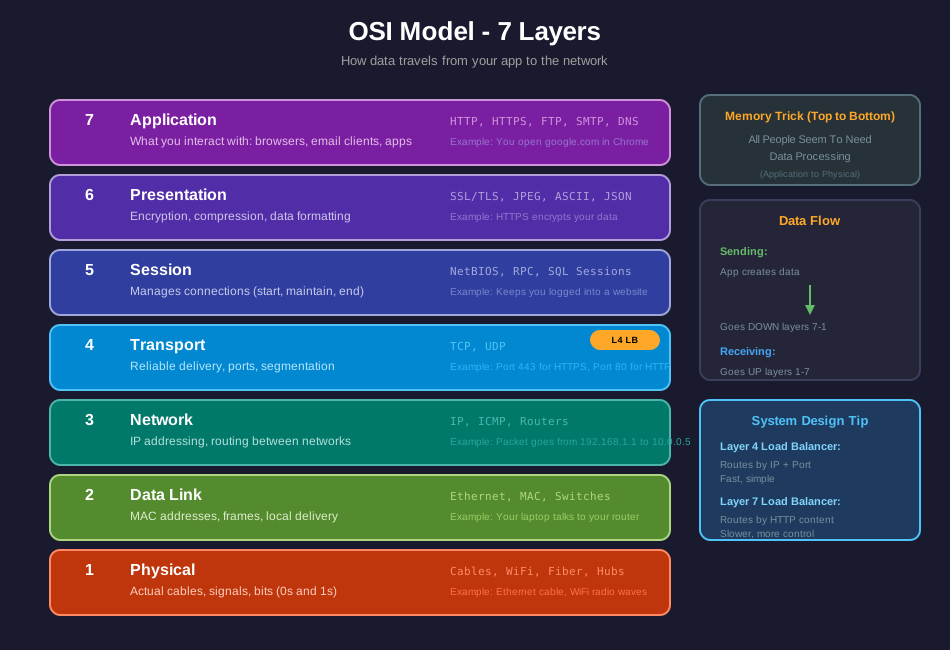
How Data Flows
Section titled “How Data Flows”When you send data (e.g., open google.com):
- Your browser creates the request (Layer 7 - Application)
- Data gets encrypted with HTTPS (Layer 6 - Presentation)
- A session/connection is established (Layer 5 - Session)
- Data is split into segments with port numbers (Layer 4 - Transport)
- Segments get IP addresses added (Layer 3 - Network)
- Frames are created with MAC addresses (Layer 2 - Data Link)
- Converted to electrical/radio signals (Layer 1 - Physical)
When receiving: The process reverses (Layer 1 → 7)
Each Layer Explained
Section titled “Each Layer Explained”| Layer | Name | What It Does | Real Example |
|---|---|---|---|
| 7 | Application | The actual app/service you use | Chrome browser, email client |
| 6 | Presentation | Encrypts, compresses, formats data | HTTPS encryption, JPEG compression |
| 5 | Session | Starts, maintains, ends connections | Staying logged into Netflix |
| 4 | Transport | Ensures delivery, assigns ports | TCP ensures no data loss, port 443 |
| 3 | Network | Routes packets across networks | Your IP address, router decisions |
| 2 | Data Link | Handles local network delivery | Your laptop’s MAC address, switch |
| 1 | Physical | Actual cables and signals | Ethernet cable, WiFi radio waves |
Memory Trick
Section titled “Memory Trick”Remember the layers (7 to 1) with: “All People Seem To Need Data Processing”
- Application
- Presentation
- Session
- Transport
- Network
- Data Link
- Physical
Why It Matters for System Design
Section titled “Why It Matters for System Design”| Layer | System Design Relevance |
|---|---|
| Layer 7 | Application load balancers (ALB), API gateways, WAF |
| Layer 4 | Network load balancers (NLB), faster but less flexible |
| Layer 3 | VPC routing, subnets, security groups |
| Concept | Key Points |
|---|---|
| Public IP | Globally unique, internet accessible |
| Private IP | Local only, uses RFC 1918 ranges |
| CIDR | /16 = 65K IPs, /24 = 256 IPs |
| Ports | 0-1023 system, 1024-65535 user |
| TCP | Reliable, ordered, connection-oriented |
| UDP | Fast, unreliable, connectionless |
| DNS | Translates domains to IPs |