
Web Security Toolkit
How to Use These Notes
Section titled “How to Use These Notes”For each topic, remember this pattern:
- What it is
- How attack works
- Why it is dangerous
- How to prevent it
- What to say in an interview
1. XSS (Cross-Site Scripting)
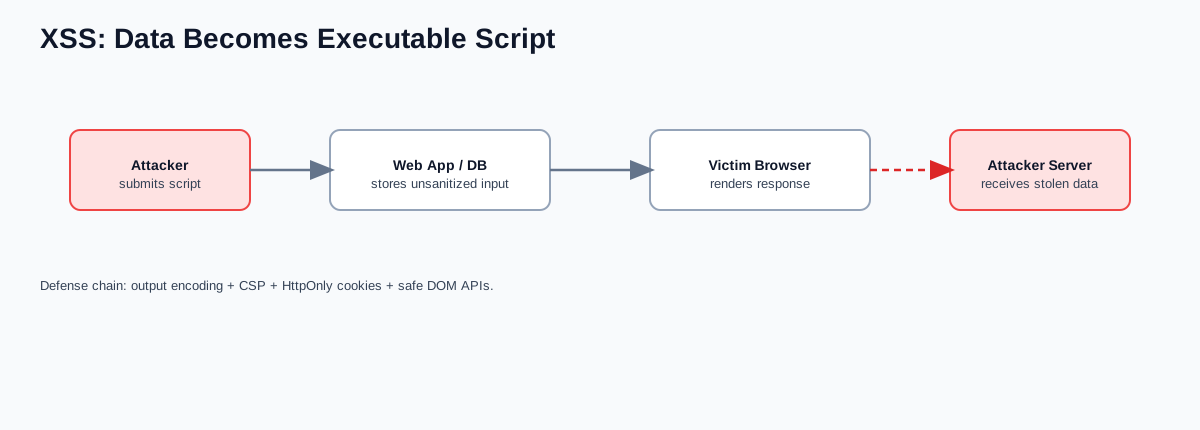
Section titled “1. XSS (Cross-Site Scripting)”XSS is when attacker-controlled JavaScript runs in the victim’s browser under your domain.
Why dangerous:
- Can steal session data/tokens
- Can perform actions as user
- Can modify UI and redirect users
🧠 How it works:
- App stores or reflects attacker payload like
<script>...</script> - Browser executes it because app treated data as code
Types:
- Stored XSS: payload saved in DB (comments, profiles)
- Reflected XSS: payload returned from request params
- DOM XSS: frontend JS injects untrusted data into DOM
🛡 Prevention:
- Escape output in the correct context (HTML/URL/JS)
- Prefer frameworks with auto-escaping
- Avoid unsafe DOM APIs (
innerHTML) for untrusted data - Use CSP to limit script execution
- Use
HttpOnlycookies to reduce token theft impact
Interview line:
“For user-generated content, we sanitize inputs, escape outputs, enforce CSP, and keep session cookies HttpOnly.”
2. CSRF (Cross-Site Request Forgery)
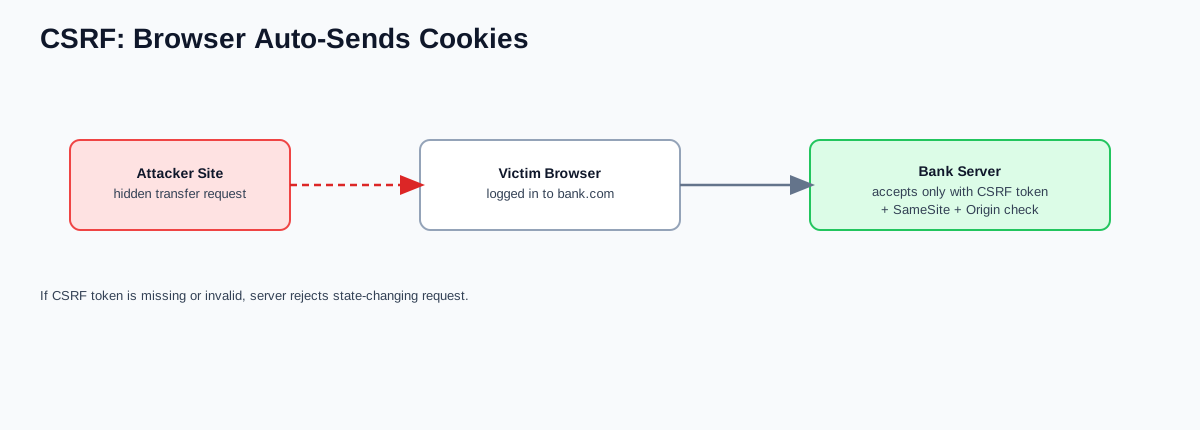
Section titled “2. CSRF (Cross-Site Request Forgery)”CSRF tricks a logged-in user’s browser into sending unwanted requests.
🧠 How it works:
- Victim logged into
bank.com - Attacker page submits hidden request to
bank.com/transfer - Browser auto-sends cookies; server may accept request as legitimate
🛡 Prevention:
- CSRF tokens (synchronizer/double-submit)
SameSite=Lax/Strictcookies- Validate
Origin/Refererfor state-changing endpoints - Re-auth for sensitive actions
Important insight:
- CSRF depends on browser auto-sending credentials (typically cookies)
- If auth uses
Authorization: Bearer <token>(not cookie), CSRF risk is lower
3. SQL Injection (SQLi)
Section titled “3. SQL Injection (SQLi)”SQL injection is when attacker input changes SQL query meaning.
Bad pattern:
SELECT * FROM users WHERE email = '$email'Attacker input:
' OR 1=1 --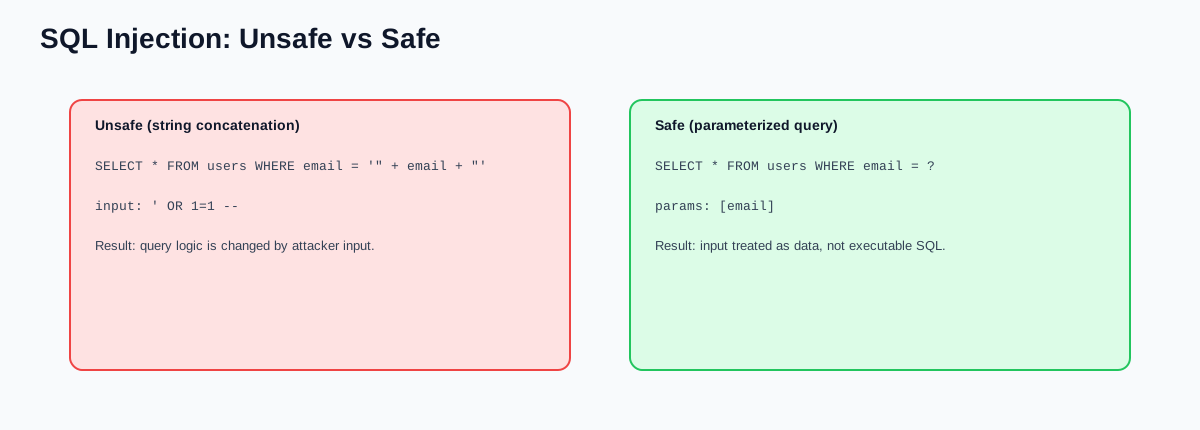
🛡 Prevention:
- Prepared statements / parameterized queries
- Never concatenate SQL strings
- Use least-privileged DB users
- Add query monitoring/timeouts
Interview line:
“All DB access goes through parameterized queries; no raw SQL string concatenation is allowed.”
4. Authentication vs Authorization
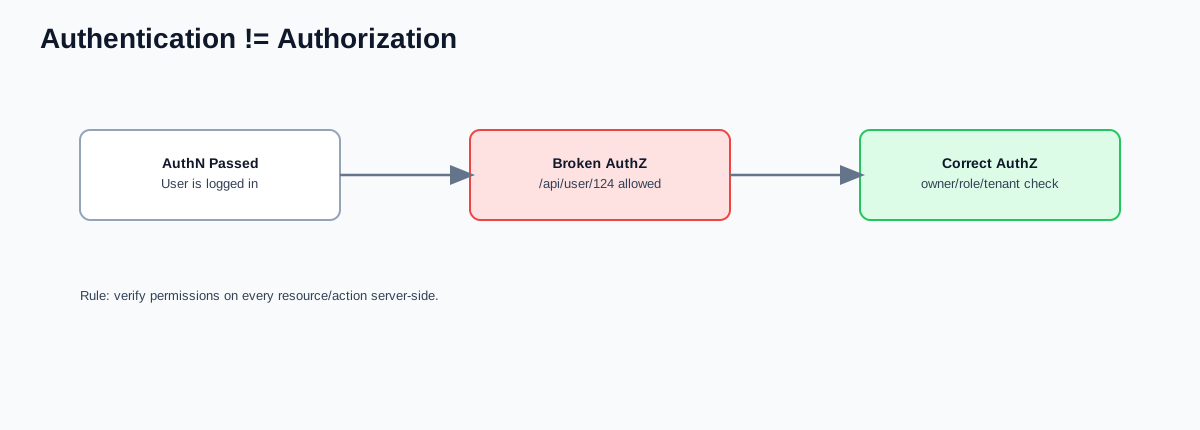
Section titled “4. Authentication vs Authorization”- Authentication (AuthN): Who are you?
- Authorization (AuthZ): What are you allowed to access?
Examples:
- Login with password/MFA = Authentication
- Access admin dashboard = Authorization
Design rule:
- AuthN happens first, AuthZ must be enforced on every protected action/resource.
5. Broken Access Control (Very Common)
Section titled “5. Broken Access Control (Very Common)”Broken access control happens when authenticated users can access data/actions they should not.
Example:
- User calls
GET /api/user/123 - Attacker changes to
GET /api/user/124 - If server skips ownership check -> data leak
🛡 Prevention:
- Enforce server-side permission checks on every request
- Use object-level authorization (owner/role/tenant checks)
- Never trust client-side hidden fields or route guards
6. IDOR (Insecure Direct Object Reference)
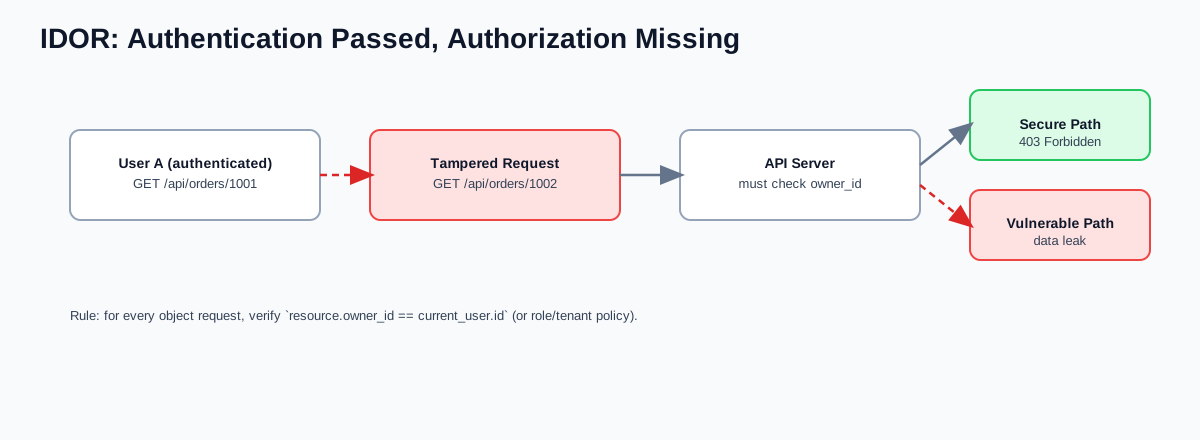
Section titled “6. IDOR (Insecure Direct Object Reference)”IDOR happens when a user can access another user’s object by changing an identifier.
Example:
GET /api/orders/1001(your order)- attacker tries
GET /api/orders/1002(someone else’s order) - if server only checks login and not ownership, data leaks
🛡 Prevention:
- Enforce object-level authorization on every request
- Validate ownership/tenant/role server-side
- Use opaque IDs (UUIDs) to reduce easy enumeration
- Add rate limits and alerts for sequential ID probing
Interview line:
“For IDOR, authentication is not enough; we enforce per-object authorization on every access path.”
7. Clickjacking
Section titled “7. Clickjacking”Clickjacking tricks users into clicking hidden UI (usually via invisible iframes).
🛡 Prevention headers:
X-Frame-Options: DENY- or CSP:
frame-ancestors 'none'
8. MITM (Man-in-the-Middle)
Section titled “8. MITM (Man-in-the-Middle)”MITM is interception/tampering of traffic between client and server.
Risk example:
- Public Wi-Fi with weak controls
🛡 Prevention:
- HTTPS everywhere
- HSTS enabled
- Correct certificate validation and renewal
9. CORS (Commonly Misunderstood)
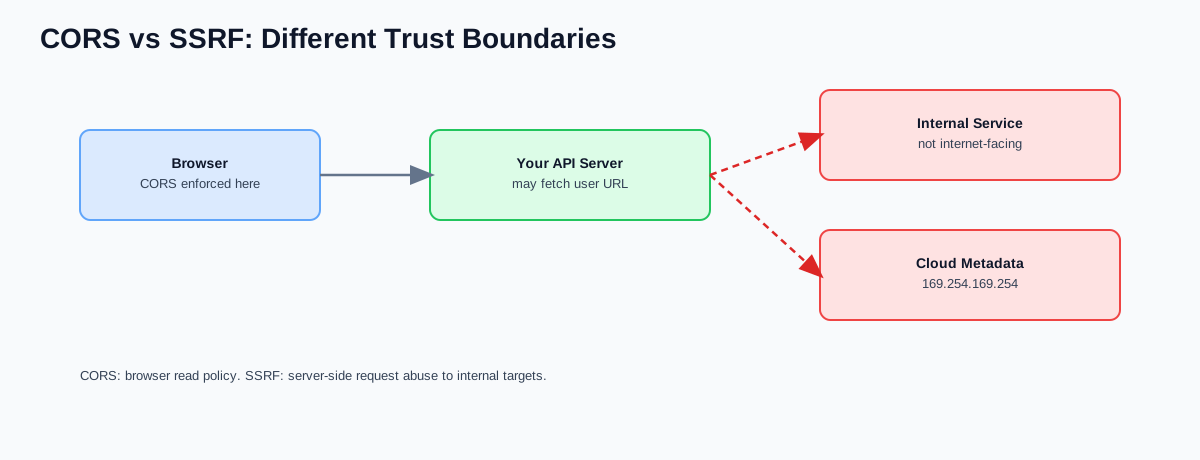
Section titled “9. CORS (Commonly Misunderstood)”CORS controls which browser origins can read responses.
Example:
Access-Control-Allow-Origin: https://myfrontend.comImportant:
- CORS is a browser policy control, not core auth security
- It does not stop direct API calls from curl/Postman/server-side clients
10. SSRF (Server-Side Request Forgery)
Section titled “10. SSRF (Server-Side Request Forgery)”SSRF is when attacker makes your server send requests to internal/private targets.
Cloud risk example:
http://169.254.169.254/latest/meta-data/(cloud metadata)- Can expose IAM credentials if unprotected
🛡 Prevention:
- Allow-list external destinations
- Block private/internal IP ranges and unsafe protocols
- Validate DNS + final resolved IP after redirects
- Restrict outbound egress by policy
- Use hardened cloud metadata settings (for example IMDSv2)